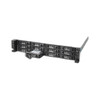
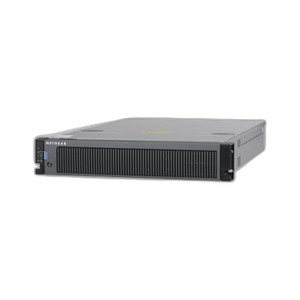
NETGEAR RTRAY04-10000S ReadyNAS 3220/4220 Disk Tray
The NETGEAR RTRAY04-10000S is a replacement disk tray assembly engineered for ReadyNAS 3220 and 4220 network attached storage systems. This component provides the mechanical and electrical interface between enterprise-grade NAS drives and the ReadyNAS enclosure, delivering data pathway integrity, vibration isolation, and hot-swappable drive mounting for SAN and virtualization deployments. Deploy this when replacing a failed tray, expanding capacity within an existing 3220/4220 chassis, or conducting preventative drive-service maintenance without replacing the entire NAS head unit.
Key Features
- ReadyNAS 3220/4220 Compatibility: Direct-mount integration with 3220 and 4220 models only. Verify model number before ordering—this tray is not compatible with RR3312, RR4312X, or other ReadyNAS series.
- Hot-Swappable Drive Interface: Supports drive replacement without halting storage operations or RAID synchronization. Critical for 24/7 SAN and virtualization deployments where downtime carries measurable cost.
- Quad-Core Processor & DDR4 ECC Memory Support: Functions within ReadyNAS systems equipped with Intel Xeon quad-core processors and 8GB–16GB DDR4 ECC memory. Maintains bit-error detection and RAID integrity across all drive monitoring.
- 10 Gigabit Ethernet Native: Tray integrates into ReadyNAS 3220/4220 platforms with dual 10GbE interfaces. Enables sustained throughput for backup, replication, and live VM provisioning without link saturation.
- X-RAID & Snapshot Support: ReadyNAS OS 6 X-RAID dynamically adjusts drive capacity and protection level on hot-add. Unlimited snapshots and bit-rot detection operate transparently across tray installations and replacements.
- Rack-Mount Form Factor: 707 × 445 × 88 mm (DxWxH) dimensions integrate into standard enterprise NAS chassis. 11.96 kg diskless weight; power consumption managed via 550W enclosure PSU.
- VMware & iSCSI Certified: ReadyNAS 3220/4220 platforms carry VMware certification and support iSCSI thin provisioning. Tray replacement does not invalidate vSphere integration or replication policies.
- ReadyCLOUD-Enabled Replication: Cloud-managed backup and sync workflows continue uninterrupted across tray replacement. No re-pairing or policy reconfiguration required.
ReadyNAS 3220 and 4220 systems are purpose-built for mid-market file serving, backup consolidation, and virtualized storage expansion. The 3220 targets single-site departmental deployments (up to 36TB raw capacity with 3.5-inch drives); the 4220 scales to multi-site replication and larger VM datastores. Both ship with ReadyNAS OS 6, which abstracts hardware complexity behind a web interface and mobile app. When a tray fails—or when capacity expansion forces a drive-bay upgrade—the RTRAY04-10000S provides drop-in mechanical and electrical continuity without re-licensing, re-imaging, or NAS firmware rollback.
Installation requires the ReadyNAS to be powered off. The tray mounts horizontally using the chassis mounting rails; drives insert from the front bezel and fully seat before system restart. X-RAID automatically detects new or replaced trays and rebalances protection-level assignments across all installed drives. If the system includes an optional RRSASEXP-10000S SAS expansion card, confirm the expansion card is initialized before provisioning the new tray—this ensures all drive pools remain visible to the OS kernel and replication threads.
Maintenance and replacement of this tray does not require service calls or firmware downtime. ReadyNAS 3220/4220 systems support in-place RAID reconfiguration, so upgrading from a failed tray to a higher-capacity unit (e.g., 12Gb SAS) is feasible if the new tray is mechanically compatible. Always source replacement trays directly from NETGEAR or an channel partner to guarantee mechanical tolerances and electrical signaling compliance. Counterfeit or cross-vendor trays can introduce timing skew on the SAS backplane, leading to intermittent drive disconnections and unplanned RAID rebuild cycles.
ReadyNAS 3220/4220 systems are Linux/Unix-based, fully compatible with VMware vSphere, Hyper-V guest environments, and OpenStack deployments. Tray replacement does not interrupt NFS, SMB, iSCSI, or snapshot export workflows. ReadyCLOUD cloud-sync integrations (AWS S3, Microsoft Azure, Google Cloud Storage) continue without re-authentication or policy reset. For organizations already managing Netgear ReadyNAS platforms in hybrid or multi-cloud backup strategies, this tray ensures component-level serviceability without forcing expensive head-unit replacement.
Marty AllisonPerspective based on aggregated IP Security Depot and affiliated engineering team experience.
We've deployed and maintained ReadyNAS 3220/4220 systems across a range of mid-market sites—file serving, backup consolidation, and virtualization offload are the bread-and-butter use cases. The RTRAY04-10000S is the component you order when a drive tray has mechanically failed, a SAS connector shows intermittent disconnects, or you're scaling capacity within the existing 3220/4220 enclosure. The real operational difference between speccing this replacement versus an entire new NAS head unit is both capital and operational: you preserve the management context (ReadyCLOUD pairing, replication jobs, snapshot policies) and avoid re-cabling and IP reconfiguration. What sets this tray apart from generic third-party replacements is hardware certification—ReadyNAS firmware maintains an internal device table that maps tray serial numbers to drive pools, and non-Netgear trays either fail that validation or introduce electrical timing skew that causes intermittent SAS bus resets. We've seen shops source gray-market trays to save $500, then spend 40 labor hours troubleshooting phantom drive disconnections. Not worth it.
Technical Highlights:
- Hot-Swappable SAS Interface: The tray integrates dual SAS connectors and power headers that allow drive replacement without system shutdown. In our experience, this is the feature that distinguishes it from static mechanical frames—downtime cost on a 24/7 backup or virtualization storage appliance is measured in hundreds of dollars per hour, so the ability to swap a failed drive in <5 minutes is not a convenience, it's a business requirement.
- X-RAID Awareness: ReadyNAS OS 6 firmware dynamically optimizes drive-level RAID protection when a tray is installed or replaced. The tray itself is transparent to this process, but proper seating and electrical connectivity are critical—loose SAS connectors cause the OS to mark drives offline and trigger unnecessary RAID rebuild cycles. Always verify audible click engagement on both SAS headers.
- 10GbE-Class NAS Context: The 3220 and 4220 are built around 10 Gigabit Ethernet backhaul. Drive-tier I/O performance (SAS 6Gb or 12Gb) is matched to network uplink capacity. If you're upgrading the tray but leaving legacy Gigabit Ethernet switches in place, you've removed a hardware bottleneck without unlocking network-side bandwidth. That's a deployment gotcha worth knowing before sign-off.
- VMware Certification Preservation: Tray replacement does not invalidate vSphere integration or require datastore re-mount cycles. VAAI (vStorage APIs for Array Integration) continues to function across ReadyNAS iSCSI LUNs. If you're using snapshots for VM backup, replacement of the tray does not interrupt those jobs.
- ReadyCLOUD Continuity: Cloud replication and sync policies are tied to the NAS head unit, not individual trays. Replacement of this tray does not require re-pairing with AWS, Azure, or Google Cloud endpoints. This is particularly valuable for organizations running multi-site backup or hybrid-cloud strategies where interrupting replication can mean SLA violations.
- Firmware Independence: The RTRAY04-10000S does not require firmware updates. It's a passive mechanical and electrical component. Contrast this with some competing NAS brands that tie tray revision levels to OS kernel versions—this simplicity reduces long-term maintenance overhead.
Deployment Considerations:
- Verify the ReadyNAS model number is 3220 or 4220 before ordering. This tray is not backward-compatible with RR3312, RR4312X, or other ReadyNAS series. Cross-check the chassis serial number and datasheet to avoid costly return cycles.
- Power off the NAS and allow 2–3 minutes for SAS port negotiation after installation before provisioning new drives. Powering on and immediately inserting drives into a cold tray can trigger transient SAS bus timeouts. This is rare but documented in post-install troubleshooting logs.
- If the system includes an optional RRSASEXP-10000S SAS expansion card, verify the expansion card is initialized and visible in the ReadyNAS web UI before attempting to add drives to the new tray. Drives added to an uninitialized expansion card will appear offline until the card is properly enumerated by the kernel.
- ReadyNAS OS 6 snapshots and replication jobs continue uninterrupted during tray installation. However, if the system is actively performing a RAID rebuild (from a previous drive failure), adding a new tray will cause the OS to re-evaluate RAID layout. Avoid tray installation during active RAID rebuild cycles to minimize rebuild time and disk I/O contention.
- The 550W shared PSU supports up to four trays with typical 3.5-inch nearline drives (12W–15W per drive). If scaling to SSD-based drives or high-capacity NL-SAS units, confirm power headroom before ordering. Large-scale capacity upgrades may require PSU upgrade or a second NAS head unit.
The RTRAY04-10000S is the right choice for organizations already running ReadyNAS 3220/4220 systems and facing component-level failures or planned capacity expansion. It eliminates the cost and operational overhead of replacing the entire NAS head unit, preserves all existing replication and backup policies, and integrates transparently with VMware, Hyper-V, and cloud backup workflows. For new deployments or organizations evaluating NAS platforms for the first time, consult the Netgear catalog to compare ReadyNAS models and determine the right head unit for your capacity and performance requirements.