StarTech RKCONS1701 1U 17-Inch Rackmount KVM Console
Overview
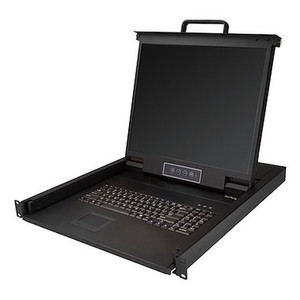
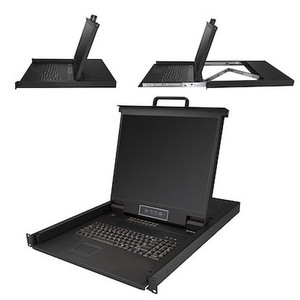
The StarTech RKCONS1701 is a 1U rackmount KVM console built for data center technicians and IT integrators who need a reliable local access point without dedicating permanent desk space to a keyboard, monitor, and mouse. The 17-inch active matrix TFT LCD slides into a standard rack, connects to your KVM switch via USB, and accepts VGA video from virtually any server or KVM infrastructure you're running today. At 25.6 lbs and constructed from steel, this is a purpose-built rack accessory rated for 50,000 hours MTBF — not a repurposed consumer display bolted to a shelf.
If your server room runs a mix of KVM switches from different vendors, the RKCONS1701 works as a universal local console: the USB interface and VGA input cover the widest possible range of existing rackmount KVM switch brands and generations, so you're not locked into a single-vendor stack for local console access.
Key Features
- 17-inch Active Matrix TFT LCD at 1280×1024 native: The 5:4 aspect ratio and 1280×1024 native resolution match exactly what most server BIOS, IPMI, and console interfaces are optimized to display. You get a pixel-for-pixel match without scaling artifacts — important when you're reading BIOS error codes or partition tables at 2 AM. The 16.7 million color depth means status indicators and management GUI color-coding render accurately.
- 5ms response time: For KVM console work — BIOS navigation, OS installation, live system triage — 5ms response eliminates the ghosting you'd see on slower panels. You won't miss a scrolling log line or misread a blinking cursor.
- 1000:1 contrast ratio, 250 cd/m² brightness: 250 cd/m² is sufficient for machine room ambient lighting without washing out. The 1000:1 contrast ratio keeps text sharp against dark terminal backgrounds, which matters when you're staring at a black-on-white or white-on-black console for extended troubleshooting sessions.
- 170° horizontal / 160° vertical viewing angles: Wide viewing angles mean a second technician can observe the same console from the side without color shift or brightness falloff — practical when two people are working through a system recovery together in a crowded rack row.
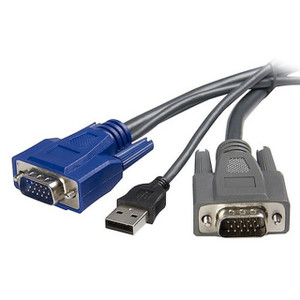
- USB PC interface, VGA video input: USB keyboard/mouse and VGA video is the de facto standard for legacy and current-generation rackmount KVM switches. No proprietary adapter dongles, no firmware compatibility concerns — plug in and you're operational. This also means the console pairs cleanly with the vast majority of existing KVM infrastructure without requiring a forklift upgrade.
- 1U rack height, 17.6 × 18.5 × 1.7-inch footprint: A single rack unit preserves premium vertical real estate. The minimum mounting depth is 17.7 inches and maximum is 31.1 inches, covering short-depth network racks and full-depth server cabinets alike — confirm your cabinet depth before ordering.
- Steel construction, 50,000-hour MTBF: The steel chassis survives the physical abuse of a working data center environment — rack vibration, repeated drawer open/close cycles, and casual contact from technicians working adjacent equipment. The 50,000-hour MTBF rating gives you a predictable service life for maintenance planning.
- 100–240V AC input, 1.5A, 13W operating consumption: Universal voltage input means it deploys globally without a transformer. At 13W operating draw, it adds virtually nothing to your PDU load budget — roughly equivalent to a single LED desk lamp.
- Operating temperature 0°C to 40°C, 10–80% RH: Covers standard data center and server room environmental specs without issue. If your facility runs below 0°C (cold-aisle containment extremes or unheated colos in winter), verify ambient temps before mounting.
Integration and Compatibility
The RKCONS1701 connects via a single USB cable for keyboard and mouse, and a standard VGA cable for video — interfaces supported by virtually every KVM switch platform from the past 15+ years. Because it uses no proprietary signaling, it functions as a drop-in console for multi-brand KVM environments where standardization across vendors is a practical constraint rather than a design choice.
The VGA input supports up to 1280×1024 resolution, which aligns with the native panel resolution, so there's no upscaling or downscaling in the signal path. KVM switches that output resolutions higher than 1280×1024 will be downscaled at the source — plan accordingly if your switch supports higher-resolution modes for other console types.
For integrators building out rackmount server room infrastructure, the 1U form factor and universal depth adjustment (17.7–31.1 inches) make the RKCONS1701 suitable for both two-post open-frame racks and enclosed four-post cabinets. Review your rack planning and depth compatibility guide if you're mixing cabinet types across a deployment.
Frequently Asked Questions
Q: What KVM switches is the RKCONS1701 compatible with?
A: The RKCONS1701 uses a standard USB interface for keyboard and mouse and a VGA input for video, making it compatible with the vast majority of rackmount KVM switches that support USB and VGA. It is not locked to any single vendor's KVM platform.
Q: What is the native resolution of the RKCONS1701 display?
A: The native resolution is 1280×1024 at a 5:4 aspect ratio. This is the optimal input resolution for the panel. Feeding a lower resolution will result in upscaling; higher resolutions will be downscaled at the KVM switch.
Q: What rack depths does the RKCONS1701 support?
A: The RKCONS1701 supports a minimum mounting depth of 17.7 inches (45 cm) and a maximum mounting depth of 31.1 inches (79 cm), covering most standard server cabinet depths.
Q: What is the warranty on the RKCONS1701?
A: The RKCONS1701 carries a 2-year manufacturer warranty.
Q: How much power does the RKCONS1701 consume?
A: Operating power consumption is 13W at up to 1.5A. The unit accepts 100–240V AC input, so it is compatible with both North American and international power standards without a step-down transformer.
Q: How many rack units does the RKCONS1701 occupy?
A: The RKCONS1701 occupies 1U (1.7 inches / 4.2 cm height) in a standard 19-inch equipment rack.
The spec that stands out to me on the RKCONS1701 is the 31.1-inch maximum mounting depth — I've seen integrators get burned ordering rackmount consoles that physically won't close in a full-depth cabinet. This unit spans 17.7 to 31.1 inches of usable depth, which realistically covers the full range of two-post and four-post enclosures in a typical mixed data center environment. At 25.6 lbs in a steel chassis, it's a legitimate commercial-grade console, not a repurposed consumer monitor with rack ears welded on.
Technical Highlights:
- 50,000-Hour MTBF: At typical data center use rates, that's well over a decade of expected service life — meaningful for a local console that isn't actively replaced on a refresh cycle.
- 13W / 100–240V AC: Negligible PDU load and global voltage compatibility mean you can deploy this across facilities without power planning complications. One less variable in a rack build.
- 1280×1024 Native at 5:4: The panel resolves exactly what server BIOS and IPMI interfaces are designed to output — no interpolation, no scaling, no distorted aspect ratio when you're reading partition tables or crash dumps.
Deployment Considerations:
- Verify your cabinet's usable interior depth against the 17.7-inch minimum before ordering — some short-depth network racks or wall-mount enclosures will be too shallow for the slide mechanism.
- The VGA input caps at 1280×1024, so if your KVM switch or servers are configured to output higher resolutions to other consoles, you'll need to account for that in your KVM switch resolution settings to avoid a downscaled or unusable display.
The RKCONS1701 is a practical fit for colocation deployments and enterprise server rooms where technicians need reliable local console access across multi-vendor KVM infrastructure — particularly where cabinet space is tight and a permanent monitor-keyboard-mouse stack on a cart isn't an option.