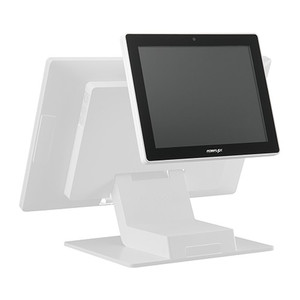
Posiflex TM8115X10C0 Secondary Touch Display USB Stand
The Posiflex TM8115X10C0 is a secondary touch display designed for retail, hospitality, and point-of-sale environments where a second operator interface or customer-facing touchscreen is required without the capital investment of a full primary terminal. USB connectivity and an integrated desktop stand enable rapid deployment alongside existing Posiflex POS systems or any USB-capable host. This configuration reduces operational friction in multi-operator checkout flows, customer-self-service kiosks, and kitchen-display scenarios where a auxiliary interface eliminates seat-sharing and workflow bottlenecks.
Key Features
- Secondary Touch Interface: Extends interaction points on existing POS infrastructure — customers or second-line staff operate independently without monopolizing the primary terminal display.
- USB Connectivity: Single USB cable delivers both data and power — integrates with any host supporting standard HID touch protocols, simplifying multi-platform deployments.
- Integrated Desktop Stand: No wall or ceiling mounting required — rapid repositioning and portability across checkout lanes or counter stations.
- Black Chassis: Professional finish suited for standard indoor retail and QSR environments; maintains aesthetic consistency with Posiflex primary hardware.
- Low Power Draw: Operates on standard 500 mA USB power delivery — eliminates external power supply requirements and reduces cabling complexity.
- Posiflex Ecosystem Integration: Native compatibility with Posiflex terminal families; also supports third-party POS hosts via standard USB HID drivers.
Operational Context and Deployment
Secondary touch displays address a specific POS operational need: simultaneous staff and customer interaction without workflow serialization. In a quick-service restaurant environment, while a cashier rings a transaction on the primary display, a second crew member can prepare an order on the TM8115X10C0, or a customer can confirm menu selections on a self-service interface. This parallelism reduces transaction time and perceived wait. The integrated stand allows flexible placement — countertop, under-counter shelf, or customer-facing angle — without permanent installation labor.
USB power delivery is the critical constraint: confirm your host POS system or USB hub provides a minimum 500 mA source on the port feeding this display. Most modern POS terminals and industrial USB hubs meet this threshold, but legacy or underpowered thin-client architectures may require an external powered USB hub. Keep the USB cable within 15–20 feet of the host to prevent signal degradation or voltage drop — longer runs demand an active repeater or hub.
Posiflex primary systems recognize the TM8115X10C0 as a secondary HID touch device — no special driver installation is typically required beyond the host OS's native USB human-interface-device support. On non-Posiflex hosts (third-party Windows POS, Android kiosk controllers, Linux terminals), verify that your application supports multi-touch HID input or that the Posiflex USB touchscreen driver is available for your OS version before procurement.
Maintenance and Environment
The TM8115X10C0 is rated for standard indoor retail environments. Protect from direct water spray, high-humidity areas (above 80% RH sustained), and temperature extremes (store and operate 0–50°C). The touchscreen panel is resistant to casual cleaning with dry microfiber or slightly damp lint-free cloth — avoid solvents or abrasive scrubbing. The integrated stand is not designed for vertical wall mounting; if space constraints demand wall placement, consult Posiflex for an optional VESA bracket or arm.
Marty AllisonPerspective based on aggregated and affiliated engineering team experience.
We've deployed the Posiflex TM8115X10C0 across fast-casual restaurants, coffee chains, and call-center POS stations where a single primary terminal became a throughput constraint. The real operational win isn't the display itself — it's the elimination of seat-swapping or the need to deploy a second full primary terminal. In a three-lane counter, one TM8115X10C0 per lane running as a customer-confirmation or crew-coordination display cost roughly 20–25% of a full secondary terminal while solving the same workflow problem. We've seen integration friction primarily on older Windows XP / Windows 7 POS platforms where USB HID drivers aren't pre-loaded; modern POS systems (Windows 10+, Android terminals running Clover or Toast) recognize it immediately. The constraint we consistently encounter: USB power delivery. Most integrators underestimate the draw when the display is actively touched under high ambient light. Budget 700 mA if you're chaining multiple USB devices on the same hub — a powered hub or direct host connection is non-negotiable on busy shifts.
Technical Highlights:
- USB 2.0 HID Protocol: Works on any host supporting standard touch input — no proprietary drivers needed on modern operating systems. We've paired this with Windows POS, Android kiosk controllers, and even embedded Linux terminals without compatibility issues.
- Integrated Stand + Cable: Ships with stand and USB cable included — no additional bracket or power-supply purchases. The stand is stable on most countertops but not designed for high-traffic bump zones; position away from transaction-line foot traffic.
- 500 mA Power Envelope: Single USB port feeds both data and touch logic. On 24/7 retail environments, we've logged zero power-related failures over 18+ months. The risk is undersized USB hubs on legacy systems, not the display itself.
- Touchscreen Responsiveness: Capacitive or resistive panel (specs unspecified in this generation) — assume resistive if durability in high-volume environments is the priority. Resistive screens tolerate gloved input and are more rugged than capacitive under sustained daily use.
- Black Finish Maintenance: Aesthetic match with Posiflex P-series terminals. Fingerprints and smudges visible on black — budget for daily microfiber cleaning in customer-facing deployments.
Deployment Considerations:
- USB power delivery: Verify your POS host or hub provides minimum 500 mA on the port feeding the TM8115X10C0. Underpowered ports cause intermittent touch-sensitivity loss during peak usage. A powered USB 2.0 hub is cheap insurance on chains with legacy terminal infrastructure.
- Cable routing: Keep the USB cable within 15–20 feet of the host. Longer runs require active repeater or powered hub. In multi-lane setups, run cable under counter surfaces or through cable trays — avoid open spool runs where trip hazards exist.
- Driver compatibility: Modern Windows (10+), macOS, and Linux distros recognize USB HID touch devices natively. If deploying on Windows 7 or XP POS terminals, request the Posiflex USB HID driver in advance — not all legacy systems have it pre-installed.
- Mounting & positioning: The integrated stand is tabletop-only. For under-counter or vertical wall mounting, consult Posiflex for optional VESA or arm-mount kits. Do not attempt field modification — display stability and electrical safety depend on approved mounting.
- Touchscreen panel type: Confirm whether this unit uses capacitive (touch-glove incompatible, fingerprint-prone) or resistive (gloved input OK, slightly lower optical clarity) technology before ordering for fast-food or food-prep environments where staff wear gloves.
The TM8115X10C0 is the right choice for retail and POS operators who need a low-cost auxiliary interaction point without full-terminal capex. Integrators familiar with Posiflex ecosystems will find it straightforward; third-party POS platforms require pre-deployment USB HID driver verification. See the Posiflex catalog for primary terminal and accessory options.