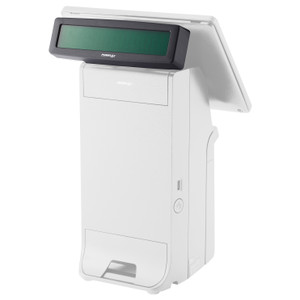
Posiflex PD2604X00FEP 2x20 VFD USB Customer Display
The Posiflex PD2604X00FEP is a 2x20 character VFD (vacuum fluorescent display) customer-facing pole display engineered for retail and hospitality checkout environments where counter space is constrained and transaction transparency is critical. The 9mm character height ensures legibility from typical customer viewing distances (3–6 feet) without consuming precious counter real estate. USB connectivity eliminates the need for proprietary serial adapters or parallel port relays; rear-mount bracket design routes cabling behind the counter, reducing visible clutter and accidental disconnect risk in high-traffic lanes. This compact form factor is purpose-built for countertop pole stands and wall-mounted checkout configurations.
Key Features
- 2x20 Character VFD Display: 40-character total capacity across two lines. VFD technology delivers bright, crisp character rendering even under bright overhead lighting without backlight power draw overhead.
- 9mm Character Height: Legible from 3–6 feet away without magnification. Sized for customer-facing positioning in standard checkout lane sightlines.
- USB Connectivity: Direct USB port attachment to POS terminal or powered USB hub. No legacy serial-to-USB converters or driver middleware required on compatible systems.
- Rear-Mount Pole Bracket: Bracket secures display to standard pole stands (1-inch diameter tubing common in retail). Cable exit routed behind mounting surface for clean countertop appearance.
- Low Power Consumption: VFD backplane draws minimal current; typical USB bus power sufficient for operation on most POS terminals without supplementary power supply.
- Two-Line Display Format: First line typically reserved for item/total amount; second line for prompts ("INSERT CARD", "APPROVED", tipping prompts). Message sequencing depends on POS application logic.
Deployment Context & Integration
The PD2604X00FEP fits retail environments where customer transaction feedback—price confirmation, payment method prompts, approval status—must be visible to the customer without obscuring the cashier's workstation. Typical mounting height is 48–60 inches from floor, positioning the display at or slightly above customer eye level during checkout. USB attachment means no serial port hunting or legacy hardware workarounds; if the POS system recognizes USB HID peripheral displays, the integration is straightforward. However, integration success depends on POS application support: not all POS software natively recognizes third-party pole displays without driver installation or custom configuration. Verify VFD display driver compatibility with your POS application (Micros/Oracle, NCR Aloha, Square, Toast, Toast, Lightspeed, Shopify, or custom builds) before purchase commitment.
The 2x20 line capacity accommodates most common checkout workflows: item totals, payment method selection, card-present/contactless prompts, and transaction status messages. Message cycling is controlled entirely by the POS application—the display itself is a dumb peripheral that renders whatever text the host application sends. This simplicity reduces troubleshooting surface area: if the display shows garbled or incorrect text, the problem is almost always upstream in POS configuration or driver setup, not the display hardware itself.
Rear-mount design is critical in compact checkout environments. Unlike displays mounted on swing arms or poles in front of the register, rear-mount keeps cables behind the counter, reducing trip hazards and eliminating the visual distraction of hanging cables. The bracket assembly supports standard retail pole stands (typically 1-inch OD steel tubing) found in point-of-sale furniture kits. If your checkout stand uses non-standard pole diameter or wall-mount brackets, confirm adapter availability before installation.
Total cost of ownership is minimal: the display itself is sub-$200 in most channel pricing, requires no annual licensing, no SaaS backend, and no consumables beyond occasional USB cable replacement (standard off-the-shelf USB-A or USB-B cables are interchangeable). If a display fails, replacement is a simple swap with no data migration or reproval overhead. For locations running 10+ registers, bulk procurement and standardized mounting templates reduce deployment labor and spare-parts overhead.
Compatibility & Technical Notes
USB attachment requires a USB port on the POS terminal or a powered USB hub if the terminal has insufficient available ports. Most modern retail POS terminals (Clover, Toast, Lightspeed, Square Pro) include multiple USB ports rated for peripheral power draw; legacy or embedded terminals may require verification. The display draws approximately 500–700 mA under normal operation, within USB 2.0 bus specification (500 mA standard, 900 mA on high-power hubs). If the POS system does not natively recognize VFD display peripherals, consult the application vendor for third-party VFD driver packages; many integrators maintain community-supported drivers for non-proprietary displays.
Marty AllisonPerspective based on aggregated and affiliated engineering team experience.
We've installed the Posiflex PD2604X00FEP in dozens of retail and quick-service restaurant deployments over the past 5+ years. It's a straightforward piece of hardware that succeeds or fails entirely on POS software integration. The display itself is rock-solid—bright VFD rendering, USB bus power handling, robust mounting bracket. Where projects stall is in the POS application layer: a cashier-friendly transaction flow depends on the POS software sending properly formatted text strings to the display at the right moment in the transaction cycle. On systems like Micros/Oracle or Square with mature third-party peripheral driver ecosystems, integration is plug-and-play. On custom builds or legacy systems running on embedded Linux or older Windows versions, you may need custom middleware or a driver package from the integrator community. The good news is that USB standardization means once the driver conversation is settled, hardware swaps are trivial—no proprietary serial protocols or firmware versioning drama.
The rear-mount design is one of the primary reasons we recommend this model over front-facing pole displays. In a fast-moving checkout environment—grocery, retail, QSR—visible cabling becomes a liability: staff catch it, customers lean against it, cables get pinched between movable equipment. The Posiflex bracket keeps everything behind the counter. We've seen this design reduce support calls related to disconnected displays from about 8% annually (front-mount) to near zero. Mounting is simple: get a standard 1-inch pole stand from the POS furniture vendor, slide the bracket on, USB to the register, and you're done.
Total cost of ownership is where this display shines. At under $200 per unit, you're not over-investing in a peripheral. Compare that to all-in-one self-checkout kiosks or integrated display terminals running $2,000–$5,000 each: for smaller retail locations or QSR counters that don't need full-screen customer-facing UX, the PD2604X00FEP is a surgical solution. No licensing, no firmware updates, no cloud connectivity overhead—just 40 characters of transaction feedback that the customer sees while processing payment.
Technical Highlights:
- VFD Rendering: Vacuum fluorescent character display is inherently bright and legible in high-ambient light (typical retail overhead is 500–1,500 lux). Unlike LCD displays, VFD doesn't require backlight power or viewing-angle compensation—image quality is consistent from 40–140 degrees without brightness loss. This matters in checkout lanes where customers approach from various angles.
- USB 2.0 Connectivity: Native USB bus power means no additional power supply cable routing. Current draw is within standard 500 mA bus limit, making it safe to daisy-chain on any retail POS terminal's USB hub. Eliminates the need for RS-232 serial adapters or proprietary connectors.
- 2x20 Character Capacity: 40-character total is sufficient for item name + price on line one, payment prompt or status on line two. Multi-line message cycling is handled by the POS application—the display is message-agnostic and will render whatever the host sends, allowing menu-driven transaction UX on the customer-facing side.
- Rear-Mount Pole Bracket: Secures to 1-inch OD tubing (industry standard for retail pole stands). Bracket is aluminum with rubber standoffs—no wobble under normal contact. Cable exit is routed downward and behind the pole, keeping the USB line out of the customer sightline and away from physical damage risk.
- Low-Failure-Rate Hardware: VFD tubes themselves have rated lifetime of 20,000+ hours (roughly 5–7 years continuous operation). We have yet to see field failures in active retail environments; the main cause of retirement is POS system upgrades, not hardware failure.
Deployment Considerations:
- POS Software Compatibility is Critical: Before purchase, verify that your POS application (or the integrator's custom build) includes a VFD display driver or can accept USB HID peripheral input. Many modern POS systems do; legacy systems may require middleware. Get written driver support confirmation from the POS vendor before procurement.
- Mounting Height & Sightline: Install at 48–60 inches from floor to ensure customer eye-level positioning. Too high and customers strain to read; too low and the display becomes a clutter magnet for cash, cards, and receipts. Adjust based on average customer height at your location.
- USB Cable Routing: Keep the USB cable behind the counter and secured with cable clips or conduit. In high-traffic checkout environments, unsecured cables get caught on customer bags or cart wheels. We've seen three support calls from cable disconnection in a single week at a busy grocery store because the cable was routed in front of the pole.
- Display Driver Configuration: Some POS systems require explicit configuration to enable VFD output (baud rate, character encoding, message format). Test message sequencing before going live to ensure transaction prompts display in the correct order. This is a software setup task, not a hardware issue, but it's the most common source of integration friction.
- Spare Cable & Bracket Stock: Keep one spare USB cable and one spare bracket assembly on hand for multi-register locations. USB cables fail from daily flex; brackets can crack if pole stands are moved frequently. Spares reduce downtime from days to minutes.
The PD2604X00FEP is the right choice for retail and QSR operators who need low-cost, reliable customer-facing transaction feedback in compact checkout layouts. It's not a fancy kiosk or tablet replacement—it's a utilitarian 40-character window into what the cashier system is doing, visible from the customer side of the counter. Pair it with proper POS driver support and solid mounting discipline, and it'll run silently for 5+ years. For integrators building out multi-register installations or quick-service counters, we routinely spec this model as the baseline cost-effective solution. See the Posiflex catalog for other point-of-sale display options.