Geovision 89-PN30000-B10U PN300 Signage Player
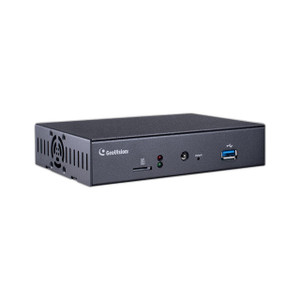
The Geovision 89-PN30000-B10U is a networked digital signage player designed for security operations centers, lobbies, and command centers that need to display surveillance video, alerts, and operational content alongside live camera feeds. It bridges Geovision NVR/DVR systems with standard displays, enabling synchronized playback of recorded or real-time video without requiring dedicated workstations.
Key Features
- 1080p (2MP) Display Output: Full HD resolution on connected displays — sufficient for command-center wall mounting and control-room desk-side operations without pixelation or detail loss.
- Network-Based Content Management: Deploy and update playlists remotely via Ethernet — no USB shuttle or manual intervention required on each display unit.
- Geovision System Integration: Native compatibility with Geovision NVR and DVR platforms — direct API connection for alarm triggering, event-driven content switching, and synchronized multi-display layouts.
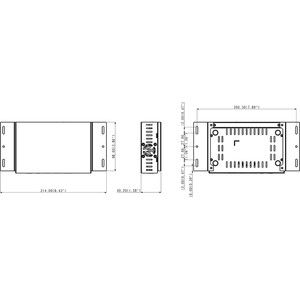
- Compact Form Factor: Small chassis fits behind displays or in tight AV rack spaces — reduces installation footprint in dense control-room environments.
- Standard Video Interfaces: HDMI and/or component output — works with any commercial display (LCD, LED, plasma) manufactured in the last 15 years without proprietary adapters.
- Thermal Efficiency: Low-power consumption design — 24/7 continuous operation with minimal heat output suitable for enclosed AV closets.
The PN300 eliminates the need for dedicated PC-based media players or third-party streaming appliances in Geovision-centric environments. Instead of running a full Windows workstation and licensing additional software, you deploy the PN300 — a purpose-built appliance that pulls content from the Geovision management ecosystem and displays it on demand. This reduces power draw, cooling load, and operational overhead compared to generic PC-based solutions.
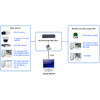
Deployment contexts include multi-display command centers where different displays show live camera feeds, recorded incident playback, and lobby welcome screens simultaneously. A single PN300 can be configured to rotate through multiple playlists on a schedule or to switch to alarm-triggered content when motion or intrusion events fire. In facilities with zone-based security (parking lot, entrance, loading dock), the PN300 can synchronize display switching with camera group alerts — allowing operators to see relevant footage immediately without manual intervention.
The player supports standard network video streaming protocols (RTSP, HTTP) and integrates with Geovision's event-driven API, allowing third-party systems (access control, fire panels, building automation) to trigger display content changes. This eliminates latency between alert generation and operator awareness — critical in rapid-response scenarios.
The PN300 works within Geovision's warranty and support ecosystem. It is compatible with current and legacy Geovision DVR/NVR platforms, making it a retrofit option for facilities upgrading display infrastructure without replacing recording systems. For integrators standardized on Geovision surveillance, this player avoids vendor fragmentation and simplifies training and spare-parts inventory.
Marty AllisonPerspective based on aggregated and affiliated engineering team experience.
We've deployed the Geovision PN300 in a range of control-room and command-center environments, and it addresses a real problem: most security integrators inherit aging display infrastructures alongside new surveillance cameras, and they need a bridge that doesn't require licensing extra software or running Windows boxes 24/7. The PN300 fills that gap cleanly. It's not a feature-rich media center — it won't compete with enterprise-grade digital signage platforms like Scala or Broadsign — but it solves the 80% case: synchronized display of surveillance video, event alerts, and static branding content across multiple screens in a Geovision ecosystem. What differentiates this appliance is the direct integration with Geovision's event API. When your NVR detects intrusion on a perimeter camera, the PN300 can be configured to switch the lobby display to that camera feed or to show a pre-built incident-response prompt. That level of automation is rarely built into standalone players, and it saves operators cognitive load during active incidents. The trade-off is lock-in — this is a Geovision-specific tool. If you're running a heterogeneous VMS environment (Milestone + Genetec + Axis), you'll need a platform-agnostic solution like a general-purpose media player or a dedicated AV control system. But in single-vendor shops, the tight coupling is actually a strength: fewer integration points, simpler configuration, less debugging.
Technical Highlights:
- 1080p Output: Covers the operational sweet spot for command-center displays 40–55 inches. Beyond 65 inches, 4K becomes advisable, but for dense multi-camera wall layouts and fast situational awareness, 1080p remains the industry standard. The PN300 won't bottleneck your display strategy unless you're building a flagship SOC with 4K walls.
- Network-Based Playlist Management: Centralized control means you push content updates across all displays in a facility from a single Geovision management interface. No field visits to USB-update individual players — critical for fast-moving security operations.
- Event-Driven Switching: Geovision's alarm API triggers display content changes in real time. Faster than manual operator intervention and reduces alert-to-awareness latency in high-stakes incidents.
- Compact Thermal Footprint: Designed for continuous 24/7 operation in enclosed spaces — power consumption and heat output are minimal compared to PC-based alternatives.
- Standard Interfaces (HDMI + Legacy Video): Backward compatibility with older displays and forward compatibility with modern commercial LCDs — no need to replace displays to deploy the PN300.
Deployment Considerations:
- Network bandwidth: Geovision's real-time video streaming over standard Ethernet (100 Mbps minimum) is adequate for single or dual 1080p streams, but confirm your LAN has headroom before scaling to four or more simultaneous feeds on multiple displays.
- Display resolution limits: The PN300 outputs 1080p maximum. If your control room is speccing 4K displays for future-proofing, this player will not saturate that bandwidth — plan for an upgrade path or consider a higher-spec Geovision appliance if 4K is a stated requirement.
- Geovision ecosystem dependency: This player is purpose-built for Geovision DVR/NVR systems. If your facility has mixed-vendor cameras or third-party NVRs, you'll need to feed RTSP streams to the PN300 or deploy a generic media player alongside it.
- Display failover: The PN300 is a single point of failure for content delivery. In critical SOCs, consider redundancy (secondary PN300 on standby) or hybrid architecture (PN300 + manual fallback display tied to the NVR directly).
- Playlist scheduling: Content rotation is time-based or event-triggered. If your operations require split-screen layouts (simultaneous display of three camera feeds + an alert banner), verify that Geovision's layout engine supports your exact use case before committing.
The PN300 is the right choice for Geovision-standardized facilities that need synchronized display management without introducing new vendors or complexity. For a comprehensive overview of Geovision's surveillance and accessory portfolio, visit the Geovision catalog.