Image coming soon
Product images are provided for reference and may not represent the exact model, configuration, or included components.

Overview

SKU: KA7920
UPC: 672792400520
Condition: New
Write a Review 0% OFF

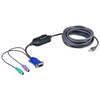
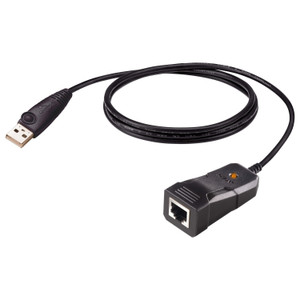
ATEN Network Cable - 15 PIN HD D-sub (HD-15) - Female - RJ-45 - Male - 15 Feet - KA7920

ATEN KA7920 PS/2 and VGA KVM Adapter CableOverviewThe KA7920 is a KVM adapter cable that connects a server or workstation's PS/2 keyboard, PS/2 mouse,…

$68.00 $67.99 SAVE $0
Ships same business day
In stock

Quantity:

Adding to cart… The item has been added
Compatibility guidance available for your deployment
Senior specialists for pre and post-sales support
Authorized sourcing and documentation support
Shipping and lead-time confirmation before install

Laura Bennett, IPSD Senior Specialist

Talk to Laura

200+ hrs training • U.S - based

Senior Specialist • 877-277-7147

ATEN Network Cable - 15 PIN HD D-sub (HD-15) - Female - RJ-45 - Male - 15 Feet - KA7920

$68.00
$67.99

Overview

SKU: KA7920
UPC: 672792400520
Condition: New

No Bots, Just Experts

Questions about this product? Free pre-sales support from a senior specialist — product questions, compatibility checks, BOM quotes, price confirmation — typically answered within one business day. Need camera placement or system design work? Engineering time is $175 per hour (qty 1 = 1 hour). Hardware buyers get up to one hour ($175) credited back on their order.

Description

ATEN KA7920 PS/2 and VGA KVM Adapter Cable

Overview

The KA7920 is a KVM adapter cable that connects a server or workstation's PS/2 keyboard, PS/2 mouse, and VGA video ports to a compatible ATEN KVM switch installation. The cable presents two 6-pin Mini-DIN male connectors (keyboard and mouse) plus one HDB-15 male connector on the computer side, allowing rack-mounted servers with legacy PS/2 and analog VGA interfaces to integrate into a centralized KVM switch console management setup. If you're consolidating access to older rack servers that haven't moved to USB or digital video, the KA7920 bridges that gap without requiring additional adapters.

Compatibility

The KA7920 is designed for use with ATEN KVM switches that support PS/2 and VGA computer-side connections — specifically rack-mountable switch families that accept KA79xx-series adapter cables. The computer-side interface requires: two available 6-pin Mini-DIN ports (PS/2 keyboard and mouse) and one HDB-15 female VGA video output. Servers with USB-only or DisplayPort/HDMI video outputs are not compatible with this cable and require a different adapter in the ATEN KVM accessory line. Verify your KVM switch model accepts KA79xx adapters before ordering — not all ATEN switches share the same adapter family.

Installation Notes

Storage temperature range is -20°C to 60°C, so avoid leaving the cable in unheated environments below that threshold before installation. The Online indicator (1x orange LED) confirms active connection status once the cable is seated and the KVM switch recognizes the computer port — a useful confirmation step when cabling dense rack enclosures where visual access is limited. For rack mount deployments, note that ATEN expresses physical dimensions in LxWxH format rather than the more common WxDxH — factor that in when planning cable routing and rack management spacing.

Specifications
Mount Type: Rack
Computer: 2 x 6-pin Mini-DIN Male1 x HDB-15 Male
Online: 1 (Orange)
Storage Temperature: -20-60°C
Q&A
Reviews
Have Questions?

RELATED PRODUCTS

System Design, Deployment & Technical Support

Support services and planning resources for commercial surveillance, access control, and infrastructure deployments.

Fixed scope • Fixed price

System Design Assistance

  • Get help validating product compatibility
  • Coverage requirements
  • Storage planning and deployment architecture before you buy.
Request Design Help

Deployment & Configuration Support

  • Access fixed-scope support for rollout planning
  • User setup guidance
  • Migration and system standardization across single-site or multi-site deployments
View Support Services

Guides, Tools & Calculators

  • PoE requirements
  • Storage retention
  • Camera selection and deployment methodology
Open Technical Resources