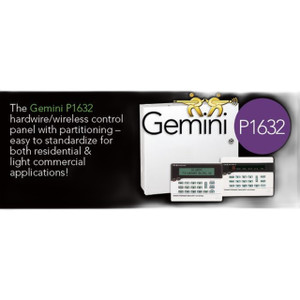
Napco GEM-K1VPS Backlit Alphanumeric Keypad Reader
Overview
The Napco GEM-K1VPS is a backlit keypad reader engineered for access control systems where facility personnel or tenants need reliable PIN entry combined with real-time visual feedback. Unlike basic LED indicators, the GEM-K1VPS delivers a custom alphanumeric LCD display that confirms entries, communicates system status, and guides users through access workflows without external lighting support. This reader integrates directly into Napco GEM security platforms, making it suitable for indoor deployments where operators require tactile credential input and contextual on-screen communication.
Key Features
- Backlit Custom Alphanumeric LCD Display: The large, easy-to-read LCD screen reduces user confusion by displaying custom prompts (e.g., "Enter Badge ID") and status messages (e.g., "Access Denied"). This contextual feedback lowers support calls and improves tenant experience—particularly important in multi-tenant buildings where different user populations need distinct instructions.
- Auto-Sensing Dim Mode: Intelligent backlighting automatically adjusts display intensity based on ambient light conditions. During daylight hours, the display dims to reduce power draw; in low-light environments, brightness ramps up automatically for readability. This eliminates manual brightness tweaks and ensures consistent visibility throughout 24/7 operations without wasting energy.
- Dedicated Keypad Reader Interface: Purpose-built for PIN entry workflows within the Napco GEM architecture. The physical keypad accepts 0–9 numeric input and supports alphanumeric sequences depending on system configuration, enabling flexible credential types without additional hardware swaps.
- Tactile Feedback: Each key press produces audible and tactile confirmation. This physical feedback reduces input errors—operators know immediately whether their press registered, eliminating the frustration of silent failures common with membrane keypads in noisy or fast-paced environments.
- Custom Text Messaging: Integrators configure prompts and status messages during system setup. Facility-specific language (e.g., "Stairwell Access") or multi-language support can be deployed across a site without hardware changes, reducing deployment complexity and support overhead.
- Robust Panel-Mount Construction: The GEM-K1VPS mounts securely into access control panels or dedicated keypad enclosures. The rugged plastic and metal frame withstand repeated use in high-traffic entry points—common areas, office lobbies, loading docks—without cosmetic degradation or mechanical failure.
Integration & Compatibility
The GEM-K1VPS integrates directly into Napco GEM security systems via a dedicated reader protocol. No external converters or intermediate controllers are required—the keypad connects to the GEM panel and communicates credentials and display state in real time. Integrators configure custom messaging and access logic within the GEM software, supporting multi-zone or multi-tenant scenarios where different access points require distinct prompts or denial messages. The auto-sensing backlighting feature ensures consistent readability across indoor installations throughout operating hours—basements, interior corridors, and stairwells remain visible without dependence on site lighting infrastructure.
Deployment Considerations
Deploy the GEM-K1VPS in indoor access points where facility personnel or tenants require operator-friendly PIN entry and visual confirmation. Common installations include office common-area access, multi-tenant building lobbies, loading dock entry control, and facility management stations. The backlit LCD design addresses a key operational challenge: visibility in low-light areas. Without external lighting, users in basement corridors or interior stairwells may struggle to see simple LED indicators. The GEM-K1VPS eliminates this friction.
Plan keypad placement with clear sight lines to the LCD; while the backlit design provides visibility from a wider viewing angle than basic LED readers, direct outdoor sunlight exposure can reduce contrast and should be avoided. If your installation requires outdoor-facing credential entry, consider shading or an indoor vestibule to protect the display. The custom text capability allows clear communication of access denial reasons (e.g., "Access Hours Expired") or entry instructions (e.g., "Enter ID Badge Number"), which meaningfully reduces tenant support tickets and improves confidence in the access process.
Frequently Asked Questions
Q: Is the GEM-K1VPS compatible with Napco GEM systems only, or can it integrate with third-party access control panels?
A: The GEM-K1VPS is designed and tested for direct integration with Napco GEM platforms. Integration with non-Napco systems is not supported by the manufacturer. If you have a mixed-vendor environment, consult with your integrator about whether a separate access control gateway or protocol converter is needed.
Q: Can the auto-sensing dim mode be disabled if I need consistent brightness?
A: The auto-sensing feature is enabled by default and automatically adjusts based on ambient light. Configuration options for brightness override should be verified with your integrator during system setup—some deployments may allow manual override through software settings.
Q: What characters and symbols does the LCD display support?
A: The display is alphanumeric, supporting letters (A–Z), numbers (0–9), and basic symbols. Custom messaging is configured during system setup. Consult the Napco GEM documentation or your integrator for the complete character set and any language-specific limitations.
Q: Does the GEM-K1VPS require an external power supply, or does it draw power from the GEM panel?
A: The GEM-K1VPS connects to and draws power from the Napco GEM control panel. No separate power supply is required, simplifying installation and reducing panel-side wiring.
Q: Can the keypad be mounted horizontally or only vertically?
A: The GEM-K1VPS is designed as a panel-mount component, typically integrated into vertical or horizontal panel layouts. Mounting orientation should be confirmed with your integrator based on your panel enclosure design and user ergonomics.
Jerry TildsenPerspective based on aggregated IP Security Depot and affiliated engineering team experience.
The Napco GEM-K1VPS solves a real friction point in access control deployments: how do you give facility users clear, contextual feedback about their access attempt without relying on a separate PC or mobile app? The backlit alphanumeric LCD on the GEM-K1VPS delivers that feedback directly at the keypad, which matters far more than it sounds in high-traffic or multi-tenant installations. The auto-sensing brightness feature is particularly valuable in basements, interior corridors, and stairwells—environments where site lighting is inconsistent or absent and where simple LED readers leave users fumbling in poor visibility.
Technical Highlights:
- Auto-Sensing Backlit LCD: Automatically adjusts brightness based on ambient conditions, ensuring consistent readability in low-light environments while reducing power consumption during daylight. This removes the operational friction of manual brightness adjustment and ensures 24/7 visibility without external lighting infrastructure.
- Custom Alphanumeric Messaging: Integrators configure facility-specific prompts and status messages during setup. A user sees "Enter Badge ID" on arrival and "Access Denied—Stairwell Closed" if their credential doesn't match. This contextual communication dramatically reduces support calls and user confusion compared to generic LED indicators.
- Tactile Keypad Feedback: Physical keys provide audible and tactile confirmation on every press. Users immediately know whether their keystroke registered—no silent failures, no re-entry uncertainty. This matters in noisy environments and reduces transcription errors on long credential sequences.
Deployment Considerations:
- The GEM-K1VPS is Napco GEM–only. If your site runs mixed-vendor access control, this reader won't bridge to third-party panels without a gateway. Confirm Napco GEM compatibility early in your selection process.
- Avoid direct outdoor sunlight exposure to the LCD. Backlighting reduces contrast in high-brightness environments, making the display harder to read. If your keypad location faces a bright window or exterior door, plan shading or relocate to an indoor vestibule.
- The custom text feature is a real operational advantage in multi-tenant or multi-zone deployments. Use it to communicate access denial reasons, emergency procedures, or facility-specific instructions. This transparency improves tenant satisfaction and reduces false alarms or security incidents caused by user confusion.
Choose the GEM-K1VPS for multi-tenant office buildings, secure facility lobbies, or warehouse entry points where you want to reduce support friction and improve access transparency. If you're running a standalone single-door installation with basic numeric PIN entry, a simpler LED reader may suffice. But in any deployment where users benefit from clear visual feedback about their access attempt—especially in low-light environments—the GEM-K1VPS delivers measurable operational value.