NETGEAR GSM4212P-100NAS M4250-10G2F-POE+ Managed Switch
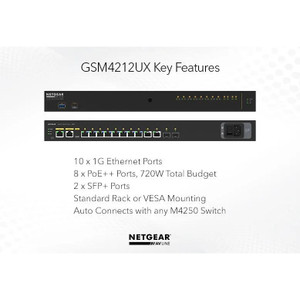
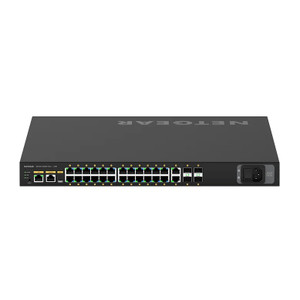
The NETGEAR GSM4212P-100NAS is a managed Layer 3 switch engineered for mid-to-large scale PoE-dependent security deployments. It delivers PoE+ power and Gigabit connectivity to 48 endpoints—IP cameras, wireless access points, VoIP phones, and access control readers—while maintaining upstream bandwidth via dual 10G SFP+ ports. Unlike unmanaged PoE injectors or daisy-chained PoE extenders, this switch consolidates power delivery, switching fabric, and network intelligence in a single 1U rack unit, eliminating operational overhead and reducing total system footprint on multi-building or geographically dispersed installations.
Key Features
- PoE+ Power Delivery: 802.3at PoE+ on all 48 ports. Supplies up to 30W per port for high-powered IP cameras (PTZ, thermal, multi-sensor), reducing reliance on separate power supplies and simplifying cable runs.
- Dual 10G SFP+ Uplinks: Two 10 Gigabit uplinks for fiber or direct copper connectivity to your core network or NVR backend. Supports both redundancy and aggregated throughput—critical for sites with 20+ simultaneous video streams.
- Layer 3 Switching & VLAN Segmentation: Native VLAN support isolates camera traffic from corporate networks, separates access control data, and prevents broadcast storms across security zones. Essential for multi-tenant or campus deployments.
- Web GUI & SNMP Management: Configurable via intuitive web interface, Telnet, or SNMP—no proprietary software required. Full support for standard network monitoring tools (Zabbix, Nagios, PRTG).
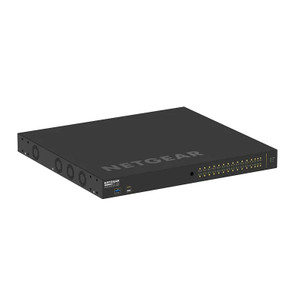
- 1U Rack Mount Form Factor: Compact footprint fits standard 19-inch server racks alongside NVRs, firewalls, and UPS units. Reduces sprawl in crowded equipment closets.
- Redundancy & High Availability: Built-in support for link aggregation (LACP) and spanning tree protocols. Multiple units can be stacked or configured in active-passive failover for critical infrastructure.
- PoE Power Budget: Total switch budget supports simultaneous delivery across all ports when correctly sized. Use PoE power planning tools to validate endpoint count and wattage before deployment.
- Fanless or Low-Noise Operation Option: Depending on configuration, operates with minimal acoustic signature—suitable for quiet office environments or surveillance control rooms.
Deployment Integration & Architecture
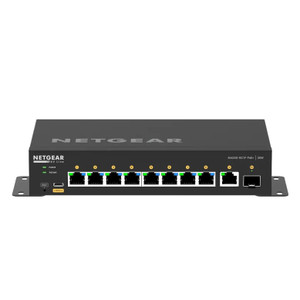
The M4250-10G2F-POE+ integrates seamlessly with any PoE-compatible IP camera (Axis, Hikvision, Uniview, Hanwha, Bosch, Dahua), wireless access points, access control readers, and VoIP phones. The dual 10G SFP+ uplinks connect to your core switch or directly to an NVR system via fiber or copper, enabling centralized video recording and playback. ONVIF compliance across connected cameras ensures cross-platform VMS compatibility (Genetec, Milestone, Avigilon, ExacqVision). VLAN support allows you to isolate surveillance traffic on a dedicated broadcast domain, preventing video streams from consuming bandwidth allocated to office data or guest networks. For campus deployments spanning multiple buildings, fiber uplinks eliminate distance constraints and provide electrical isolation.
Power is the critical dimension on this hardware. PoE+ delivers up to 30W per port across all 48 endpoints; the total switch power budget is manufacturer-rated and must accommodate your connected device list. A typical camera draws 8-15W (depending on sensor, heater, and PTZ motor); an access control reader draws 3-7W. With 48 ports, you cannot simultaneously max-power all endpoints without exceeding budget—this is by design (most installations don't run all ports at full power simultaneously). Before deployment, conduct a load audit: count your cameras, add their typical power draw (consult each camera's datasheet), confirm the total is within the switch budget, and configure network QoS policies to prevent bandwidth hogging if multiple 4K streams are active.
Uplink architecture determines throughput ceiling. The dual 10G SFP+ ports support up to 20 Gbps aggregate bandwidth upstream. A single 4K Axis or Hanwha camera at H.265 compression consumes 10-25 Mbps; at H.264, 20-50 Mbps. Simple math: 20 Gbps ÷ 50 Mbps per camera = 400+ concurrent 4K streams before saturation. In practice, 10G uplinks are future-proofed for growth and provide redundancy if one fiber link fails. If your site maxes out at 50 cameras, a single 10G port is sufficient; the second acts as a failover and enables active-active load balancing on larger deployments.
Installation & Operations
The switch requires 120V AC or 240V AC mains power (verify your regional standard before purchasing); it is not powered by PoE. Plan for 1U of 19-inch rack space and ensure adequate ventilation clearance on both sides and above—do not install in a sealed cabinet or direct sunlight. For fiber uplinks, specify SFP+ modules (LC or SC connectors) compatible with your existing cable plant; most deployments use LC duplex across campus fiber runs. Telnet or web GUI access allows real-time monitoring of PoE consumption per port, VLAN membership, and port statistics. Enable SNMP to integrate with your network management platform (Zabbix, Nagios, PRTG) for alerts on high power draw, port failures, or temperature anomalies. Document your VLAN scheme before deployment: assign camera traffic to VLAN 100, access control to VLAN 200, management to VLAN 50, etc. This discipline pays dividends when troubleshooting multicast streams or isolating rogue endpoints.
PoE power planning is non-negotiable. Most integrators configure the switch conservatively: assume 20W average per powered camera, multiply by total camera count, add 10% margin. If your budget math shows 85% utilization at peak, you're in safe territory. If it shows 105% utilization, either upgrade to a second switch, upgrade connected cameras to PoE-efficient models (low-power sensors, H.265 only), or split the load across two PoE sources. Test PoE delivery to a representative camera load before final sign-off. Verify that all cameras power on simultaneously and maintain stable operation under full load; intermittent brownouts indicate budget overrun or a failing PSU.
Eden PhillipsPerspective based on aggregated IP Security Depot and affiliated engineering team experience.
We've deployed the NETGEAR GSM4212P-100NAS across campus buildings, retail strips, and warehouse perimeters where a single point of switching and PoE distribution simplifies infrastructure planning and reduces recurring maintenance. The appeal is straightforward: you eliminate the operational headache of managing dozens of standalone PoE injectors or budget constraints that force you to choose between buying a dedicated PoE extender and a managed switch separately. The M4250 does both. The dual 10G SFP+ uplinks are the real strength—fiber runs eliminate distance restrictions on larger campuses, and the 20 Gbps aggregate bandwidth means you can move dozens of simultaneous 4K streams without saturation or frame drops. We've also seen the Layer 3 VLAN intelligence pay for itself on multi-tenant properties or large enterprises where network security teams insist on traffic segregation. Yes, you can use a dumb PoE injector and an unmanaged switch to save $1,000 upfront, but the operational cost of troubleshooting brownouts, managing QoS on mixed-priority traffic, and replacing failed injectors adds up quickly. The M4250 is the pragmatic choice for integrators who spec systems meant to run unattended for 5+ years. The main trade-off versus competitors: this is a 1U rackmount-only form factor—if your site doesn't have rack space, you'll need a separate cabinet or DIN-rail conversion kit. Also, the PoE power budget is real; undersizing is the most common installation mistake. Count your endpoints, get their actual power specs (not guesses), and validate the math before you plug in a camera and watch it brown out under peak load.
Technical Highlights:
- PoE+ 802.3at across 48 ports: 30W per port, standard across all endpoints. Eliminates the capex and maintenance burden of separate wall-mount PoE injectors. On a 40-camera site, this consolidation alone justifies the switch cost versus four separate injectors plus a managed switch.
- Dual 10G SFP+ Uplinks: 20 Gbps aggregate upstream capacity. Handles 400+ concurrent 4K streams at H.265 compression before saturation; future-proofs for camera refresh cycles or site expansion. Fiber connectivity enables campus deployments across distances that would require active repeaters on Gigabit copper.
- Layer 3 VLAN Segmentation: Native VLAN support isolates camera, access control, and management traffic on separate broadcast domains. Prevents video streams from consuming bandwidth allocated to corporate networks and simplifies SIEM ingestion (all camera syslog on VLAN 100, for example).
- Web GUI + SNMP Management: No proprietary software required. Integrates with Zabbix, Nagios, PRTG, and other standard monitoring platforms. Real-time per-port PoE consumption visibility prevents surprise brownouts mid-deployment.
- 1U Footprint: Compact rack mount saves space in crowded MERs (main equipment racks) and enables consolidated infrastructure on multi-building sites.
- Redundancy Support (LACP, STP): Link aggregation and spanning tree protocols enable active-active load balancing or active-passive failover across multiple switch units on high-availability deployments.
Deployment Considerations:
- PoE power budget is your hard constraint. Sum the actual power draw of all 48 connected endpoints (consult camera datasheets, don't guess). If total exceeds manufacturer budget, your deployment will fail under peak load. Plan for 70-80% utilization as a safe operating ceiling.
- 1U rack mount only—no DIN-rail or wall-mount options. If your site lacks a server cabinet, plan for separate enclosure costs or deploy a second switch at a remote location. Fiber uplinks (10G SFP+) may require fiber runs; LC duplex is industry standard, but verify module compatibility with your existing plant before ordering.
- VLAN configuration is operationally essential but often overlooked. Assign camera traffic to a dedicated VLAN (e.g., VLAN 100) from day one. This discipline prevents broadcast storms, simplifies QoS policy, and accelerates troubleshooting when endpoints misbehave. Use the web GUI to document your scheme in the switch config backup.
- Thermal management: ensure adequate ventilation clearance above and below the switch. Rack installations in sealed cabinets without airflow will throttle performance and shorten MTBF. Test temperature sensors via SNMP alerts if your monitoring platform supports it.
- Firmware updates are periodic but not frequent. Subscribe to NETGEAR security advisories; most updates address edge-case VLAN or SNMP vulnerabilities rather than breaking changes. Test updates in a staging environment before deploying to production.
This switch is the right choice for integrators speccing mid-to-large security infrastructure where consolidation, VLAN isolation, and PoE distribution are non-negotiable. The NETGEAR GSM4212P-100NAS is proven field-tested and cost-effective over a 5-year lifecycle. For more options and architectural guidance, visit the NETGEAR catalog.