Overview
QNAP Long/Flat/Short(117X22/90X18/80X16 MM) - BRKT-QM2-10G1T
QNAP BRKT-QM2-10G1T Bracket Kit for QM2 10GbE Expansion CardsOverviewThe BRKT-QM2-10G1T is a replacement or alternate-profile bracket kit designed for…
QNAP Long/Flat/Short(117X22/90X18/80X16 MM) - BRKT-QM2-10G1T
Build Your Complete System
Manufacturer-verified compatible cameras, recorders, mounts, accessories, and licenses for this product. Adjust quantities and add the entire bundle to your cart in one click.
Bundle Summary
Overview
No Bots, Just Experts
Questions about this product? Free pre-sales support from a senior specialist — product questions, compatibility checks, BOM quotes, price confirmation — typically answered within one business day. Need camera placement or system design work? Engineering time is $175 per hour (qty 1 = 1 hour). Hardware buyers get up to one hour ($175) credited back on their order.
QNAP BRKT-QM2-10G1T Bracket Kit for QM2 10GbE Expansion Cards
Overview
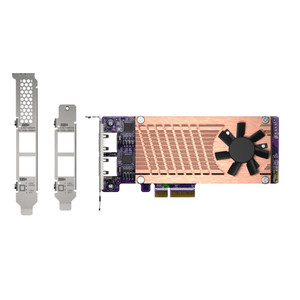
The BRKT-QM2-10G1T is a replacement or alternate-profile bracket kit designed for QNAP QM2 series PCIe expansion cards that include a 10GbE port. If you are installing a QM2 card into a chassis that requires a different bracket height than what ships with the card — or if the original bracket was damaged or lost — this kit restores the correct mechanical fit without requiring a full card replacement.
Compatibility
Designed for use with QNAP QM2 series PCIe expansion cards equipped with a 10GbE (10GBASE-T) interface. The kit includes brackets in three profile sizes — Long (117 x 22 mm), Flat (90 x 18 mm), and Short (80 x 16 mm) — covering standard full-height and low-profile slot configurations. Verify your target chassis slot type before ordering: low-profile short brackets (80 x 16 mm) are required in half-height chassis, while standard full-height slots take the 117 x 22 mm bracket. Using the wrong profile prevents the card from seating flush with the rear panel and can block adjacent slots.
Installation Notes
Bracket swaps on PCIe cards require removing the card from the chassis, transferring the bracket using the card manufacturer's specified fasteners, and reseating. Ensure the replacement bracket aligns with the 10GbE port cutout on the QM2 card before securing. No special tooling beyond a standard Phillips screwdriver is required for most QNAP NAS enclosures.
Build Your Complete System
Manufacturer-verified compatible cameras, recorders, mounts, accessories, and licenses for this product. Adjust quantities and add the entire bundle to your cart in one click.
Bundle Summary
Looking for more QNAP products? Shop the full QNAP catalog →
System Design, Deployment & Technical Support
Support services and planning resources for commercial surveillance, access control, and infrastructure deployments.
Fixed scope • Fixed price
System Design Assistance
- Get help validating product compatibility
- Coverage requirements
- Storage planning and deployment architecture before you buy.
Deployment & Configuration Support
- Access fixed-scope support for rollout planning
- User setup guidance
- Migration and system standardization across single-site or multi-site deployments
Guides, Tools & Calculators
- PoE requirements
- Storage retention
- Camera selection and deployment methodology