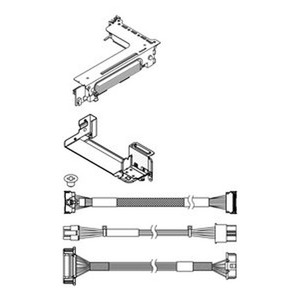
Lenovo 4XH7A61048 SR650 V2 PCIe Gen4 x8/x8 Riser 3 Kit
Overview
The Lenovo 4XH7A61048 is a PCIe Gen4 x8/x8 Riser 3 Kit designed for the ThinkSystem SR650 V2 rack server. It adds a third riser slot position, enabling installations that require additional full-height PCIe Gen4 adapters — GPUs, high-speed NICs, HBAs, or storage controllers — beyond what the base riser configuration supports. If your SR650 V2 workload has outgrown its initial PCIe expansion capacity, this kit is the direct path to adding slots without chassis changes. The kit weighs 1.0 lb and interfaces via PCIe, matching the SR650 V2's Gen4 backplane architecture for full-bandwidth adapter operation.
Compatibility
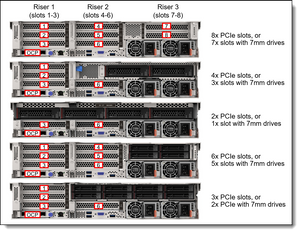
The 4XH7A61048 is engineered specifically for the Lenovo ThinkSystem SR650 V2 server platform. It is not a universal riser — do not attempt installation in SR650 (Gen1), SR650 V3, or other ThinkSystem chassis, as riser slot geometry, backplane connector pinout, and mechanical retention differ across generations. Confirm your chassis is the SR650 V2 (7Z72/7Z73 machine types) before ordering. If you are configuring a rack server build that requires GPU compute or multi-port networking, verify the specific adapter form factor (full-height, half-length vs. full-length) fits the Riser 3 bay on your SR650 V2 chassis variant — some configurations restrict Riser 3 to specific slot lengths depending on installed drive backplane options.
Installation Notes
Installation follows Lenovo's standard tool-based riser swap procedure for the SR650 V2: power down, discharge static, remove the top cover, seat the riser card into the designated Riser 3 slot on the system board, and secure with the integrated retention hardware. Lenovo's server component installation guidelines for the SR650 V2 specify torque and grounding requirements — follow the Hardware Maintenance Guide for the 7Z72/7Z73 machine type to avoid PCIe connector damage. No firmware update is required for riser hardware; adapter-specific drivers remain the responsibility of the installed PCIe card. Cross-reference your storage or networking adapter slot assignment table in the SR650 V2 configuration guide before finalizing adapter placement, as some slots share bandwidth depending on CPU and memory population.