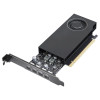
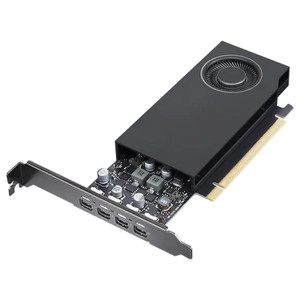
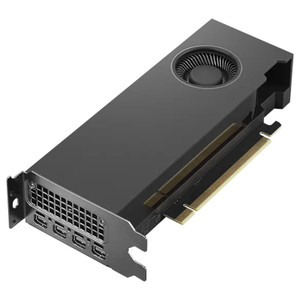
Lenovo 4X61Q73040 NVIDIA RTX A400 4GB Professional GPU
Overview
The Lenovo 4X61Q73040 is a workstation-class discrete graphics card built around NVIDIA's RTX A400 GPU with 4GB of GDDR6 memory. Designed in a Full-Height/Half-Length (FH/HL) form factor and drawing only 50W typical, it targets deployments where professional multi-display output, CUDA compute, and low thermal footprint must coexist inside a standard rack-mount or tower workstation. If you're provisioning a workstation or server platform that needs to drive four independent displays at up to 8K resolution while also offloading CUDA-accelerated workloads from the CPU, the 4X61Q73040 is worth a direct look.
Key Features
- 768 CUDA Cores on RTX A400: NVIDIA's Ampere-class CUDA cores deliver hardware-accelerated compute for analytics, AI inference, and visualization tasks. For operators running video management or analytics software that supports GPU acceleration, 768 CUDA cores offload the CPU meaningfully — particularly in multi-stream decode or object detection pipelines.
- 4GB GDDR6 at 96 GB/s Memory Bandwidth: GDDR6 at 96 GB/s sustains frame-buffer throughput for multi-display compositing and GPU-compute workloads without the memory contention you see on GDDR5-equipped entry cards. Tight-loop analytics or real-time rendering tasks benefit from the headroom this bandwidth provides versus lower-tier alternatives.
- Four Mini DisplayPort 1.4a Outputs: Four simultaneous Mini-DP 1.4a ports support up to four independent monitors, each capable of driving 7680×4320 (8K) at the resolution ceiling. Video wall operators, control room architects, and multi-screen dispatch workstations can eliminate the second GPU entirely — one card, four screens, no PCIe slot conflicts.
- 7680×4320 Maximum Resolution: 8K maximum output per port means this card is over-specified for 4K displays, giving you future headroom without a hardware swap when display refresh cycles bring 8K panels into your environment.
- 50W Typical Power Draw: At 50W typical, the RTX A400 sits well under the 75W threshold that PCIe slots supply without supplementary cabling — but note it ships with a 1x 16-pin supplementary power connector, so verify your system's power connector availability before ordering. The low thermal envelope also means reduced cooling noise and heat load in environments where ambient temperature or acoustics matter.
- PCIe x8 4.0 Interface: PCIe 4.0 x8 delivers 16 GB/s of bidirectional bandwidth to the host — effectively identical throughput to PCIe 3.0 x16 in most GPU workloads. Systems with PCIe 4.0 x16 slots running the card in x8 electrical mode should see no meaningful performance degradation for display or moderate-compute workloads.
- Active Cooling with Single Fan: The single-fan active cooler keeps the GPU within thermal spec without requiring a dual-slot footprint. FH/HL dimensions mean it installs in the majority of tower and pedestal workstations without blocking adjacent PCIe slots.
- Full-Height/Half-Length Form Factor: FH/HL keeps the card compatible with standard ATX and workstation chassis — no riser bracket gymnastics, no low-profile adapter needed. The half-length board length also leaves room for neighboring expansion cards in dense multi-card configurations.
Integration and Compatibility
The 4X61Q73040 connects via PCIe x8 4.0, which is electrically backward-compatible with PCIe 3.0 and 4.0 x16 slots — confirm your motherboard's mechanical slot sizing accepts x8-keyed cards. The 16-pin supplementary power connector is required; not all workstation PSUs include a native 16-pin connector, so verify or plan for an adapter cable. DisplayPort 1.4a supports DSC (Display Stream Compression) for high-refresh 4K and 8K operation, and is compatible with the broad ecosystem of professional monitors and video wall controllers that accept DP 1.4 input. CUDA support enables use with NVIDIA-accelerated frameworks including TensorRT, NVENC, and NVDEC — relevant if your workstation hosts GPU-accelerated VMS analytics or transcoding pipelines.
Frequently Asked Questions
Q: How many monitors can the Lenovo 4X61Q73040 drive simultaneously?
A: Four. The card provides four Mini DisplayPort 1.4a outputs, each capable of driving an independent display at up to 7680×4320 (8K) resolution.
Q: Does the 4X61Q73040 require a supplementary power connector?
A: Yes. Despite its 50W typical draw, the card includes a 1x 16-pin supplementary power connector. Confirm your workstation's PSU provides this connector or source an appropriate adapter before installation.
Q: What PCIe slot does the 4X61Q73040 require?
A: It uses a PCIe x8 4.0 interface. The card is backward-compatible with PCIe 3.0 x16 slots and will operate in x8 electrical mode in x16 mechanical slots without meaningful performance loss for display or moderate compute workloads.
Q: Is the 4X61Q73040 suitable for AI inference or GPU-accelerated analytics?
A: Yes, within its class. The 768 CUDA cores support NVIDIA's CUDA compute stack, including TensorRT and NVENC/NVDEC, making it viable for GPU-accelerated VMS analytics, inference at the edge, or transcoding workloads on a workstation host.
Q: What is the form factor of the 4X61Q73040?
A: Full-Height/Half-Length (FH/HL). It installs in standard ATX and workstation chassis without requiring a low-profile bracket or riser, and the half-length board leaves adjacent PCIe slots accessible.
Q: What memory type and bandwidth does the RTX A400 use?
A: 4GB GDDR6 with 96 GB/s maximum memory bandwidth — the higher-bandwidth GDDR6 versus GDDR5 alternatives in this power tier sustains frame-buffer throughput under multi-display and compute-concurrent workloads.
The 4X61Q73040 catches my attention specifically because of that PCIe x8 4.0 interface paired with a 50W thermal envelope — that combination is harder to find than it should be in the RTX A400 class. When I'm speccing a control room workstation that needs four independent display outputs plus some CUDA headroom for analytics, most alternatives either eat a full PCIe slot budget or push the power envelope past what a compact workstation PSU handles cleanly.
Technical Highlights:
- 96 GB/s GDDR6 bandwidth: At this memory bandwidth, you won't see the frame-stutter artifacts that show up on GDDR5 cards when four displays are actively compositing — relevant in video wall and dispatch workstation builds where all four outputs are live simultaneously.
- 4x Mini-DP 1.4a @ 8K max: DP 1.4a with DSC support means you can pair this with any current 4K or 8K professional monitor without an adapter chain — fewer failure points, cleaner cable management than HDMI dongles on every port.
- FH/HL + active cooling: Half-length keeps the second PCIe slot open for a NIC, RAID card, or second GPU — a real constraint in workstations where slot count is the binding limit, not power budget.
Deployment Considerations:
- The 16-pin supplementary power connector is non-negotiable — don't assume a 50W card skips aux power. Verify the workstation PSU ships with or supports a 16-pin connector before the system arrives on-site.
- PCIe x8 4.0 electrical in an x16 mechanical slot is fine for display and light compute, but if the host board only offers x4 4.0 electrical in its secondary slot, you'll see bandwidth constraints under concurrent four-display + CUDA workloads.
This card is a solid fit for security operations center (SOC) workstations running four-monitor layouts with a GPU-accelerated VMS analytics engine — it handles the display stack and CUDA offload in one card without monopolizing the PCIe topology the way a full-length dual-slot card would.