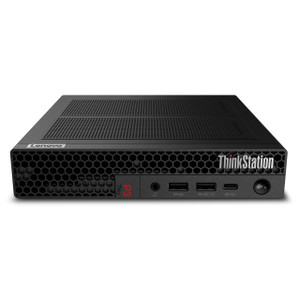
Lenovo 30K50054US ThinkStation P3 Tiny Gen 2 Compact Workstation
Overview
The Lenovo ThinkStation P3 Tiny Gen 2 (30K50054US) is a sub-2-liter commercial workstation built around Intel's Core Ultra 7 265 vPro platform and an NVIDIA RTX A1000 8GB discrete GPU — a combination that fits a dedicated graphics workload into a form factor smaller than most network switches. If you're deploying VMS operator stations, AI-accelerated video analytics edge nodes, or engineering review workstations where rack or desk space is genuinely constrained, this is the configuration to evaluate. The 20-core/20-thread Core Ultra 7 265 keeps CPU-bound tasks moving while the RTX A1000 handles GPU-accelerated decode, inferencing, or CAD rendering without pulling from a shared pool of integrated graphics resources. Explore the broader Lenovo workstation and compute line if you need to compare this unit against tower or rack configurations in the same family.
Key Features
- Intel Core Ultra 7 265 vPro — 20 Cores, 20 Threads: The vPro designation means this processor supports Intel's hardware-level remote management stack (AMT/ME), which matters for enterprise IT departments that need out-of-band access for patching, reimaging, or diagnostics without physically touching the unit. At up to 4.60 GHz boost, it handles multi-stream video decode alongside OS and application tasks without thrashing the CPU scheduler.
- NVIDIA RTX A1000 8GB Discrete GPU: Unlike consumer GeForce cards, the RTX A1000 is a professional-class GPU with ECC memory support and ISV-certified drivers for workstation applications. For video surveillance workstations running GPU-accelerated VMS decoders or AI analytics, 8GB VRAM provides headroom for multi-stream concurrent decode without hitting the memory ceiling that plagues 4GB variants.
- 16GB DDR5-5600MHz in a Single SO-DIMM Slot: DDR5 at 5600 MHz delivers roughly 30–40% more memory bandwidth than DDR4 at equivalent speeds — relevant when the GPU and CPU are sharing system bus bandwidth across multiple high-resolution streams. One slot is currently occupied; the second SO-DIMM slot leaves room to expand to 32GB or up to the 128GB maximum without replacing existing hardware.
- 512GB PCIe Gen 4 M.2 2280 TLC Opal SSD: PCIe Gen 4 read throughput typically exceeds 5,000 MB/s sequential — fast enough that OS and application load times are no longer the bottleneck. The Opal 2.0 self-encrypting drive capability means you can enforce hardware-level full-disk encryption via a compatible TCG Opal management tool without the CPU overhead of software encryption, a relevant consideration for deployments in regulated environments.
- Dual SO-DIMM Slots, Up to 128GB Max RAM: The 16GB baseline is appropriate for a light VMS operator station or analytics node, but the 128GB ceiling means this unit can grow into heavier workloads — multi-channel AI inferencing or large dataset workflows — without a platform replacement. Upgrading is a standard SO-DIMM swap; no proprietary memory required.
- PCIe, USB, and Ethernet Interfaces: The interface complement covers the standard connectivity requirements for IP camera management workstations: Ethernet for network camera feeds and VMS server communication, USB for peripherals and KVM, and PCIe internally for storage and GPU. The Intel BE200 vPro Wi-Fi (Bluetooth 5.4 also included) adds wireless flexibility for environments where wired drops aren't available at every station.
- 300W Power Supply: A 300W internal PSU provides adequate headroom for the Core Ultra 7 TDP plus the RTX A1000's power envelope with margin for storage and peripherals. This is a single-supply configuration — no redundant PSU — which is standard for desktop workstations but worth noting if you're deploying in an environment that requires power redundancy at the node level.
- Compact Form Factor — 19.10 x 10.50 x 5.70 in, 9.45 lb: The Tiny chassis is designed for VESA mounting behind a monitor or side-mounting under a desk, keeping the operator console footprint minimal. At 9.45 lb, it's light enough for single-person installation and repositioning. Compared to a tower workstation, this form factor recovers meaningful desk or rack shelf space in multi-station control rooms.
- Windows 11 Pro 64-bit, English: Ships with a licensed, activated Windows 11 Pro install — no OEM reinstall media required for initial deployment. Pro licensing includes BitLocker, Remote Desktop host capability, and domain join, all relevant for enterprise security deployments.
- 3-Year On-Site Warranty: The configuration includes a 3-year on-site service entitlement, which means a technician comes to the deployment location for covered hardware failures — not a depot or mail-in model. For production operator stations or analytics nodes where downtime directly impacts security coverage, on-site response is the right service tier.
Integration and Compatibility
The vPro platform and Windows 11 Pro base make the 30K50054US compatible with standard enterprise management stacks including Microsoft Endpoint Manager (Intune/SCCM), Intel AMT-based KVM-over-IP, and domain group policy. The RTX A1000 supports CUDA, which is the required compute framework for most AI-based video analytics platforms. VMS vendors that publish GPU-accelerated decode support (Milestone, Genetec, Avigilon, and others) typically qualify NVIDIA professional GPUs ahead of consumer cards, so the A1000 is the lower-risk choice versus a GeForce equivalent for commercial deployments. For PoE switch and network infrastructure pairing, standard Gigabit Ethernet is the assumed uplink; the Intel BE200 card also covers Wi-Fi 7 if the deployment environment warrants it.
Frequently Asked Questions
Q: What is the maximum RAM this workstation supports?
A: The ThinkStation P3 Tiny Gen 2 supports up to 128GB of DDR5 RAM across its two SO-DIMM slots. The 30K50054US ships with 16GB (1x16GB) in one slot, leaving the second slot open for an upgrade.
Q: Does the 30K50054US include an on-site warranty?
A: Yes. This configuration includes a 3-year on-site service entitlement, meaning a technician is dispatched to your location for covered hardware failures rather than requiring depot or mail-in service.
Q: Can the SSD be upgraded or replaced?
A: The unit ships with a 512GB M.2 2280 PCIe Gen 4 SSD in the primary slot. The M.2 2280 form factor is a standard interface, so the drive can be swapped for a higher-capacity compatible M.2 PCIe Gen 4 module if your storage requirements grow.
Q: Is the NVIDIA RTX A1000 suitable for VMS GPU-accelerated decoding?
A: The RTX A1000 is a professional-grade GPU with ISV certifications and ECC memory support, making it the appropriate choice for commercial VMS platforms that support GPU-accelerated decode. Most major VMS vendors qualify NVIDIA professional GPUs (Quadro/RTX line) ahead of consumer GeForce equivalents. Confirm your specific VMS vendor's GPU compatibility list for the RTX A1000 before deployment.
Q: Does this workstation support Intel vPro remote management?
A: Yes. The Core Ultra 7 265 vPro processor and Intel BE200 vPro wireless adapter both carry the vPro designation, enabling Intel AMT out-of-band management for remote access, diagnostics, and remediation independent of the OS state.
Q: What is the physical footprint of the 30K50054US?
A: The unit measures 19.10 x 10.50 x 5.70 inches (L x W x H) and weighs 9.45 lb. The Tiny chassis supports VESA mounting behind compatible monitors to eliminate desk footprint entirely.
The 30K50054US is the configuration I'd hand to an integrator standing up a multi-station security operations center where the client insists on a clean desk policy. The RTX A1000 8GB is the differentiator here — you're not compromising on GPU capability to get the Tiny form factor. That 8GB VRAM ceiling is enough to run GPU-accelerated decode on 16–32 streams at 1080p in most VMS platforms without starving the frame buffer, and the professional driver stack means you won't hit the stability issues that show up when people try to run commercial VMS on GeForce cards.
Technical Highlights:
- Core Ultra 7 265 vPro, 20 cores/threads: The hybrid architecture handles background OS tasks without stealing performance from the video decode pipeline. vPro AMT means IT can manage, patch, or reimage these stations remotely — important when they're wall-mounted behind monitors in locations that are inconvenient to reach physically.
- DDR5-5600MHz, expandable to 128GB: DDR5's memory bandwidth advantage over DDR4 matters when the GPU and CPU are competing for bus throughput during multi-stream analytics. Starting at 16GB is lean for a heavy analytics node — budget for a 32GB upgrade on day one if you're running more than 8 concurrent AI inference streams.
- 512GB PCIe Gen 4 Opal SSD: The Opal 2.0 self-encrypting drive means you can enforce hardware-level disk encryption via policy without any CPU overhead — the drive handles encryption in silicon. At 512GB, this is operating system and application storage only; VMS recording storage needs to live on a network share or dedicated NAS.
Deployment Considerations:
- The 300W single PSU is sized correctly for this platform but offers no power redundancy. For SOC operator stations where continuous uptime is critical, pair each unit with a line-interactive UPS on a monitored circuit — the Tiny chassis has no internal redundant supply option.
- The single SO-DIMM slot currently occupied means a RAM upgrade requires adding a second module, not swapping the first — verify that your target upgrade module runs at 5600MHz to avoid a speed downgrade on the populated channel.
This configuration is a strong fit for security operations centers deploying individual analyst stations where desk space is controlled, IT management overhead is real, and GPU-accelerated VMS decode is a requirement — not a nice-to-have.