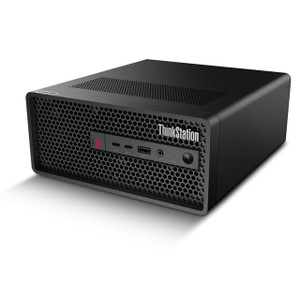
Lenovo 30K5001YUS ThinkStation P3 Tiny G2 Compact Workstation
Overview
The Lenovo ThinkStation P3 Tiny G2 (30K5001YUS) is a compact form-factor workstation built around Intel's Core Ultra 5 235 processor — a 14-core, 14-thread hybrid architecture chip that brings genuine multi-threaded compute into a sub-1-liter chassis. If you're sizing a dedicated video management server for a mid-size surveillance deployment, provisioning an edge analytics node, or equipping a security operations center workstation where desk space is constrained, the P3 Tiny G2 is worth a close look. This machine ships with 16GB of DDR5-5600 RAM across a single SO-DIMM slot, leaving a second slot open — so expanding to 32GB or beyond is a day-one option without pulling the unit from service for long.
Key Features
- Intel Core Ultra 5 235 (14 cores / 14 threads): The hybrid core architecture handles mixed workloads well — simultaneous VMS decoding, analytics processing, and operator UI rendering without the frame-drop stutter you'll see on older quad-core embedded systems. 14 threads give the scheduler room to keep all workloads responsive concurrently.
- 16GB DDR5-5600 RAM (expandable to 128GB): DDR5-5600 delivers nearly double the memory bandwidth of DDR4-3200 — relevant when your VMS is streaming dozens of high-resolution channels through RAM simultaneously. The 128GB ceiling means this chassis can scale well beyond its initial configuration as channel counts grow; you're not painting yourself into a corner at purchase.
- 512GB PCIe 5.0 NVMe SSD: PCIe 5.0 storage is the current generation interface — sequential read/write throughput roughly doubles PCIe 4.0 drives. For a VMS appliance writing continuous high-bitrate streams, that headroom reduces the risk of I/O bottlenecks under burst-record conditions. The 512GB base is a staging volume; pair this unit with network-attached or external storage for long-term NVR retention requirements.
- 2x SO-DIMM memory slots (1 populated): Single-channel out of the box means memory bandwidth is running at half of what dual-channel configuration would deliver. If you're pushing high channel counts through this machine, install a matched second DIMM early — the performance delta in multi-stream decode workloads is measurable.
- Tiny G2 form factor: The compact chassis mounts cleanly on the back of a display via VESA adapter or sits on a shelf in a server rack's utility drawer. For IP camera deployments where the management workstation lives at the head-end panel rather than a full rack, this footprint keeps the installation clean.
- ThinkStation P-series platform: The P-series line is Lenovo's workstation-class product family — differentiated from consumer ThinkCentre SKUs by ISV certification support, higher thermal headroom, and longer-lifecycle component sourcing. Relevant if your VMS vendor publishes a certified hardware list.
Integration and Compatibility
The 30K5001YUS runs on Intel's Core Ultra architecture (codenamed Meteor Lake), which includes a built-in Neural Processing Unit (NPU). Several current-generation VMS platforms and analytics engines can offload AI inference tasks to the NPU, reducing CPU load on the primary cores. Verify with your specific VMS vendor whether their build supports NPU acceleration on this silicon generation before sizing the deployment around that capability.
Memory expandability to 128GB via dual SO-DIMM slots means this unit can realistically support enterprise-grade VMS deployments with large channel counts, deep analytics libraries, and concurrent operator sessions — provided GPU resources are sufficient for your decode workload. Confirm GPU specifications for your specific build variant before finalizing the configuration for graphics-intensive VMS environments.
For storage architecture, this workstation functions best as the compute and OS host in a tiered storage design — local NVMe for OS and VMS application, networked or direct-attached storage for video retention. Plan your storage capacity separately from the local 512GB SSD.
Frequently Asked Questions
Q: What processor does the Lenovo 30K5001YUS use?
A: The 30K5001YUS ships with an Intel Core Ultra 5 235, a 14-core, 14-thread hybrid architecture processor from Intel's Meteor Lake generation.
Q: How much RAM does this workstation include, and can it be upgraded?
A: It ships with 16GB of DDR5-5600 RAM in a single SO-DIMM slot. It has two SO-DIMM slots total, and supports a maximum of 128GB, so significant expansion headroom is available.
Q: What is the storage configuration on the 30K5001YUS?
A: The unit includes a single 512GB NVMe SSD on a PCIe 5.0 interface — the current-generation storage bus offering the highest sequential throughput available at this class.
Q: Is the memory running in dual-channel mode out of the box?
A: No. Only one of the two SO-DIMM slots is populated at the base configuration, which means memory runs in single-channel mode. Installing a matched second DIMM will enable dual-channel operation and increase effective memory bandwidth — worth doing for multi-stream VMS workloads.
Q: What is the weight of the ThinkStation P3 Tiny G2?
A: The 30K5001YUS weighs 9.00 lb as shipped.
Q: Is this a Tiny form factor suitable for VESA mounting behind a monitor?
A: Yes — the ThinkStation P3 Tiny G2 chassis is designed for the compact Tiny form factor, which supports VESA mounting options for behind-display installation.
The 30K5001YUS is the configuration I'd recommend when a customer needs a dedicated VMS host in a space-constrained head-end but doesn't want to compromise on CPU muscle. The Intel Core Ultra 5 235's 14-thread count is the key differentiator here — in my experience, VMS platforms that run simultaneous live decode, motion search, and analytics inference will saturate a 4- or 6-core box under load, and you end up undersizing the machine for a 5-year deployment. The PCIe 5.0 SSD interface is also genuinely useful for burst-write scenarios common in alarm-triggered high-bitrate recording.
Technical Highlights:
- Intel Core Ultra 5 235 (14 cores / 14 threads): Handles parallel VMS workloads — live decode, playback, analytics — without core contention that causes dropped frames or sluggish operator UI on busy systems.
- DDR5-5600, expandable to 128GB: The memory bandwidth improvement over DDR4 is tangible in high-channel-count deployments; the 128GB ceiling future-proofs the chassis for VMS software that keeps large frame buffers in RAM.
- PCIe 5.0 NVMe SSD (512GB): Current-generation storage interface means I/O is unlikely to be the bottleneck even under simultaneous multi-stream write bursts — though 512GB is a staging volume, not a retention volume, so plan your external storage accordingly.
Deployment Considerations:
- The single-channel memory configuration at ship time will limit memory bandwidth — install a matched second SO-DIMM before deploying in any VMS role handling more than 16 simultaneous HD streams to get full dual-channel throughput.
- Confirm GPU specifications with your Lenovo reseller for this exact SKU before committing it to GPU-accelerated VMS decode workloads — the Tiny chassis limits discrete GPU options and the base spec does not document a discrete GPU in the available evidence.
This unit is a strong fit for a mid-size retail or commercial building deployment where the VMS server lives at the front desk or in a small IDF closet: enough compute for 32–64 channel systems, minimal footprint, and memory headroom to grow without replacing the machine.