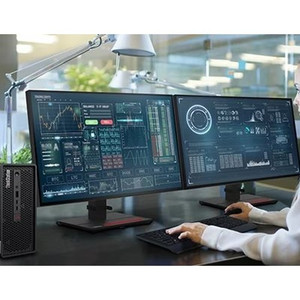
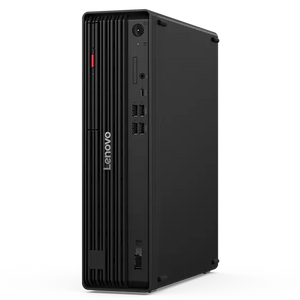
Lenovo 30HA00AKUS ThinkStation P3 Ultra Compact Workstation
Overview
The Lenovo ThinkStation P3 Ultra (30HA00AKUS) is a compact professional workstation built around Intel's 14-core Core i5-14600 processor — the kind of dense compute-in-a-small-footprint configuration that fits under a desk, on a shelf, or inside a rack-adjacent equipment cabinet without requiring a full tower footprint. At 9.00 lb, it ships ready for deployment with 32GB of DDR5-4800 RAM and a 1TB SSD. If you're running a commercial workstation alongside a VMS head-end, a command center display wall, or a data-intensive security operations workflow, this configuration covers the fundamentals without over-speccing the platform.
Key Features
- Intel Core i5-14600 (14-Core / 20-Thread): With 6 performance cores and 8 efficiency cores running up to 5.2 GHz boost, the i5-14600 handles parallel workloads — think simultaneous video decoding streams in a VMS client, background analytics processing, or multi-tab enterprise management consoles — without the premium cost of an i7 or i9. 20 threads means real multitasking headroom, not just burst performance.
- 32GB DDR5-4800 (Single Module, 3 Slots Open): Shipping with one 32GB SO-DIMM in a 4-slot chassis means three expansion slots remain open. You can double to 64GB by adding a single matched module, or build out to 192GB maximum — the full capacity ceiling for this platform — if your workload grows into heavy virtualization, multi-stream 4K decoding, or large-dataset analytics. DDR5 at 4800 MHz also delivers roughly double the peak bandwidth of DDR4, which matters when the CPU and GPU are competing for memory throughput on graphics-intensive VMS displays.
- 1TB NVMe SSD (No Optical Drive): A 1TB SSD gives the OS, VMS client, and active recording buffer fast sequential and random I/O — boot times and application launch speeds are categorically faster than spinning-disk predecessors. The omission of an optical drive is a deliberate trade-off for the compact Ultra chassis; if you need optical media in the workflow, plan for an external USB drive.
- ThinkStation P3 Ultra Form Factor (9.00 lb): The Ultra chassis sits between a mini PC and a traditional SFF tower in terms of expandability. At 9 lb it's light enough to redeploy or reposition without a facilities request, yet substantial enough to carry discrete GPU and storage expansion options. Confirm rack or wall-mount bracket compatibility with Lenovo's ThinkStation P3 Ultra accessory lineup before purchasing a mounting solution.
- 4× SO-DIMM Slots / 192GB Memory Ceiling: Most compact workstations cap memory expansion early. The 192GB maximum here is unusually high for the Ultra class — it means this chassis can grow with a deployment as VMS channel counts, concurrent analytics instances, or virtualized workloads increase, rather than requiring a full hardware replacement cycle.
- Intel Platform — Software Ecosystem Breadth: The i5-14600's Intel architecture ensures broad compatibility with enterprise security software, VMS platforms, and remote management tools that publish Intel-first driver and SDK support. If your site standardizes on a specific VMS or physical security information management (PSIM) platform, verify the vendor's compatibility matrix against the 14th-generation Intel Core lineup.
Integration & Compatibility
The 30HA00AKUS runs on a 14th-generation Intel Core platform, which is broadly supported by major NVR software and VMS platforms. Milestone XProtect, Genetec Security Center, Avigilon Control Center, and Hanwha Wisenet WAVE all publish compatibility guidance for Intel Core-class workstations — verify channel counts and GPU requirements for your specific deployment scale before finalizing the BOM. For deployments pairing this workstation with a IP camera network, factor in GPU selection carefully: the base configuration does not specify a discrete GPU, so high-channel 4K decoding may require adding a GPU via the platform's expansion capability. Consult Lenovo's Lenovo workstation configuration guides for supported GPU options in the P3 Ultra chassis. Power and connectivity planning should account for the workstation's peripheral requirements — pair with a managed PoE network switch upstream for camera infrastructure, keeping the workstation itself on a clean, UPS-backed power circuit given its role as the VMS head-end.
Frequently Asked Questions
Q: What is the maximum RAM this workstation supports?
A: The ThinkStation P3 Ultra 30HA00AKUS supports up to 192GB of DDR5-4800 RAM across its 4× SO-DIMM slots. It ships with a single 32GB module, leaving three slots open for expansion.
Q: Does the 30HA00AKUS include a discrete GPU?
A: The base 30HA00AKUS configuration as specified does not list a discrete GPU. If your VMS or analytics workload requires hardware-accelerated video decoding across many 4K streams, verify the supported GPU options for the ThinkStation P3 Ultra chassis with Lenovo before ordering.
Q: What processor does the 30HA00AKUS use?
A: It uses the Intel Core i5-14600 — a 14-core (6P + 8E), 20-thread processor with a 2.7 GHz base clock and 5.2 GHz maximum boost frequency.
Q: Is the storage upgradeable?
A: The unit ships with a single 1TB SSD. Whether additional storage bays are available depends on the P3 Ultra chassis configuration — consult Lenovo's ThinkStation P3 Ultra specification sheet for storage expansion options before committing to a configuration.
Q: What is the weight of the 30HA00AKUS?
A: The ThinkStation P3 Ultra 30HA00AKUS weighs 9.00 lb, making it practical to reposition or redeploy without facilities support.
Q: Is the 30HA00AKUS suitable for running VMS software as a workstation client?
A: Yes — the i5-14600's 14-core/20-thread architecture and 32GB DDR5-4800 RAM provide solid headroom for VMS client workloads. For high-channel 4K deployments, confirm whether your VMS vendor recommends a discrete GPU for hardware decoding at your target channel count.
When I look at the 30HA00AKUS, the spec that anchors my recommendation is the memory architecture: one 32GB DDR5-4800 SO-DIMM installed, three slots open, 192GB ceiling. In a VMS workstation deployment, that's not a minor footnote — it's the difference between a machine that tops out at your day-one channel count and one that scales alongside a camera expansion without a forklift hardware upgrade.
Technical Highlights:
- i5-14600 at 5.2 GHz Boost: 14 cores and 20 threads handle parallel VMS decoding, background analytics, and OS tasks concurrently without the thermal or cost overhead of an i7-class chip — right-sized for 30–60 channel deployments at 1080p or mixed-resolution environments.
- DDR5-4800 Bandwidth: DDR5 doubles the peak memory bandwidth over DDR4, which reduces bottlenecks when multiple software threads compete for data — relevant when running simultaneous live view, playback, and analytics on the same workstation.
- 1TB SSD Boot/App Drive: Fast random I/O keeps VMS application load times and event-search responsiveness snappy; no spinning-disk latency to fight during high-activity incidents when operators are jumping between cameras and timeline scrubbing.
Deployment Considerations:
- The base config ships without a discrete GPU — if your VMS vendor recommends GPU-accelerated decoding for channel counts above ~32 streams at 4K, budget for a compatible add-in card and confirm it fits the P3 Ultra's expansion envelope before ordering.
- Single-channel memory (one 32GB stick) means the CPU's memory controller runs in single-channel mode until a second SO-DIMM is added — for maximum DDR5 bandwidth, install a matched pair; the second 32GB module is a low-cost upgrade with a measurable throughput benefit on memory-bound workloads.
This configuration is a strong fit for a security operations center workstation or a VMS client station in a mid-size enterprise deployment — the kind of environment where 40–80 cameras feed a central monitoring position and the platform needs room to absorb future camera additions without replacement.