Kantech KT-MOD-CAB Expansion Module Cabinet
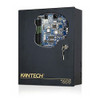
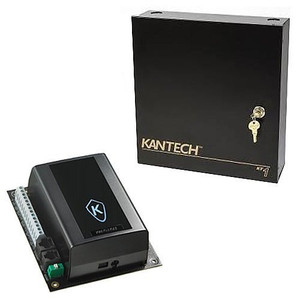
The Kantech KT-MOD-CAB is a dedicated expansion cabinet designed to scale access control infrastructure on Kantech KT-400 platforms. When your initial KT-400 deployment reaches capacity, this cabinet accepts additional expansion modules to support more doors, readers, and credential processors without replacing the core controller. The cabinet arrives factory-configured with all internal interconnect hardware pre-installed, eliminating manual assembly and reducing deployment risk.
Key Features
- KT-400 System Integration: Purpose-built to work exclusively with Kantech KT-400 platforms, ensuring electrical and mechanical compatibility without adapter plates or workarounds. Plug expansion modules into the cabinet, connect the SPI-36 cable to the controller, and the system recognizes them immediately.
- Factory Pre-Configuration: Arrives with all internal mounting rails, connector blocks, and interconnect routing already installed. You receive a ready-to-mount enclosure, not a kit requiring assembly — meaningful when you have 50+ doors to provision across multiple buildings and downtime is expensive.
- Included SPI-MOD-SPI-36 Interconnect Cable: The cabinet ships with the dedicated 36-pin SPI cable required to link expansion modules to the KT-400 controller. This cable uses Kantech's proprietary SPI (Secure Protocol Interface) connector — not generic RJ-45 — so incompatibility isn't a risk. Standard length supports typical rack and wall-mount distances.
- Integrated Security Lock: Black cabinet features a security lock with keys to prevent unauthorized access to installed modules and field wiring. Critical in multi-tenant facilities or high-security environments where access to the expansion hardware itself must be controlled separately from the controller.
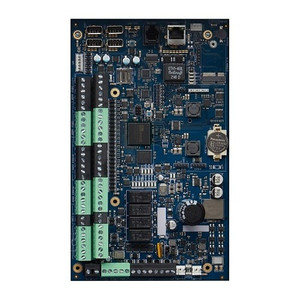
- Modular Capacity Expansion: Cabinet framework accepts multiple Kantech expansion modules (sold separately). Each module typically adds 4 additional door controllers or reader I/O blocks. If your initial KT-400 supports 32 doors and you need 64, add one cabinet with two modules; later add a second cabinet as you grow. No rip-and-replace of the base system.
- Multi-Zone Deployment Ready: Designed for distributed access control across campuses, warehouses, and complex facility layouts. Mount the cabinet near a secondary entrance, connect it via SPI cable to the main controller, and you've extended the system reach without adding latency or requiring a second independent controller license.
Integration & Compatibility
The KT-MOD-CAB is compatible exclusively with Kantech access control systems in the KT-400 family. It does not support older KT-300 hardware or third-party controllers. Expansion modules you install must be Kantech-certified KT-400 expansion modules; the cabinet will not physically accommodate non-standard modules. For deployments requiring integration with third-party readers, databases, or VMS platforms, consult the Kantech KT-400 controller documentation to confirm protocol support (typically Wiegand, RS-485, or Ethernet depending on the module).
What's in the Box
- 1x KT-MOD-CAB Black Cabinet Enclosure
- 1x KT-MOD-SPI-36 SPI Interconnect Cable
- 1x KT-LOCK Security Lock with Keys
Frequently Asked Questions
Q: Can I install the KT-MOD-CAB outdoors?
A: No. The cabinet is designed for indoor mounting in secure equipment rooms or secured closets. It has no weatherproofing (IP rating). For outdoor expansion deployments, consider a weatherproof enclosure and consult Kantech technical support for module compatibility in extended-temperature environments.
Q: How many expansion modules can fit in one KT-MOD-CAB cabinet?
A: The cabinet's physical capacity and the controller's maximum supported modules determine this limit. Consult the KT-400 controller documentation or a Kantech technical representative for your specific module type and count requirements.
Q: Do I need additional cables beyond the included SPI-36?
A: The KT-MOD-SPI-36 interconnect cable is included and connects the cabinet to the KT-400 controller. You will need to provision power to any installed modules (typically 12VDC from a dedicated module power supply, sold separately) and any reader wiring for the modules you install.
Q: Is a separate KT-400 controller required?
A: Yes. The KT-MOD-CAB expands an existing KT-400 system — it is not a standalone device. You must have a functioning KT-400 controller already deployed before adding this cabinet.
Q: What's the physical form factor and mounting options?
A: The KT-MOD-CAB is a black cabinet enclosure designed for wall or rack mounting in equipment areas. Exact mounting dimensions and footprint are detailed in the product datasheet; verify available space in your equipment room before ordering.
Q: Can I use multiple KT-MOD-CAB cabinets on a single KT-400 controller?
A: Possibly, depending on the controller's expansion capacity and your specific module configuration. Consult Kantech documentation or a systems integrator to confirm the maximum number of cabinets and total modules your KT-400 can support.
Ted PerryPerspective based on aggregated IPSD and affiliated engineering team experience.
The KT-MOD-CAB (often searched as KT MOD CAB) is a straightforward capacity lever for mid-stage KT-400 deployments. Factory pre-configuration saves real labor — no field assembly means you spend engineering time on commissioning and integration, not troubleshooting interconnect routing. The cabinet arrives with the SPI-36 cable included, so you're not hunting for a $40 connector that wasn't in the vendor invoice.
Technical Highlights:
- Pre-Configured Internal Wiring: All mounting rails and interconnect blocks arrive installed. This eliminates the risk of reversed polarity, loose connectors, or misaligned pin headers — common sources of intermittent reader failures in hastily assembled expansion hardware.
- Proprietary SPI Protocol: The KT-MOD-SPI-36 cable uses Kantech's dedicated SPI connector (not RJ-45), guaranteeing electrical compatibility. You cannot accidentally plug a standard network cable into the wrong port and cause a short. This matters in multi-technician shops where standardization saves callbacks.
- Security Lock & Key Access Control: The integrated lock prevents tampering with module wiring or credential processing hardware. In facilities with segregated access (e.g., building operations team versus security team), this decouples physical module security from controller access.
Deployment Considerations:
- SPI Cable Length: Standard included cable is suitable for typical rack-mounted or wall-mounted distances in equipment rooms. If your KT-400 controller and expansion cabinet are more than 50+ feet apart, verify cable length before ordering — longer SPI runs may require consultation with Kantech technical support for signal integrity.
- Power Supply for Modules: The cabinet itself does not supply power to expansion modules. You must provision a separate 12VDC power supply rated for the total current draw of all installed modules. Budget for this in your BOM — a typical 4-module expansion draws 5–10A depending on reader load.
- No Backward Compatibility: The KT-MOD-CAB is KT-400 only. Do not attempt to integrate older KT-300 hardware or third-party expansion enclosures. The SPI protocol and mounting standards differ.
Position the KT-MOD-CAB for multi-building campuses where you want a single centralized KT-400 controller but need to distribute door and reader hardware across geographically separated entrances. Avoid this if your deployment requires true distributed control (independent fail-over at remote sites) — that calls for a second KT-400 controller, not an expansion cabinet.