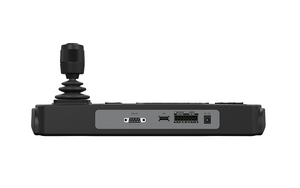
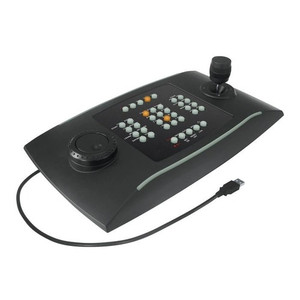
Bosch KBD-DIGITAL IntuiKey Security Keyboard with Joystick and Backlit Display
Overview
The Bosch KBD-DIGITAL is a dedicated operator control keyboard designed for security command environments where precise PTZ camera control, multi-display management, and fast operator response matter. Built around an ergonomic joystick for pan/tilt movement and a rotatable zoom knob, the KBD-DIGITAL gives security operators direct, tactile control over PTZ cameras without navigating nested software menus. Backlit keys and easy-to-read displays reduce operator fatigue during extended monitoring shifts. For integrators building out Bosch-centric control rooms, this is the hardware interface that ties VIDEOJET decoders and multi-screen display walls into a coherent operator workflow.
The KBD-DIGITAL (often searched as KBD DIGITAL) is compatible with Configuration Manager version 7.74 or later, making firmware and device management straightforward in an existing Bosch ecosystem. Browse the full Bosch surveillance line for compatible cameras, encoders, and decoders that pair with this keyboard.
Key Features
- Joystick Pan/Tilt Control: The analog joystick maps directly to PTZ camera movement — operators get proportional speed response, so pushing further deflects the camera faster. This is the difference between smooth tracking of a subject and jerky menu-driven repositioning during a live incident.
- Rotatable Zoom Knob: Dedicated zoom control keeps the operator's hands on the keyboard during active tracking. Separating zoom from the joystick axis means you can hold a pan position steady while pulling in on a subject — a workflow advantage in busy environments like transportation hubs or large retail floors.
- Focus and Iris Adjustment: Direct hardware controls for focus and iris adjustment mean operators can fine-tune image quality in real time — useful when a camera transitions from a bright exterior to a shadowed entrance and auto-iris needs a manual override.
- Backlit Keys and Clear Displays: Backlit key labeling keeps the console legible in dimly lit security operations centers (SOCs) or video walls rooms where ambient light is intentionally reduced. Easy-to-read displays reduce the chance of operator error when switching between camera presets or decoder channels.
- Support for 1 to 4 VIDEOJET Decoders: A single KBD-DIGITAL can drive up to four VIDEOJET decoders — enough to manage a substantial display wall from one operator position without adding hardware. This reduces console footprint and simplifies cabling at the operator desk.
- 1 to 8 (Up to 16) Display Support: The system can push video to between 1 and 8 displays standard, expandable to 16 — suitable for control room video walls in mid-size to large facilities. Operators can assign and switch camera feeds across the display matrix from the keyboard without touching a mouse or separate software interface.
- Keyboard Scalability — Up to 4 Units: Up to four KBD-Digital or KBD-UxF keyboards can operate concurrently in the same system. In a multi-operator control room, this means each position gets dedicated control without contention, and operators can hand off camera control between positions cleanly.
- Configuration Manager 7.74+ Compatibility: Requires Bosch Configuration Manager version 7.74 or later, which is important to confirm before deploying into an existing Bosch installation. Upgrading Configuration Manager is typically straightforward, but it is a prerequisite step that needs to be scheduled before commissioning the keyboard.
Integration and Compatibility
The KBD-DIGITAL is built for Bosch-ecosystem deployments. It integrates directly with VIDEOJET decoders (1 to 4 per system) and supports concurrent operation of up to 4 KBD-UxF or KBD-Digital keyboards in the same installation. Display configurations scale from a single monitor up to 16 screens, making it a practical choice for everything from a small security office with a video wall to a full security operations center. Configuration Manager 7.74 or later is required — verify your current version before planning installation. For guidance on building out a complete network video recorder and decoder infrastructure around this keyboard, review your system architecture against Bosch's decoder and display matrix specifications.
If you are planning a multi-operator control room, consult a PTZ camera and control buying guide to match keyboard count and decoder assignments to your operator workflow before finalizing hardware quantities. Consider pairing with a PoE switch sized for the camera count your operators will be managing.
Frequently Asked Questions
Q: What version of Bosch Configuration Manager is required for the KBD-DIGITAL?
A: The KBD-DIGITAL requires Configuration Manager version 7.74 or later. Confirm your current Configuration Manager version before deploying this keyboard, as it is a hard prerequisite.
Q: How many VIDEOJET decoders can a single KBD-DIGITAL control?
A: One KBD-DIGITAL supports 1 to 4 VIDEOJET decoders. This allows a single operator position to drive a multi-decoder display wall without additional control hardware.
Q: Can multiple KBD-DIGITAL keyboards operate in the same system?
A: Yes. The system supports 1 to 4 KBD-UxF or KBD-Digital keyboards operating concurrently, enabling multi-operator control room deployments where each position has dedicated keyboard control.
Q: How many displays does the KBD-DIGITAL support?
A: The KBD-DIGITAL supports 1 to 8 displays, expandable to 16. This range covers single-monitor security desks up to larger video walls in mid-size control rooms.
Q: Does the KBD-DIGITAL support focus and iris control, or just pan/tilt/zoom?
A: Yes. In addition to the joystick for pan/tilt and the rotatable knob for zoom, the KBD-DIGITAL includes dedicated controls for both focus and iris adjustment, giving operators full camera image control from the keyboard.
Q: Is the KBD-DIGITAL compatible with non-Bosch cameras or VMS platforms?
A: Based on available evidence, the KBD-DIGITAL is designed for integration within the Bosch ecosystem, specifically with VIDEOJET decoders and Bosch Configuration Manager. Compatibility with third-party VMS platforms or non-Bosch cameras is not confirmed in the available specifications — verify with Bosch technical documentation before committing to a mixed-vendor deployment.
The KBD-DIGITAL earns its place in Bosch-native control rooms specifically because of its hardware-level separation of PTZ axes — joystick for pan/tilt, dedicated rotatable knob for zoom, and independent controls for focus and iris. That separation matters operationally: during a live tracking event, an operator can hold a steady pan while independently pulling zoom without fighting axis coupling that software joystick emulation often introduces.
Technical Highlights:
- 4-Decoder Capacity: A single keyboard position controlling up to 4 VIDEOJET decoders means one operator can manage a meaningful display matrix — 8 to 16 screens — without a second console. For mid-size SOCs, that consolidates hardware cost and reduces the training footprint.
- Multi-Keyboard Scalability (up to 4): The 1-to-4 keyboard support lets you build a multi-position control room where operators share the same decoder and display infrastructure without contention. Each keyboard position gets discrete control assignment, which is important for shift handoffs in 24/7 monitoring environments.
- Configuration Manager 7.74 Requirement: This is the spec that bites integrators who skip the pre-installation audit. If the existing Bosch system is running an older Configuration Manager version, the keyboard simply will not commission correctly. Build the CM upgrade into your project timeline, not as an afterthought on go-live day.
Deployment Considerations:
- Verify Configuration Manager version 7.74 or later is installed and licensed before delivering the keyboard to site — this is a hard dependency that cannot be worked around in the field.
- The KBD-DIGITAL is designed for the Bosch VIDEOJET decoder ecosystem. If the project scope includes non-Bosch decoders or a third-party VMS, this keyboard's native integration does not extend there — confirm compatibility with Bosch technical specifications before spec'ing it into a mixed-vendor design.
This keyboard is the right fit for a dedicated Bosch command center — a campus security operations center, a transportation hub control room, or a large retail loss prevention suite — where operators need sustained, ergonomic PTZ control across a multi-screen display wall and the system is already committed to the Bosch VIDEOJET decoder infrastructure.