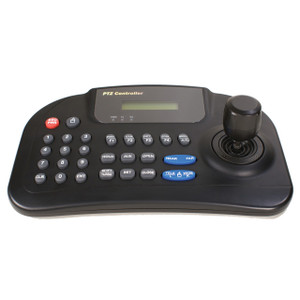
Bosch KBD-UXF USB Control Keyboard with Joystick and Jog Shuttle
Overview
The Bosch KBD-UXF is a dedicated USB control keyboard engineered for operators managing PTZ cameras and video streams inside Bosch Video Management System (BVMS), Building Integration System (BIS) with Video Engine, or DIVAR IP environments. Where a standard mouse falls short — especially during high-pressure monitoring shifts — the KBD-UXF puts camera control, playback navigation, and system commands under purpose-built hardware with tactile feedback and a full joystick axis. If your operators are spending time hunting through software menus to position a PTZ or jog through recorded footage, this keyboard eliminates that friction at the workstation level.
At 379 x 224 x 89 mm and 1.4 kg (3 lb), the KBD-UXF sits solidly on a desk without dominating the workspace. The approximately 1 m (39 in) USB cable reaches most operator console configurations without an extension.
Key Features
- 4-Axis HID Joystick Emulation: The joystick reports as a standard HID 4-axis device, meaning no proprietary driver stack is required on the host PC — the OS enumerates it natively and BVMS maps the axes to PTZ pan, tilt, and zoom. Operators get fluid, proportional camera control without custom driver maintenance across Windows updates.
- 38 Backlit Rubber Keys: Rubber key construction resists wear and spill contamination in 24/7 control room use. Backlighting keeps key labels readable in dimmed monitoring environments where screen glare is managed — a practical detail operators notice on long shifts.
- Jog Shuttle Dial: The jog shuttle accelerates forensic playback workflows — scrubbing through recorded video to find a specific event takes seconds rather than repeated mouse drags on a timeline. For post-incident review, this is the primary productivity driver on the unit.
- USB 2.0, 350 mA Max Power Draw: Draws under 350 mA from a standard USB 2.0 port — no powered hub required. Any modern workstation or thin client with a spare USB-A port can drive it without a separate power supply or additional procurement.
- 0 °C to +45 °C Operating Range: Rated for the full range of conditioned control room environments including industrial monitoring stations that run warmer than typical offices. Not rated for outdoor or unconditioned spaces — keep it inside.
- CE, UL, FCC Part 15 Class B, EN55022 Class B Certifications: Class B EMC ratings mean the keyboard meets residential and commercial radiated emissions limits — relevant when the operator console shares a rack room with sensitive network or recording equipment. UL listing satisfies facility compliance requirements at many enterprise and government sites.
Integration and Compatibility
The KBD-UXF (often searched as KBD UXF) is designed specifically for Bosch video management platforms — BVMS, BIS with Video Engine, and DIVAR IP. It is not a universal VMS keyboard; do not specify it for Milestone, Genetec, or other third-party platforms unless you have confirmed Bosch plugin support in that environment. For operators managing PTZ cameras across a multi-monitor NVR or VMS workstation, pairing this keyboard with a Bosch VMS license is the intended deployment pattern. Refer to a camera and control selection guide when sizing operator stations for large deployments.
Frequently Asked Questions
Q: Does the KBD-UXF work with Milestone XProtect or Genetec Security Center?
A: The KBD-UXF is designed for Bosch BVMS, BIS with Video Engine, and DIVAR IP systems. Compatibility with third-party VMS platforms like Milestone or Genetec is not confirmed in the available evidence — verify with Bosch before specifying for non-Bosch VMS environments.
Q: Does the KBD-UXF require a special driver to function?
A: The joystick emulates a standard HID 4-axis device over USB 2.0, which means the operating system recognizes it natively without a proprietary driver. However, full PTZ axis mapping and key function assignment require the Bosch VMS software layer.
Q: What is the cable length on the KBD-UXF?
A: The USB cable is approximately 1 m (39 in). This is sufficient for most desktop operator console setups. If your workstation is rack-mounted at a distance, plan for a USB extension or active extender.
Q: Is the KBD-UXF rated for outdoor or industrial environments?
A: The operating temperature range is 0 °C to +45 °C (+32 °F to +113 °F), suitable for conditioned indoor spaces. It is not rated for outdoor use or unconditioned industrial environments.
Q: What certifications does the KBD-UXF carry?
A: Certifications include CE, UL, FCC Part 15 Class B, EN55022 Class B, EN50130-4, EN61000-6-3, and EN60950-1. The Class B EMC ratings cover both commercial and residential installations.
Q: How much power does the KBD-UXF draw from the host PC?
A: Maximum draw is 350 mA over USB 2.0 — well within the 500 mA budget of a standard USB-A port. No powered hub or external power supply is needed.
The KBD-UXF is the piece of the Bosch operator station that most integrators quote last and operators notice first. The 4-axis HID joystick emulation is the spec that matters most in day-to-day use — because it means your BVMS workstation treats it as a generic input device, and PTZ control is smooth and proportional without any driver babysitting after Windows patch cycles.
Technical Highlights:
- HID 4-Axis Joystick: Enumerates as a standard input device over USB 2.0 — no proprietary drivers, no compatibility breakage after OS updates. PTZ pan, tilt, and zoom map directly inside BVMS without additional configuration layers.
- Jog Shuttle Dial: Transforms post-incident playback from a mouse-drag exercise into a deliberate, tactile scrub — forensic review on a 24-hour recording goes from minutes to seconds when an operator has physical control of playback speed and direction.
- 38 Backlit Rubber Keys, 350 mA Draw: Rubber construction handles the wear of 24/7 shift use; backlighting keeps the layout readable in dimmed control rooms. The 350 mA draw means it runs off any USB-A port with headroom to spare — no powered hub required.
Deployment Considerations:
- The ~1 m cable is right for a desktop operator station but short for a rack-mounted workstation behind a console — spec a USB active extender if the PC is more than a meter away from the operator position.
- This keyboard is scoped to Bosch BVMS, BIS with Video Engine, and DIVAR IP. Do not assume it will function as a full-featured keyboard in any non-Bosch VMS — the key mappings and joystick axis assignments are platform-specific.
The KBD-UXF is the right call for a staffed Bosch BVMS control room where operators are actively managing PTZ cameras and reviewing recorded footage under time pressure — a hospital security operations center or a transit authority dispatch console where every second of PTZ response time is accountable.