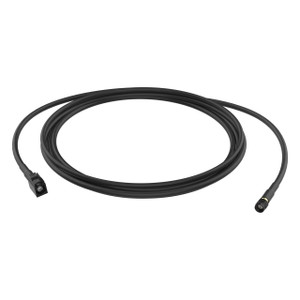
i-PRO WV-QCA501A I/O Multi Cable
The i-PRO WV-QCA501A is a purpose-built I/O multi cable engineered to integrate directly with i-PRO IP cameras in multi-camera surveillance deployments. This connectivity solution handles signal routing and power distribution without introducing additional points of failure — a critical concern when camera downtime costs money or safety.
Overview
Cable assemblies matter more than installers typically admit. A poorly specified cable can introduce noise into audio circuits, voltage drop under load, or incompatibility headaches weeks into a project. The WV-QCA501A (often searched as WV QCA501A) is designed to eliminate that friction for i-PRO dome installations by consolidating power, audio, and control signals into a single run.
The cable supports 12VDC power delivery, meaning your cameras can run on a centralized power supply or PoE midspan without stepping outside i-PRO's tested configuration. Audio signals pass cleanly through dedicated conductors — important if you're deploying two-way audio or integrating with building intercoms. HTTPS encryption capability ensures that any configuration or firmware updates over the cable connection stay protected against interception during installation or maintenance.
Key Features
- 12VDC power support: Delivers regulated DC power directly to i-PRO cameras, reducing dependency on individual power supplies and simplifying wiring runs in cabinet-mounted or distributed installations.
- Audio signal path: Dedicated audio conductors prevent crosstalk and maintain clean two-way communication — essential when deploying audio verification or intercom integration alongside video.
- HTTPS encryption capability: Supports encrypted communication during configuration and firmware management, protecting against credential interception during camera setup or remote provisioning.
- Dome form factor compatibility: Designed specifically for i-PRO dome camera housings, ensuring mechanical fit and electrical pinout alignment without adapter confusion.
- Standardized i-PRO connectivity: Uses i-PRO connector standards, so you're not hunting for obscure adapters or worrying about pin mismatches across different camera models in the same family.
- Streamlined installation: Consolidates multiple signal paths into one cable run, reducing labor time on ceiling or wall mounts where every extra wire adds installation complexity.
Integration & Compatibility
The WV-QCA501A is purpose-built for i-PRO network camera systems and dome-form installations. Before ordering, confirm that your specific i-PRO camera model supports this cable's connector type — the i-PRO product family spans multiple connector generations. If you're retrofitting cameras from an earlier generation or mixing models, cross-check the connector pinout in your camera's installation guide.
For deployments mixing cameras with different power requirements or using external PoE switches, verify your switch's power budget and cable run lengths. Long cable runs at 12VDC can introduce voltage drop — typically acceptable for surveillance cameras, but measurable in runs exceeding 100 feet without intermediate power injection.
Audio integration requires that both your camera and your NVR or NVR support audio input/output. Not all i-PRO models include built-in microphones, so confirm your camera's audio capabilities before designing your intercom or verification workflow around this cable.
Frequently Asked Questions
Q: Does the WV-QCA501A work with all i-PRO dome cameras?
A: The WV-QCA501A is designed for i-PRO dome cameras, but connector types and pinouts vary across product generations. Always verify compatibility with your camera's datasheet or contact the manufacturer before ordering.
Q: Can I use this cable with a PoE power source instead of a 12VDC supply?
A: The WV-QCA501A is specified for 12VDC input. If you're deploying PoE cameras, check whether your camera model supports PoE natively or requires a separate power injector. Do not attempt to feed PoE directly into a 12VDC-specified cable.
Q: What audio quality should I expect over this cable?
A: Audio quality depends on your camera's built-in microphone/speaker hardware and your NVR's audio codec support. The WV-QCA501A provides the signal path; the endpoint devices determine actual audio fidelity. Expect suitable performance for alarm verification or basic intercom use, not high-fidelity recording.
Q: How long a cable run can I use without voltage drop affecting camera performance?
A: On 12VDC, runs under 100 feet typically remain within safe operating margins for surveillance cameras. Longer runs require intermediate power injection or a larger gauge conductor. Calculate expected drop based on your specific cable gauge and current draw — your camera's datasheet specifies minimum operating voltage.
Q: Does this cable include connectors for integration into a larger network?
A: The WV-QCA501A is a camera-specific I/O cable for direct integration with i-PRO dome models. It does not replace or substitute for network cabling (Ethernet). Deploy this alongside standard Cat5e/Cat6 network runs for data connectivity.
Q: Can the WV-QCA501A be used in outdoor or harsh environments?
A: The WV-QCA501A itself is a cable assembly without its own environmental rating. Outdoor deployment depends on your camera's IP rating and the environment where the cable terminations sit. If the camera is IP66-rated, the cable connections must also remain protected from standing water — use weatherproof connectors or conduit as needed.
Ted PerryPerspective based on aggregated IP Security Depot and affiliated engineering team experience.
The WV-QCA501A is a straightforward I/O multi cable — no surprises, no hidden gotchas, but also no magic. It consolidates power, audio, and control signaling into one bundle, which cuts installation labor on dome mounts where every extra wire adds complexity. The 12VDC power support is the real value here: if you're building a distributed surveillance network with centralized power supplies in a wiring closet or cabinet, this cable eliminates the need for separate power runs to each camera. That matters at scale.
Technical Highlights:
- 12VDC power delivery: Supports centralized power distribution without requiring individual AC adapters at each camera. On runs under 100 feet, voltage drop remains negligible for surveillance camera operation, reducing wiring complexity in multi-camera ceiling mounts.
- Audio signal integration: Dedicated audio conductors prevent crosstalk with power and control lines. Two-way audio verification and intercom workflows depend on clean signal routing — this cable's design isolates audio from electromagnetic noise that would otherwise degrade intelligibility.
- HTTPS encryption support: Protects firmware updates and camera configuration traffic during initial provisioning. In shared facilities or open jobsites, this prevents credential sniffing during setup — a compliance requirement in some regulated environments.
Deployment Considerations:
- Connector pinouts vary across i-PRO product generations. Cross-check your specific camera model's installation guide before order confirmation — a mismatch won't be obvious until installation day.
- On cable runs exceeding 100 feet at 12VDC, measure expected voltage drop using your conductor gauge and current draw. Some surveillance cameras tolerate a 1–2 volt drop gracefully; others hit a minimum operating threshold and shut down. Datasheet specs matter here.
- Audio quality is end-to-end: this cable provides the path, but your camera's microphone hardware and your NVR's codec support determine actual fidelity. Don't expect broadcast-grade audio on a surveillance platform.
Best fit: multi-camera dome deployments in controlled environments (lobbies, retail, warehouses) where centralized power and audio intercom integration reduce overall wiring labor. Skip this if you're running PoE-native cameras — you'll waste the 12VDC capability. If your i-PRO cameras use different connector standards, spec the exact connector type on your PO.