


Product images are provided for reference and may not represent the exact model, configuration, or included
components.
Overview
SKU:
WV-QAT502-W
UPC:
885170382008
Condition:
New
Availability:
Usually Ships Same Business Day

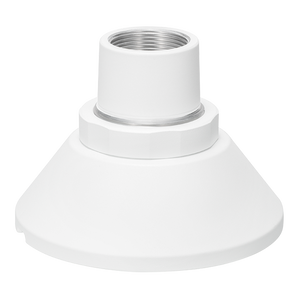
i-PRO WV-QAT502-W Gangbox Adapter White
i-PRO WV-QAT502-W Gangbox Adapter White The WV-QAT502-W is a purpose-built gangbox adapter for integrating i-PRO IP cameras directly into standard el…

i-PRO WV-QAT502-W Gangbox Adapter White
$68.99
Your recommended setup
Review items below — quantities update pricing automatically.
Item
Qty
Status
Price
Optional Add-Ons recommended
Services optional
Bundle Summary
Bundle Subtotal:
$0.00
Optional Add-Ons:
$0.00
Services:
$0.00
Total:
$0.00
Overview
SKU:
WV-QAT502-W
UPC:
885170382008
Condition:
New
Availability:
Usually Ships Same Business Day
Description
i-PRO WV-QAT502-W Gangbox Adapter White
The WV-QAT502-W is a purpose-built gangbox adapter for integrating i-PRO IP cameras directly into standard electrical junction boxes. This white-finish accessory bridges the gap between camera installation and existing building infrastructure, eliminating the need for surface-mount enclosures or external conduit. The adapter accepts PoE power, meaning a single Ethernet run delivers both power and data to your camera — no separate 12VDC supply or bulky transformer needed on-site.
Key Features
- Gangbox form factor: Fits into standard 2-gang or 4-gang electrical outlet boxes, providing a recessed, flush-mount installation that blends with existing wall and ceiling infrastructure. No surface-mounted plastic enclosure that screams "security camera."
- White finish: Matches indoor ceiling and wall environments; maintains aesthetic continuity with standard electrical trim.
- PoE power support: Accepts IEEE 802.3af or 802.3at PoE, eliminating the need for a separate power circuit or transformer. Reduces installation time and keeps wiring runs clean.
- HTTPS encryption capable: Supports encrypted communication between the camera and network, a critical requirement for enterprise surveillance where unencrypted video transit is a compliance liability.
- i-PRO camera system compatibility: Purpose-designed for i-PRO surveillance cameras, ensuring electrical and mechanical fit without adapters, splitters, or workarounds.
- Organized cable routing: Dedicated strain relief and cable management features prevent pinched Ethernet, reduce signal integrity issues, and speed troubleshooting if a connection fails in the field.
Integration & Compatibility
The WV-QAT502-W (often searched as WV QAT502 W) is designed for retrofit or new-build deployments using i-PRO cameras in environments where the electrical infrastructure already includes junction boxes or gangboxes. It integrates with standard PoE-capable network switches, allowing you to power and manage the camera from a single Ethernet drop. Cable runs can be routed directly into the existing conduit system, reducing visible infrastructure and simplifying future relocations.
For larger installations across multiple buildings or floors, coordinate gangbox placement with your IT and facilities teams to ensure adequate PoE switch capacity and network access points. A single 802.3af PoE port can support low-power cameras; higher-spec models may require 802.3at (PoE+) or dedicated power planning.
Installation Considerations
Verify that your junction boxes meet local electrical code for use as camera enclosures — building inspectors sometimes flag exposed security hardware as non-compliant. The gangbox form factor eliminates most of these concerns because the adapter sits flush inside the standard electrical box, keeping visible hardware minimal.
Ensure your PoE switch or injector is within reasonable cable distance to the installation point. Cat5e or Cat6a runs over 100m will degrade power delivery; budget for a midspan injector or PoE+ capable switch if the run exceeds ~50m with a low-power camera.
The white finish is suited for indoor environments. For outdoor gangbox installations or high-moisture areas, verify that the junction box itself is rated for the environment (IP66, stainless steel, etc.) — the adapter does not add outdoor protection beyond the box it mounts into.
When to Choose a Different Approach
If your installation does not use standard electrical gangboxes — for example, you are mounting on a NEMA enclosure, pole, or custom bracket — consider alternative mounting hardware designed for non-gangbox applications. If you require outdoor-rated infrastructure, verify that both the gangbox and surrounding enclosure meet IP67 or higher standards, as the WV-QAT502-W itself is an indoor accessory.
Frequently Asked Questions
Q: Can the WV-QAT502-W be used outdoors?
A: The adapter is rated for indoor use. If you need gangbox integration in outdoor or high-moisture environments, the junction box itself must be NEMA 4X or IP67-rated stainless steel, and the surrounding installation must be weatherproofed. The adapter provides no additional environmental protection.
Q: Does the WV-QAT502-W work with non-i-PRO cameras?
A: The WV-QAT502-W is designed for i-PRO cameras. While it accepts standard RJ-45 Ethernet connections, fit and compatibility with other brands are not guaranteed. Check with the camera manufacturer if you need cross-brand compatibility.
Q: What PoE standard does the WV-QAT502-W support?
A: The adapter supports both 802.3af (13W) and 802.3at (30W) PoE. Verify your camera's power draw to ensure your PoE switch or injector has adequate budget — low-power i-PRO cameras typically draw 8–15W, leaving margin on a single 802.3af port.
Q: Is HTTPS encryption enabled by default?
A: HTTPS encryption capability is built into the adapter. Configuration and certificate management depend on your camera model and network setup. Consult your camera's admin guide and your IT security team on implementation.
Q: How do I route cables through existing conduit?
A: The gangbox form factor allows you to pull a single Cat5e or Cat6 Ethernet run through existing electrical conduit. No separate power run is required. Cable management features on the adapter keep the Ethernet connector strain-relieved and organized inside the box.
Q: Does the WV-QAT502-W include mounting hardware?
A: The adapter mounts directly into a standard 2-gang or 4-gang electrical box using the box's existing screw holes or mounting tabs. No additional brackets or fasteners are required beyond what the electrical box provides.
Specifications
Mount Type:
Gangbox
Form Factor:
Adapter
Product Type:
Accessory
Power Type:
PoE
HTTPS Encryption:
Yes
Housing Color:
White
Have Questions?
Ask an Expert.
Videos Hide Videos Show Videos
Your recommended setup
Review items below — quantities update pricing automatically.
Item
Qty
Status
Price
Optional Add-Ons recommended
Services optional
Bundle Summary
Bundle Subtotal:
$0.00
Optional Add-Ons:
$0.00
Services:
$0.00
Total:
$0.00
RELATED PRODUCTS


System Design, Deployment & Technical Support
Support services and planning resources for commercial surveillance, access control, and infrastructure deployments.
Fixed scope • Fixed price
System Design Assistance
- Get help validating product compatibility
- Coverage requirements
- Storage planning and deployment architecture before you buy.
Deployment & Configuration Support
- Access fixed-scope support for rollout planning
- User setup guidance
- Migration and system standardization across single-site or multi-site deployments
Guides, Tools & Calculators
- PoE requirements
- Storage retention
- Camera selection and deployment methodology