Product images are provided for reference and may not represent the exact model, configuration, or included components.

Overview

SKU: P71917-B21
Condition: New
Write a Review 0% OFF

HPE DL20 GEN11 2LFF ODD Enable KIT - P71917-B21

HPE P71917-B21 Concise Descriptor Overview The HPE DL20 Gen11 2LFF ODD Enable Kit, model P71917-B21, provides the necessary components to install an o…

$35.00 $34.99 SAVE $0
Ships same business day
In stock

Quantity:

Adding to cart… The item has been added
Compatibility guidance available for your deployment
Senior specialists for pre and post-sales support
Authorized sourcing and documentation support
Shipping and lead-time confirmation before install

Laura Bennett, IPSD Senior Specialist

Talk to Laura

200+ hrs training • U.S - based

Senior Specialist • 877-277-7147

HPE DL20 GEN11 2LFF ODD Enable KIT - P71917-B21

$35.00
$34.99

Overview

SKU: P71917-B21
Condition: New

No Bots, Just Experts

Questions about this product? Free pre-sales support from a senior specialist — product questions, compatibility checks, BOM quotes, price confirmation — typically answered within one business day. Need camera placement or system design work? Engineering time is $175 per hour (qty 1 = 1 hour). Hardware buyers get up to one hour ($175) credited back on their order.

Description

HPE P71917-B21 Concise Descriptor

Overview

The HPE DL20 Gen11 2LFF ODD Enable Kit, model P71917-B21, provides the necessary components to install an optical disk drive (ODD) into specific HPE ProLiant DL20 Gen11 server configurations. This kit addresses scenarios where optical media access is required for software installation, data import/export, or system recovery, without compromising the server's primary storage density.

Compatibility

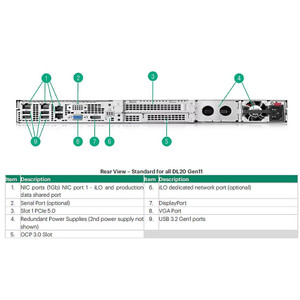
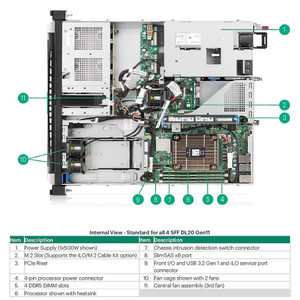
This enablement kit is designed for the HPE ProLiant DL20 Gen11 server platform, specifically for 2LFF (2 Large Form Factor) chassis configurations that support an optional optical drive. It ensures proper physical fit and integration with the server's internal structure.

Installation Notes

Installation requires disconnecting all power sources from the server. Following component removal, the processor air baffle and OCP air baffle must be installed to maintain proper airflow. The kit includes hardware for mounting the optical drive and connecting it to the server's motherboard or controller, facilitating a secure and functional installation. Friction rack rail installation is noted as a general server setup consideration.

What's in the Box

  • 1x HPE DL20 Gen11 2LFF ODD Enable Kit
Specifications
Installing The Server Into The Rack: Friction rack rail
Remove All Power: Disconnect each power cord from the power source. Disconnect each power cord from the server.
If Removed: Install the processor air baffle. Install the OCP air baffle.
Q&A
Reviews
Have Questions?

RELATED PRODUCTS

System Design, Deployment & Technical Support

Support services and planning resources for commercial surveillance, access control, and infrastructure deployments.

Fixed scope • Fixed price

System Design Assistance

  • Get help validating product compatibility
  • Coverage requirements
  • Storage planning and deployment architecture before you buy.
Request Design Help

Deployment & Configuration Support

  • Access fixed-scope support for rollout planning
  • User setup guidance
  • Migration and system standardization across single-site or multi-site deployments
View Support Services

Guides, Tools & Calculators

  • PoE requirements
  • Storage retention
  • Camera selection and deployment methodology
Open Technical Resources