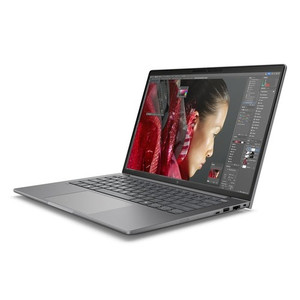
HP Inc BX7T6UT#ABA 14-Inch Mobile Workstation PC
Overview
The HP ZBook 8 G1i (BX7T6UT#ABA) is a 14-inch mobile workstation built for professionals who need desktop-class compute in the field — security integrators running VMS clients on-site, IT architects stress-testing network configs away from the office, or engineers reviewing CAD and surveillance footage simultaneously. The 2560x1600 WQXGA panel at 120Hz gives you noticeably sharper detail than a standard 1080p laptop without the bulk of a 16-inch chassis, and the 16:10 aspect ratio adds vertical real estate that matters when you're working with long log files or multi-row dashboards. At 6.30 lb, it sits at the heavier end of 14-inch notebooks — this is a workstation, not an ultrabook.
Key Features
- Intel Core Ultra 7 265H (15th Gen): 16 cores running from 1.70 GHz base to 5.30 GHz boost handle demanding parallel workloads — think simultaneous VMS decoding, report generation, and video export without the thermal throttle that slows down thinner machines under sustained load.
- 14-inch WQXGA 2560x1600 Display at 120Hz: The 16:10 ratio and 500-nit brightness make this panel usable in mixed lighting environments. The 120Hz refresh eliminates motion blur when scrubbing through recorded footage, and UWVA (Ultra Wide Viewing Angle) panel technology keeps color accurate when a colleague is reviewing the screen alongside you.
- 64GB RAM: 64GB gives you headroom to run a full VMS client, browser-based management consoles, and local analysis tools in parallel without hitting memory pressure — the ceiling where workstations start swapping to disk and performance degrades noticeably.
- 1TB Solid State Storage: 1TB of local storage is enough for a working dataset of recorded clips, firmware images, configuration backups, and software installers without needing an external drive on every job.
- Discrete Graphics (DSC): The discrete GPU offloads video decode and rendering from the CPU — relevant when running multi-stream surveillance review or any GPU-accelerated analytics tooling locally.
- Integrated Webcam: Built-in webcam supports remote sessions and video calls without external peripherals, reducing the carry kit for field deployments.
- Anti-Glare Display Coating: The AG panel reduces reflections in window-heavy offices and on-site environments where ambient light is uncontrolled — a practical difference versus glossy consumer displays when working under mixed or harsh lighting.
Integration and Compatibility
The BX7T6UT#ABA is sourced as a SmartBuy configuration through HP's commercial channel — a standardized SKU designed for business procurement with consistent hardware specifications across units. The UNSPSC code 43211503 classifies it as a commercial portable computer, making it compatible with most enterprise procurement and asset management workflows. As a Windows-based x86 workstation, it integrates natively with domain environments, MDM platforms, and any VMS or access control management software with a Windows client.
Frequently Asked Questions
Q: What display resolution does the BX7T6UT#ABA ship with?
A: The ZBook 8 G1i ships with a 14-inch WQXGA panel at 2560x1600 resolution (16:10 aspect ratio), 500 nits brightness, anti-glare coating, and 120Hz refresh rate.
Q: How much RAM and storage does the BX7T6UT#ABA include?
A: This configuration includes 64GB of RAM and a 1TB solid state drive.
Q: What processor is in the BX7T6UT#ABA?
A: It ships with an Intel Core Ultra 7 265H (15th Generation) — 16 cores, 1.70 GHz base, up to 5.30 GHz boost.
Q: Does the BX7T6UT#ABA include discrete graphics?
A: Yes. The unit includes a discrete GPU (DSC) in addition to the integrated graphics on the Core Ultra 7 processor.
Q: What does the HP SmartBuy designation mean for the BX7T6UT#ABA?
A: SmartBuy is HP's commercial-channel program for standardized, immediately available business configurations — the hardware spec is fixed and consistent across units, simplifying procurement and imaging for IT departments.
Q: How heavy is the BX7T6UT#ABA?
A: The ZBook 8 G1i weighs 6.30 lb and measures 18.60 x 10.90 x 2.70 inches — sized as a workstation-class portable, not an ultrabook.
The BX7T6UT#ABA lands in a specific sweet spot for field-deployed security engineers: the Core Ultra 7 265H's 5.30 GHz boost and 16 cores give you genuine multi-stream VMS playback performance in a 14-inch chassis, and the 2560x1600 panel at 120Hz is sharp enough to catch compression artifacts in recorded footage that a 1080p screen would blur over during scrub. This isn't a machine you buy for email — it's specced for the analyst or integrator who's running live decoding, configuration tools, and documentation simultaneously.
Technical Highlights:
- Core Ultra 7 265H (16 cores / 5.30 GHz boost): 15th-gen hybrid architecture handles mixed workloads — sustained encoding, analytics client, and remote desktop sessions in parallel without CPU saturation that would force frame drops on a VMS viewer.
- 64GB RAM: At 64GB, you won't hit memory pressure running a full VMS client alongside browser-based NVR management, a local analytics dashboard, and a Teams or Zoom call — the practical ceiling for most security operations workstation use cases.
- WQXGA 2560x1600 @ 120Hz, 500 nits: 500 nits is bright enough to work at a window-facing desk; the 16:10 aspect and anti-glare coating make this more functional than a typical 16:9 glossy panel in varied site environments.
Deployment Considerations:
- At 6.30 lb and 2.70 inches thick, this is a workstation-class machine — plan for a padded carry case on multi-site deployments; it won't disappear in a slim bag the way a 14-inch ultrabook does.
- The discrete GPU (DSC) designation in the product record doesn't specify the GPU model — if your VMS or analytics platform requires a specific CUDA or OpenCL device, verify GPU compatibility with HP's full datasheet before committing the configuration to a large fleet order.
The BX7T6UT#ABA is the right machine for a security operations center analyst or senior integrator who spends time on-site commissioning multi-camera systems and needs a single portable device that can decode live streams, run config utilities, and handle documentation without switching tools — not a general-purpose business laptop for light office tasks.