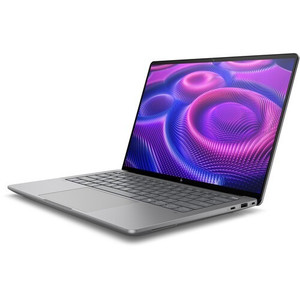
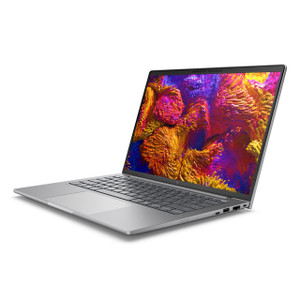
HP Inc BX7L3UT#ABA Mobile Workstation PC
Overview
The HP ZBook 8 G1A is a 14-inch mobile workstation built around AMD's Ryzen AI 7 Pro 350 platform — an 8-core, 16-thread processor with a base clock of 3.50 GHz and boost up to 5.00 GHz. The BX7L3UT#ABA is the SmartBuy commercial configuration, meaning it ships as a channel-direct, pre-configured SKU optimized for B2B procurement rather than a build-to-order system. At 5.00 lb and a profile of 2.40 inches at its thickest point, this is a portable workstation designed to move between job sites, security operations centers, or executive briefing rooms without demanding a dedicated bag slot for a power brick the size of a shoebox.
The combination of a 14-inch WUXGA (1920×1200) touchscreen with a 16:10 aspect ratio and 300-nit brightness directly addresses the practical shortcoming of standard 16:9 laptop displays — more vertical screen real estate means fewer scrolls through long configuration UIs, camera management dashboards, or spreadsheet-heavy procurement workflows. If your team spends hours in VMS software or access control management consoles, the extra vertical pixels matter more than most buyers expect until they've used them.
Key Features
- AMD Ryzen AI 7 Pro 350 (8-core / 16-thread, up to 5.00 GHz): The Pro designation brings enterprise-class security features including AMD Memory Guard (real-time memory encryption) — relevant for security integrators handling client surveillance data or access control records on a shared workstation. The 8-core architecture handles simultaneous VMS decoding, reporting, and remote configuration sessions without the thermal throttling you see on 4-core ultrabooks under sustained load.
- 14-inch WUXGA Anti-Glare Touchscreen (1920×1200, 300 nits, 60 Hz): The 16:10 panel gives you a taller working area than a standard 1920×1080 display at the same physical size. Anti-glare coating is essential for field deployment in warehouses, loading docks, or any space with overhead fluorescents or windows — glossy panels in those environments are nearly unusable. Touch input accelerates navigation in dense management software without requiring a separate mouse at a cluttered desk.
- 32GB RAM: Running a full VMS client, a browser with open vendor portals, and a remote desktop session simultaneously is a realistic workload for a security systems integrator. 32GB means none of those applications will start competing for memory and degrading responsiveness mid-client-presentation or during a live commissioning session.
- 512GB SSD Storage: Fast NVMe storage cuts application load times and handles large exported video clips or PDF datasheet libraries without the seek-time penalties of spinning drives. 512GB is adequate for a primary workstation; pair with network storage or an external drive if local video clip archiving is part of the workflow.
- 5.00 lb Weight with 14-inch Form Factor: Heavier than a consumer ultrabook but substantially lighter than traditional 15-inch mobile workstations. The weight-to-screen-size ratio makes this practical for a technician who needs to carry it through a multi-floor installation without fatigue — it fits in a standard backpack without dominating the load.
- SmartBuy Commercial Configuration (BX7L3UT#ABA): SmartBuy SKUs are pre-configured and stocked in the distribution channel, which compresses procurement lead times compared to custom-configured workstations. For IT departments running a standardized image and asset management program, the fixed hardware configuration simplifies driver management and support ticketing.
- UWVA Anti-Glare LCD Panel Technology: Ultra Wide Viewing Angle (UWVA) IPS-class panels maintain color accuracy and contrast when viewed off-axis — important when a manager or client is reviewing footage or a site plan alongside you rather than directly in front of the screen. Narrow-angle TN panels wash out at the exact angles colleagues naturally occupy.
- Integrated AMD Radeon Graphics (UMA): The unified memory architecture graphics share system RAM. This is adequate for VMS clients, CAD-light drawing review, and video conferencing. It is not suited for GPU-accelerated rendering or training machine learning models locally — if the workload involves GPU compute, that requires a configuration with discrete graphics.
Integration and Compatibility
The ZBook 8 G1A runs on the AMD Ryzen AI platform, which supports Windows 11 Pro (standard for commercial SmartBuy SKUs) and integrates with enterprise management infrastructure including Microsoft Endpoint Manager, HP Manageability Integration Kit (MIK), and HP Sure Recover for remote OS restoration over the network. The AMD Pro platform also supports AMD Dash for out-of-band management — a consideration for IT teams managing distributed workstations across multiple physical sites.
For HP Inc commercial workstations and the broader ZBook lineup, this platform integrates with HP Wolf Security for hardware-enforced endpoint protection, which is relevant when the machine will be used to access live camera feeds or access control systems on a corporate network. The Ryzen AI 7 Pro's built-in NPU (neural processing unit) accelerates on-device AI workloads including Windows Studio Effects for video conferencing — a minor but genuine benefit for integrators conducting remote client meetings from field locations.
Connectivity at the port level is not fully enumerated in the available evidence; verify the specific I/O configuration (Thunderbolt, USB-A count, HDMI version) against HP's product page before specifying this unit for a deployment requiring a specific external display or docking station. For teams already standardized on mobile workstations in the HP ZBook family, this unit uses the same HP docking ecosystem, simplifying desk-to-field transitions. If your procurement workflow requires matching this to a docking station or external display, cross-check the port spec sheet before ordering. Pair this workstation with a managed PoE switch at the desk for a clean single-cable docking setup where available.
Frequently Asked Questions
Q: What processor does the HP ZBook 8 G1A BX7L3UT#ABA use, and how many cores does it have?
A: The BX7L3UT#ABA is configured with the AMD Ryzen AI 7 Pro 350, an 8-core, 16-thread processor with a base clock of 3.50 GHz and a boost clock up to 5.00 GHz.
Q: What is the display resolution and size on the BX7L3UT#ABA?
A: The display is a 14-inch WUXGA panel at 1920×1200 resolution with a 16:10 aspect ratio, 300-nit brightness, anti-glare coating, UWVA wide-viewing-angle technology, and touchscreen support at 60 Hz.
Q: How much RAM and storage does the BX7L3UT#ABA come with?
A: This SmartBuy configuration ships with 32GB of RAM and a 512GB SSD as the standard fixed configuration.
Q: What does the SmartBuy designation mean for the BX7L3UT#ABA?
A: SmartBuy is HP's commercial pre-configured SKU program, meaning this unit ships as a fixed hardware configuration stocked in the distribution channel. It is optimized for B2B procurement with shorter lead times compared to custom-built configurations, and the consistent hardware spec simplifies enterprise image deployment and asset management.
Q: How much does the HP ZBook 8 G1A BX7L3UT#ABA weigh, and what are its dimensions?
A: The unit weighs 5.00 lb and measures 10.70 inches (length) by 18.60 inches (width) by 2.40 inches (height).
Q: Does the BX7L3UT#ABA have discrete graphics?
A: No. This configuration uses integrated AMD Radeon graphics (UMA — unified memory architecture), which shares system RAM. It handles VMS clients, video conferencing, and general productivity workloads but is not suited for GPU-accelerated rendering or local AI model training.
The BX7L3UT#ABA sits in a practical middle ground that not enough integrators think about when specifying field workstations: it delivers the AMD Ryzen AI 7 Pro 350's 8-core, 16-thread muscle in a 5.00 lb chassis with a 14-inch anti-glare touchscreen — which means you get a machine that can actually run a full VMS client and a remote desktop session side-by-side without thermal throttling, while still fitting in a carry-on without triggering a baggage check conversation.
Technical Highlights:
- 1920×1200 (16:10) WUXGA Display: That extra vertical height versus a 1080p screen is not marketing copy — in Milestone XProtect, Genetec Security Center, or Lenel OnGuard, you get one more camera tile or one more table row visible without scrolling, which adds up across an eight-hour commissioning day.
- 32GB RAM / 512GB SSD: 32GB is the floor for running a VMS client, a browser with open vendor portals, and a Teams call simultaneously without memory pressure. The SSD means exported video evidence clips load and scrub without the several-second seek delays you get on spinning media.
- AMD Ryzen AI 7 Pro 350 — Pro Platform: The Pro designation is the relevant purchase criterion here, not the AI branding. AMD Pro brings hardware memory encryption and enterprise manageability hooks (AMD Dash) that matter when this machine touches live security infrastructure or stores exported incident footage.
Deployment Considerations:
- The integrated UMA graphics configuration is the single constraint to flag upfront: if your deployment includes locally running AI-accelerated video analytics, GPU transcoding, or 3D CAD review alongside security management, you need a ZBook variant with a discrete GPU. The UMA config handles the VMS and management console workloads cleanly but has no headroom for GPU-compute tasks.
- Port and I/O specifics are not enumerated in the available specification data — verify Thunderbolt generation, USB-A port count, and HDMI version against HP's product page before specifying this unit against a particular docking station or multi-display setup. This is a realistic gap to close before a purchase order, not after.
The BX7L3UT#ABA is the right call for a security integrator or IT architect who needs a standardized, procurement-friendly commercial workstation that runs VMS software and remote management tools without compromise, travels between sites regularly, and fits inside a corporate HP endpoint management environment — particularly when the team is already standardized on HP docking infrastructure.