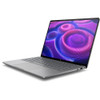
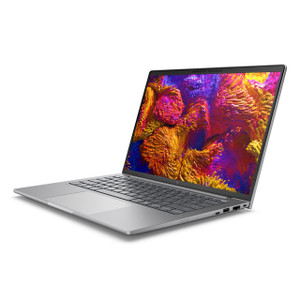
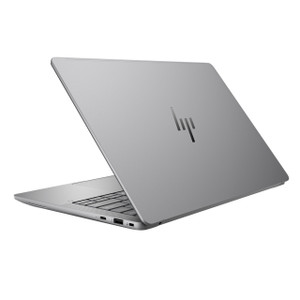
HP Inc BZ7K9UT#ABA 14-Inch Mobile Workstation PC
Overview
The HP ZBook 8 G1A is a 14-inch mobile workstation built for professionals who need serious compute performance in a portable form factor. Model BZ7K9UT#ABA ships as the SmartBuy configuration — a channel-optimized SKU that locks in a specific build so procurement teams get consistent hardware across deployments without the spec-drift that plagues configure-to-order purchases. The 1920x1200 (WUXGA) 16:10 panel gives you more vertical screen real estate than a standard 1920x1080 display — a tangible productivity gain when working in split-view applications, long code files, or multi-row spreadsheets. At 6.10 lb and 18.70 x 10.70 x 3.00 inches, this is a full-capability workstation, not an ultrabook — plan your bag accordingly.
Key Features
- AMD Ryzen AI 9 HX Pro 375 Processor (12 cores / 24 threads, up to 5.10 GHz): Twelve physical cores with a 5.10 GHz boost clock handle demanding workloads — CAD rendering, large dataset analysis, multi-stream video processing — without queuing tasks. The 24-thread count means running a build process and a browser-heavy research session simultaneously won't visibly degrade either. The 'Pro' designation includes business-class security and manageability extensions relevant to enterprise IT environments.
- Integrated AMD Radeon 890M Graphics: The Radeon 890M is the AMD RDNA 3-based iGPU embedded in the HX Pro 375. It handles display output, light GPU-accelerated workloads, and video decode without requiring a discrete card — keeping the thermal and power budget available for the CPU cores. For workloads that demand a discrete GPU, this platform does not provide one; verify your rendering or ML inference requirements against integrated graphics capability before specifying this SKU.
- 32GB RAM: 32GB is the practical minimum for serious workstation use in 2025-2026 — enough headroom to hold a large project in memory, run a VM alongside your primary workflow, or keep dozens of browser tabs and several professional applications open simultaneously without thrashing to disk. It eliminates the performance cliff that 16GB systems hit under real workstation loads.
- 1TB NVMe Storage: 1TB of internal storage provides room for a full OS installation, development toolchains, project files, and local caches without constant housekeeping. NVMe speeds ensure application launches and large file operations don't become a bottleneck for the CPU and RAM above them.
- 14-inch WUXGA (1920x1200) Anti-Glare Display, 300-nit, 60Hz: The 16:10 aspect ratio adds roughly 11% more vertical pixels versus a 16:9 1080p display at the same width — practically, that means one more row of data in a spreadsheet, more lines of code visible before scrolling, or taller map/plan views. The anti-glare coating and 300-nit brightness make it usable in mixed office lighting without excessive glare; it is not rated for direct outdoor use. 60Hz is appropriate for productivity workloads; it is not a gaming or high-refresh display.
- SmartBuy Configuration (Channel-Optimized SKU): The SmartBuy designation signals a fixed, HP-defined configuration maintained at channel inventory — the same build is available consistently from distribution. This matters for IT asset management: all units on a PO carry identical hardware, drivers, and image targets, simplifying deployment imaging and warranty tracking across a fleet.
- Commercial-Grade Platform: The ZBook 8 line is positioned as HP's commercial mobile workstation — it undergoes MIL-STD-810H testing for environmental durability (shock, vibration, temperature variation) appropriate to field and office professional use. This is distinct from consumer notebook builds that share similar CPU specs but differ in chassis quality, manageability features, and support tiers.
Integration and Compatibility
The BZ7K9UT#ABA runs on an x86-64 AMD platform and supports standard enterprise deployment workflows — Windows imaging via WDS/MDT, HP BIOS/UEFI management via HP Manageability Integration Kit (MIK), and AMD PRO platform management extensions. The Ryzen AI 9 HX Pro 375 includes a dedicated NPU for AI-accelerated tasks in compatible applications (Microsoft Copilot+ features, AI-assisted developer tools). Verify application-specific GPU requirements against the integrated Radeon 890M before deployment; workloads requiring CUDA or significant discrete GPU memory are not served by this configuration. For surveillance, security operations, or field engineering roles where the workstation is used to configure, monitor, or manage physical security systems, the CPU and RAM headroom in this SKU handles VMS client software, concurrent streams, and documentation workflows without contention.
Frequently Asked Questions
Q: What is the display resolution and aspect ratio on the BZ7K9UT#ABA?
A: The BZ7K9UT#ABA ships with a 14-inch WUXGA (1920x1200) LED panel at a 16:10 aspect ratio, 300 nits brightness, anti-glare coating, and 60Hz refresh rate.
Q: How much RAM and storage does the BZ7K9UT#ABA include?
A: The SmartBuy configuration includes 32GB of RAM and a 1TB internal drive.
Q: What processor does the BZ7K9UT#ABA use?
A: It uses the AMD Ryzen AI 9 HX Pro 375 — a 12-core, 24-thread processor with a 2.00 GHz base clock and up to 5.10 GHz boost.
Q: Does the BZ7K9UT#ABA have a discrete GPU?
A: No. This configuration uses the integrated AMD Radeon 890M graphics built into the Ryzen AI 9 HX Pro 375. There is no discrete GPU in this SKU.
Q: How much does the BZ7K9UT#ABA weigh and what are its dimensions?
A: The unit weighs 6.10 lb and measures 18.70 inches wide by 10.70 inches deep by 3.00 inches tall.
Q: What does the SmartBuy designation mean for the BZ7K9UT#ABA?
A: SmartBuy is HP's channel-optimized fixed-configuration SKU. The hardware specification is locked — no configure-to-order variants — which simplifies fleet imaging, asset management, and warranty tracking across multiple units purchased on the same order.
The BZ7K9UT#ABA is a workstation I'd recommend to integrators and security operations staff who need a real machine — not a thin-and-light — for field configuration work, VMS client sessions, or back-office engineering tasks. The 12-core Ryzen AI 9 HX Pro 375 running up to 5.10 GHz and 32GB of RAM means you're not babysitting a spinning progress bar when you're pulling live streams from a dozen cameras while updating documentation and running a network scan in parallel.
Technical Highlights:
- 12-Core / 24-Thread CPU at 5.10 GHz Boost: Enough core count to handle parallel workloads — running a VMS client, a remote desktop session, and a terminal concurrently won't peg the CPU. The 5.10 GHz boost handles single-threaded tasks (UI responsiveness, script execution) quickly.
- WUXGA 1920x1200 16:10 Panel: The extra vertical pixels versus a standard 1080p display are not cosmetic — in split-screen workflow (e.g., VMS live view on one side, config UI on the other), you see more of each pane without scrolling. 300 nits is adequate for an office or vehicle cab environment.
- Fixed SmartBuy Configuration: For procurement teams managing a fleet, the locked SKU eliminates hardware variance across units — one image, one driver set, one warranty tracking entry per serial number. That's a real operational simplification at scale.
Deployment Considerations:
- At 6.10 lb and 3.00 inches thick, this is not a commuter-bag machine. Factor the weight into deployments where staff carry the unit for extended periods — field service roles may prefer a lighter option if GPU requirements are modest.
- The integrated Radeon 890M handles display and light GPU tasks but has no dedicated VRAM pool. Workloads requiring CUDA, OpenCL-heavy inference, or simultaneous multi-display 4K rendering should be evaluated against the iGPU's shared-memory architecture before committing to this SKU at scale.
Best fit: a fixed-desk or mobile-but-docked engineering workstation for security system integrators, IT architects, or operations center staff who run VMS software, configuration utilities, and documentation workflows simultaneously — and who need the fleet consistency that the SmartBuy channel SKU provides.