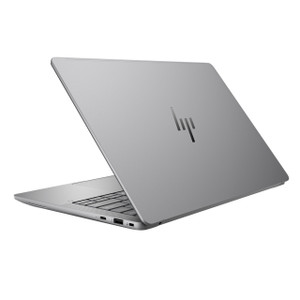
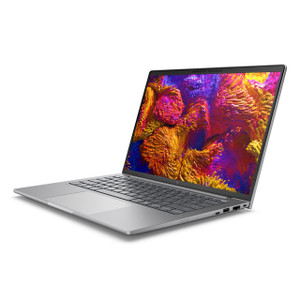
HP Inc BF6T5UT#ABA ZBook Ultra 14 G1a Mobile Workstation
Overview
The HP ZBook Ultra 14 G1a (BF6T5UT#ABA) is a 14-inch mobile workstation built around AMD's Ryzen AI MAX Pro 385 processor — an 8-core chip with a maximum boost frequency of 5.0 GHz and integrated AMD Radeon graphics. This is the machine to reach for when you need legitimate workstation compute in a package that fits in a carry-on: 6.10 lb, 18.60 inches wide, and thin enough at 2.60 inches to slide into most bags alongside field gear. The SmartBuy designation means this is a commercial-grade, business-configured unit sourced through formal distribution channels — not a consumer variant with a rebranded label.
The display is a 1920 x 1200 WUXGA LED panel in a 16:10 aspect ratio, running at 400 nits with an anti-glare UWVA coating. That extra vertical real estate versus a standard 1080p 16:9 screen is immediately useful for anyone working in split-view — code and terminal, PDF and report, VMS dashboard and camera grid — without constantly scrolling. The anti-glare treatment keeps the panel usable in mixed-lighting environments like warehouses, field trailers, and conference rooms with direct window exposure.
Key Features
- AMD Ryzen AI MAX Pro 385 (8 cores, up to 5.0 GHz): Eight physical cores with a 5.0 GHz boost ceiling give this platform headroom for simultaneous heavy workloads — running a local VMS client, a video analytics inference session, and a browser-based project dashboard concurrently without the fan screaming. The Pro designation adds enterprise security and manageability features over the consumer Ryzen AI MAX.
- Integrated AMD Radeon Graphics: The onboard Radeon GPU handles display output and GPU-accelerated tasks without requiring a discrete card — keeping thermals and weight in check. For workloads that need dedicated GPU horsepower (GPU-accelerated rendering, heavy ML inference at the edge), evaluate the discrete-GPU variants in the ZBook Ultra family before committing to this configuration.
- 32GB RAM: 32GB of memory is a practical floor for running virtualization, containerized applications, or multiple enterprise tools simultaneously. It won't bottleneck a modern VMS client, a VM, and a full browser suite running at the same time — which is the typical load for a field integration engineer on-site.
- 512GB SSD Storage: A 512GB solid-state drive keeps OS boot and application load times fast. Factor the storage ceiling into your deployment planning — if this workstation will cache significant video footage locally or hold large project datasets, you'll want to map out your external storage or network share strategy before deployment.
- 1920 x 1200 WUXGA (16:10) Display at 400 nits: The 16:10 panel gives you roughly 11% more vertical pixels than a 1920x1080 screen at the same physical size — useful in practice when working with long documents, deep terminal sessions, or multi-row dashboard layouts. 400 nits is bright enough for most indoor environments; it will wash out in direct outdoor sun.
- Anti-Glare UWVA Coating: The UWVA (Ultra Wide Viewing Angle) coating reduces reflections across a wide viewing cone, which matters in shared workspace or client-facing demo scenarios where the screen needs to be readable from slightly off-axis without repositioning the lid.
- 14-inch Form Factor at 6.10 lb: At 6.10 lb, this sits at the upper end of what most people consider comfortable for daily carry, but it's within range for engineers who are moving between sites rather than commuting on foot every day. The 14-inch chassis keeps desk footprint compact at 10.80 x 18.60 inches.
- Commercial SmartBuy Configuration: SmartBuy units are pre-configured, channel-direct SKUs intended for business procurement — they carry commercial support entitlements and are sourced factory-new through formal distribution. This matters for organizations that need standardized hardware configurations for imaging, fleet management, or warranty servicing.
Integration and Compatibility
The Ryzen AI MAX Pro 385 platform is positioned for Windows 11 Pro commercial deployments. The Pro-tier processor includes hardware-level security features relevant to enterprise IT environments. For security integration applications, this machine can run full VMS client software, configuration tools, and network management utilities simultaneously without resource contention that would force you to close applications during on-site commissioning work. Verify software compatibility with your specific VMS platform for GPU-accelerated decoding requirements — the integrated Radeon GPU supports hardware decode for common codecs, but discrete-GPU configurations in the ZBook Ultra family may be required for the highest channel counts in GPU-accelerated VMS decoding scenarios.
Frequently Asked Questions
Q: What processor does the BF6T5UT#ABA include, and how many cores does it have?
A: The BF6T5UT#ABA ships with an AMD Ryzen AI MAX Pro 385 processor — 8 cores with a maximum boost frequency of 5.0 GHz. The Pro designation includes additional enterprise security and management features versus the consumer Ryzen AI MAX line.
Q: How much RAM and storage does the BF6T5UT#ABA include?
A: This configuration includes 32GB of RAM and a 512GB SSD.
Q: What is the display resolution and aspect ratio on the BF6T5UT#ABA?
A: The display is a 14-inch WUXGA LED panel running at 1920 x 1200 resolution in a 16:10 aspect ratio, with a 400-nit anti-glare UWVA coating.
Q: What does the SmartBuy designation mean for the BF6T5UT#ABA?
A: SmartBuy identifies a pre-configured commercial SKU distributed through HP's business channel. These units are intended for business procurement, carry commercial support entitlements, and are sourced factory-new — not consumer-channel or grey-market inventory.
Q: Does the BF6T5UT#ABA include a discrete GPU?
A: No. This configuration uses integrated AMD Radeon graphics built into the Ryzen AI MAX Pro 385 processor. If your workload requires a dedicated GPU — for example, GPU-accelerated video analytics inference at higher channel counts — evaluate discrete-GPU variants in the ZBook Ultra 14 G1a family.
Q: What are the physical dimensions and weight of the BF6T5UT#ABA?
A: The ZBook Ultra 14 G1a weighs 6.10 lb and measures 10.80 x 18.60 x 2.60 inches (L x W x H).
The BF6T5UT#ABA is the ZBook Ultra 14 G1a's entry point into the Ryzen AI MAX Pro 385 tier — and the spec that earns attention here is that 5.0 GHz boost clock across 8 cores paired with 32GB of RAM. For integration engineers who spend time on-site running configuration software, VMS clients, and remote access sessions simultaneously, that memory and clock headroom is the difference between a machine that keeps pace and one that becomes the bottleneck during a client walkthrough.
Technical Highlights:
- Ryzen AI MAX Pro 385, 8 cores / 5.0 GHz boost: Eight cores at a 5.0 GHz ceiling handles concurrent enterprise workloads without thermal throttling under typical office and field use — enough headroom for VMS client, network tools, and documentation open at the same time.
- 1920 x 1200 WUXGA 16:10 at 400 nits: The extra vertical pixels versus a standard 1080p panel are immediately useful for split-view work — two application windows side-by-side without either being cramped. 400 nits holds up in most indoor environments.
- 32GB RAM / 512GB SSD: 32GB keeps virtualization and multi-app sessions fluid; the 512GB SSD is sufficient for OS and tools but should be mapped against local data retention requirements before deployment — field-heavy workflows may push against that ceiling.
Deployment Considerations:
- At 6.10 lb and 18.60 inches wide, this is a desk-to-vehicle-to-site machine rather than a daily pedestrian commuter — plan carry accordingly if the team is moving between sites on foot.
- Integrated AMD Radeon graphics handles standard display and hardware decode tasks, but GPU-intensive workloads (high-channel-count GPU-accelerated VMS decoding, ML inference) should be validated against the integrated GPU's capabilities — discrete-GPU ZBook Ultra variants exist if the integrated path proves insufficient.
The BF6T5UT#ABA is the right pick for IT architects and integration leads who need a standardized, commercial-channel Windows workstation for on-site commissioning and remote management work — specifically in environments where a 14-inch form factor with a proper 16:10 display and 32GB RAM makes the difference between productive field sessions and workaround-heavy ones.