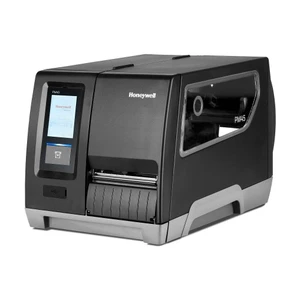
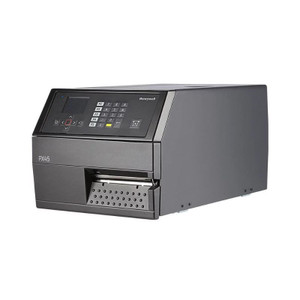
Honeywell PM45 PX4E010000000140 Industrial Label Printer
The Honeywell PM45 PX4E010000000140 is a production-class thermal label printer engineered for high-volume enterprise labeling in warehouse, manufacturing, distribution, and logistics environments. Combining Direct Thermal and Thermal Transfer printing capabilities with 406 DPI resolution, this printer delivers sharp, consistently scannable output for shipping labels, compliance documentation, product identification, and asset tracking applications. The 108 mm (4.25 in) maximum print width accommodates diverse label formats from compact product tags to full-width shipping labels, providing operational flexibility across multiple use cases.
Key Features
- 406 DPI thermal printing for clear, barcode-ready output
- Direct Thermal and Thermal Transfer printing modes for media versatility
- Maximum print width of 108 mm (4.25 in) for flexible label sizing
- 3.5-inch color touch LCD display for intuitive operation and diagnostics
- Multi-protocol emulation support (ZPL II, ZSim2, Direct Protocol, Fingerprint, IPL)
- Comprehensive connectivity: Ethernet (10/100 Mbps), dual USB 2.0 Host, RS-232, and Wi-Fi (802.11 a/b/g/n/ac)
- 256 MB SDRAM and 512 MB Flash memory for robust performance
- HTTPS encryption and LPR analytics support for secure network integration
Technical Specifications
The PM45 operates across wide environmental ranges—5°C to 40°C (41°F to 104°F) during operation and -20°C to 70°C (-4°F to 152°F) during storage—ensuring reliable performance in diverse warehouse and manufacturing climates. With 10–90% non-condensing humidity tolerance, the printer maintains output quality in demanding conditions. The 256 MB SDRAM and 512 MB Flash memory enable responsive operation and flexible firmware customization without external dependencies. Built-in PoE Class 1 support simplifies network deployment by reducing infrastructure costs.
Integration & Compatibility
Multi-language emulation support (ZPL II, ZSim2, Direct Protocol, Fingerprint, IPL) provides drop-in compatibility with legacy printer installations, minimizing migration costs and retraining requirements. Dual USB 2.0 Host ports, Ethernet, RS-232, and Wi-Fi connectivity enable seamless integration with warehouse management systems (WMS), ERP platforms, and cloud-based print management solutions. The color touch display eliminates reliance on external interfaces for configuration, status monitoring, and troubleshooting, reducing IT support overhead.
Applications
Ideal for high-volume shipping label production, compliance label generation, retail product identification, and asset tracking across warehousing, manufacturing, distribution, healthcare, and retail environments. The combination of thermal printing versatility, network connectivity, and emulation support makes this printer suitable for organizations modernizing label infrastructure while maintaining legacy system compatibility.
Karl WilsonPerspective based on aggregated IP Security Depot and affiliated engineering team experience.
The PM45 represents Honeywell's mid-range production printer, balancing throughput capability with operational simplicity. The 3.5-inch color touch display and comprehensive network stack (Ethernet, Wi-Fi, dual USB) position this printer for dynamic warehouse environments where configuration flexibility and real-time status visibility are critical. Multi-protocol emulation ensures backward compatibility with existing ZPL-based workflows, a significant advantage for enterprises with heterogeneous label infrastructure.
The 406 DPI resolution and thermal transfer capability provide the print quality and media range necessary for regulatory compliance labels and high-contrast barcode applications. Wide environmental tolerance (5–40°C operating) supports deployment in temperature-controlled warehouses and unheated distribution centers without performance degradation. For organizations seeking a reliable, upgradeable label solution with strong ecosystem support and network-first design, the PM45 delivers solid mid-market value.
Product Documentation