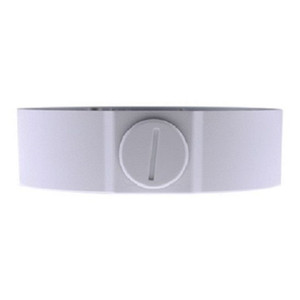
Geovision 150-MT21220-001 GV-MOUNT 212-2 Mounting Bracket
Overview
The Geovision 150-MT21220-001 is a dedicated mechanical mounting bracket engineered to support Geovision IP cameras across control room, field, and mixed-environment installations. This accessory provides the structural foundation needed when deploying compatible Geovision camera models, allowing flexible positioning without compromising rigidity or thermal stability. The GV-MOUNT 212-2 designation identifies this bracket's compatibility with specific Geovision form factors—verify your camera model against the compatibility list before ordering to ensure proper fit and load rating.
Key Features
- Dedicated Geovision Compatibility: Designed specifically for Geovision surveillance camera systems, ensuring mechanical tolerances and load ratings are optimized for supported models. This focused design approach eliminates the guesswork of universal brackets that often introduce vibration or instability.
- Secure Mechanical Mounting: Provides rigid support that prevents camera drift, vibration, or thermal sag under temperature cycling—critical when precise pan-tilt positioning or consistent optical alignment is required over months of operation.
- Flexible Installation Orientation: Supports multiple mounting angles and positions, accommodating wall-mount, ceiling, or pendant-style deployments depending on your coverage needs and site constraints.
- Indoor and Standard Environment Rated: Suitable for control rooms, offices, retail, and warehouse interiors where environmental exposure is moderate. Not rated for direct rain, salt spray, or extreme temperature cycling; outdoor deployments require weatherproof housing or an outdoor-rated bracket variant.
- Integration with Geovision Management Software: Works seamlessly with Geovision NVR and VMS platforms, allowing physical camera positioning to align with software camera naming and zone mapping without mechanical compromise.
- Straightforward Installation: Fastening methodology is consistent with Geovision's installation practice, reducing training overhead and site-level errors during bulk deployments.
Compatibility & Integration
The 150-MT21220-001 (often searched as 150 MT21220 001) is designed for specific Geovision camera models within the GV-MOUNT 212-2 family. Before purchase, confirm your camera model in the official Geovision compatibility matrix—incompatible pairing can result in misaligned bore holes, load capacity mismatch, or inability to achieve desired positioning angles. This bracket does not support cameras outside the Geovision ecosystem; third-party brand adapters are not recommended and will void any load-rating assurance.
For IP camera installations requiring weather resistance, consider whether your deployment site demands IP66/IP67 environmental sealing or outdoor temperature range (-40°C to 60°C). If so, specify an outdoor-rated mount variant in the same Geovision family or a weatherproof housing enclosure as a complement to this bracket.
Installation Considerations
Mounting surface preparation is essential: ensure wall or ceiling attachment points can support the combined weight of the camera, bracket, and any cable management hardware. Use fasteners rated for your substrate (concrete, drywall, steel). Cable management routing should avoid sharp bends near the camera connector to prevent long-term intermittent connection faults. Test camera positioning and pan-tilt range (if applicable) before final cable routing to confirm no mechanical binding occurs.
Frequently Asked Questions
Q: Will the 150-MT21220-001 work with non-Geovision cameras?
A: No. This bracket is engineered specifically for compatible Geovision camera models. Universal or third-party adapters are not supported and may compromise load rating or stability. Use only with cameras listed in the Geovision GV-MOUNT 212-2 compatibility documentation.
Q: Is this bracket rated for outdoor use?
A: No. The 150-MT21220-001 is designed for indoor and standard-environment installations. Outdoor deployments in rain, direct sun, or extreme temperature cycling require an outdoor-rated bracket variant or weatherproof housing enclosure.
Q: What fastening hardware is required?
A: Fastening requirements depend on your mounting substrate (wall, ceiling, pole, etc.). Consult the installation manual for recommended bolt types, washers, and torque specifications. Standard hardware is not included; supply your own based on your substrate material and local building codes.
Q: Can I adjust the bracket angle after installation?
A: The bracket supports multiple positioning angles during initial installation. Once cameras are powered and configured, repositioning should be done carefully to avoid cable strain or connector flex. Document your final angle setting so repositioning can be reversed if needed.
Q: How do I verify compatibility with my camera model?
A: Check your camera's model number against the official Geovision GV-MOUNT 212-2 compatibility list in the manufacturer documentation. If your model is not listed, contact Geovision technical support or consult with your integrator before ordering.
Q: What load rating does this bracket provide?
A: Load capacity varies by mounting orientation and substrate. Refer to the bracket's specification sheet or installation guide for maximum supported camera and cable weight. Exceeding the rated load may cause sag, vibration, or mechanical failure.
Marty AllisonPerspective based on aggregated IP Security Depot and affiliated engineering team experience.
The Geovision 150-MT21220-001 is a straightforward mechanical anchor—nothing fancy, just engineered rigidity. If you're deploying compatible Geovision cameras across a multi-site rollout, bracket consistency matters more than you'd think. A loose or vibrating mount introduces optical jitter, especially on fixed-lens cameras where small movements compound focus drift. The GV-MOUNT 212-2 designation ensures tolerances align with Geovision's camera design, avoiding the creep and sag you'll encounter with off-brand universal brackets over a 12-month cycle.
Technical Highlights:
- Dedicated Form Factor Alignment: Designed for specific Geovision camera models within the 212-2 family, eliminating bore-hole mismatch or load-capacity guessing. Simplifies provisioning when deploying dozens of identical camera-bracket pairs across warehouses or retail chains.
- Multi-Angle Positioning: Supports flexible mounting orientations (wall, ceiling, pendant), giving your site engineer real deployment optionality without requiring three different bracket SKUs.
- Indoor/Standard Environment Rated: Appropriate for controlled climates and typical office or warehouse interiors. Not rated for rain, salt spray, or sustained temperature cycling below -10°C or above 50°C—know your thermal envelope before specifying this bracket for outdoor or thermally extreme sites.
Deployment Considerations:
- Verify your camera model against the official GV-MOUNT 212-2 compatibility matrix before purchase—incompatible pairing wastes time at the site and may require rework.
- Fastening hardware is not included; you supply bolts, washers, and anchors based on your substrate. Do not skimp on fastener quality; undersized or corroded hardware will loosen under thermal cycling and vibration.
- Cable management routing matters more than installers often admit. Route drops with slack loops away from the camera connector to prevent intermittent connection faults caused by flex fatigue over months of thermal expansion.
The 150-MT21220-001 is purpose-built for Geovision-first deployments where consistency and mechanical stability are non-negotiable—warehouses, control rooms, and multi-location retail chains where camera repositioning happens infrequently. If you're mixing camera brands or need outdoor environmental sealing, look elsewhere; this bracket assumes a Geovision-only ecosystem and protected interior environments.