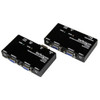
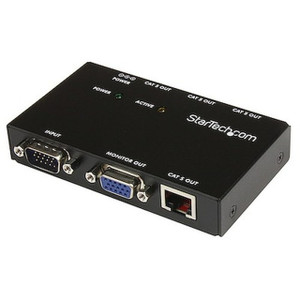
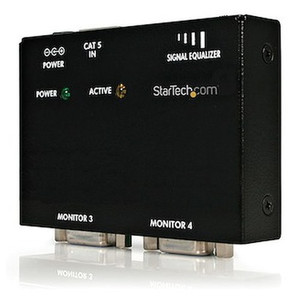
StarTech ST122UTPA VGA Signal Extender and 1-to-2 Distribution Amplifier with Audio
Overview
The StarTech ST122UTPA is a VGA-over-Cat5e extender and distribution amplifier that splits one VGA source — plus its stereo audio feed — across two remote displays while also feeding two local monitors, giving you a total of four simultaneous outputs from a single source. If you're running a control room, digital signage installation, retail point-of-sale, or a training environment where the same video content needs to appear at the source desk and at one or more remote screens, this unit handles the distribution and the distance extension in a single compact package. The aluminum housing measures just 3.3 × 2.4 × 0.8 inches, so it tucks cleanly behind a monitor or into a rack shelf without taking up rack units.
Unlike HDMI or DisplayPort extenders that require active adapters when you hit older infrastructure, the ST122UTPA works natively with the VGA and 3.5mm audio connections that still exist in a large share of installed commercial AV and presentation environments — no format conversion, no latency penalty, no additional adapters in the chain.
For environments where you're running structured cabling for network infrastructure anyway, leveraging Cat5e runs you've already pulled is a practical way to avoid running dedicated display cables.
Key Features
- Four simultaneous outputs (2 local + 2 remote): The local transmitter unit drives two VGA displays directly — useful for the operator at the source. Two remote receiver units extend the same image over Cat5e, so you get four screens from one source without any switching lag or display priority management.
- 500ft (152m) maximum extension range: The Cat5e/Cat6 extension reaches up to 500 feet, making it viable for large floor plates — warehouse operations areas, large open-plan offices, lecture halls, or retail environments where the source machine is in a back room and displays are on the floor.
- Resolution scales with distance: At 150ft (50m) you get 1440×900, sufficient for clear signage or presentation content. At 300ft (100m) the signal sustains 1280×1024, which covers most presentation and dashboard use cases. At the full 500ft (152m) run, 1024×768 is the practical ceiling — adequate for content designed at that resolution but not suitable for fine-detail dashboards or video at that distance.
- Stereo audio carried over the same Cat5e run: Both the local and remote units include two 3.5mm mini-jack connectors, so audio travels alongside video without a separate audio cable run. This matters in retail or training deployments where the presenter's audio needs to reach remote speaker systems without additional infrastructure.
- Single-cable infrastructure per remote location: Each remote display site needs only one Cat5e or Cat6 cable to the transmitter for both video and audio — simplifying the pull and reducing termination points compared to running separate video and audio cables.
- RJ-45 port on both local and remote units: The transmitter and each receiver unit each carry one RJ-45 connector — this is the Cat5e/Cat6 link that carries the extended signal. Standard patch cables or structured runs both work; no proprietary cabling required.
- Low power draw — 6W total at 12V DC: The included AC adapter delivers 12V DC at 0.5A, and the system consumes just 6 watts. That's a negligible load on any outlet or UPS, and there's no need to account for significant heat output in enclosed AV furniture or credenzas.
- Compact aluminum housing: The aluminum construction keeps the unit light (14.2 oz / 402g) while providing adequate shielding against EMI in environments with dense cabling — relevant in server rooms or near UPS units where interference can degrade analog video signals.
Integration and Compatibility
The ST122UTPA connects to any VGA output source — PC, laptop, media player, or KVM output — and drives any VGA-input display or projector. Because it's a passive analog distribution system (amplified, not digitally converted), there's no EDID management, HDCP handshake, or driver required. It works out of the box with Windows, Linux, or any OS that drives a standard VGA output.
The Cat5e infrastructure requirement is standard structured cabling — Cat6 works equally well and provides additional headroom for signal integrity at longer runs. Avoid running the Cat5e extension cables alongside high-voltage AC wiring in conduit, as analog VGA over Cat5e is more susceptible to 60Hz hum interference than digital protocols. This is worth planning in retrofit installations where existing conduit may carry mixed cabling.
For deployments where you're also sourcing KVM switches or video extenders to build out a complete AV distribution stack, the ST122UTPA integrates cleanly as a last-mile distribution point — it takes the output of a KVM or media player and fans it out to multiple screens without any additional configuration.
If your environment is transitioning away from VGA toward HDMI or DisplayPort, this unit is purpose-built for VGA and does not support digital video formats. For mixed-format deployments, consider whether an HDMI distribution amplifier with VGA input adapters better suits your long-term infrastructure direction. See the full AV distribution catalog for digital alternatives.
Frequently Asked Questions
Q: What resolution can I expect at the full 500ft (152m) Cat5e run?
A: At the maximum 500ft (152m) distance, the ST122UTPA supports 1024×768. For 1280×1024, keep the run under 300ft (100m). For 1440×900, keep it under 150ft (50m).
Q: Does the ST122UTPA carry audio to the remote displays?
A: Yes. Both the local transmitter and each remote receiver unit include two 3.5mm mini-jack connectors, so stereo audio travels over the same Cat5e cable as the video signal. No separate audio cable run is needed.
Q: How many total displays does the ST122UTPA support?
A: Four — two driven locally by the transmitter unit (direct VGA connections) and two driven remotely via Cat5e extension to the receiver units.
Q: What type of cable connects the local unit to the remote units?
A: Standard Cat5e or Cat6 patch cable or structured cabling run. Both units use RJ-45 connectors. No proprietary cable is required.
Q: What is the warranty on the ST122UTPA?
A: StarTech provides a 2-year manufacturer warranty on the ST122UTPA.
Q: Does the ST122UTPA require any drivers or software?
A: No. It is a hardware-only analog VGA distribution amplifier. No drivers, software, or OS configuration are required — it works with any device that outputs standard VGA.
The spec that matters most when evaluating the ST122UTPA is the resolution-versus-distance curve: 1440×900 at 50m, 1280×1024 at 100m, and 1024×768 at the full 150m run. A lot of installers overlook this and spec the unit purely on maximum cable length — then end up with a soft image at a remote display because the content was designed at 1280×1024 and the run is 120 meters. Match your content resolution to the distance before you pull cable.
Technical Highlights:
- 4-display output (2 local + 2 remote): The transmitter drives two direct VGA outputs simultaneously alongside two Cat5e-extended remote outputs — no switching, no priority hierarchy, all four screens live at the same time.
- 500ft Cat5e extension with stereo audio: Both the RJ-45 video link and the 3.5mm audio connectors on the remote unit mean a single Cat5e pull to each remote location covers video and audio — reduces labor on the cable pull and cuts down on termination points.
- 6W at 12V DC via included adapter: The entire system — local unit plus remote receivers — runs on a single included 12V/0.5A AC adapter drawing 6W. There is no per-receiver power requirement, which simplifies installation at remote display locations.
Deployment Considerations:
- Route Cat5e extension cables away from AC power runs — analog VGA over Cat5e picks up 60Hz hum from adjacent high-voltage cabling in conduit, and this is the most common cause of wavy or noisy images on the remote outputs in retrofit commercial installations.
- At the maximum 500ft run, you are limited to 1024×768 — if your display or signage content is authored at 1280×1024 or higher, you will see scaling artifacts at that distance. Either shorten the run or design content at 1024×768 for those positions.
The ST122UTPA is the right tool for training rooms, retail back-office-to-floor-display runs, and conference environments where VGA infrastructure is already in place and the run lengths fit within the resolution-distance envelope. It is not the right choice for environments migrating to digital video formats or requiring resolutions above 1440×900 at any distance.