
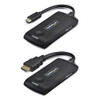

StarTech ADD A Standalone Transmitter TO - 4KUSBC-WIRELESS-TX
Usually Ships in 2-3 Weeks
Free shipping over $499
$162.99

Manufacturer-verified compatible cameras, recorders, mounts, accessories, and licenses for this product. Adjust quantities and add the entire bundle to your cart in one click.
Questions about this product? Free pre-sales support from a senior specialist — product questions, compatibility checks, BOM quotes, price confirmation — typically answered within one business day. Need camera placement or system design work? Engineering time is $175 per hour (qty 1 = 1 hour). Hardware buyers get up to one hour ($175) credited back on their order.
The StarTech 4KUSBC-WIRELESS-65FT is a driverless wireless display extender that transmits a 4K 60Hz signal from any USB-C (DisplayPort Alt-Mode) source to an HDMI display up to 65 feet away — with zero software installation required. It operates on the 5GHz band using VCT6601/VCT6602 chipsets, drawing power entirely from the host USB-C port and the display's USB port, making it a clean, infrastructure-light solution for conference rooms, training environments, digital signage, and presentation spaces where running HDMI cable across a room simply isn't practical.
Unlike HDBaseT or fiber extenders that require wall terminations and power injectors, the 4KUSBC-WIRELESS-65FT (often searched as 4KUSBC WIRELESS 65FT) ships as a two-unit transmitter/receiver pair that plugs in and works immediately on Windows, macOS, Android, and ChromeOS — no IT ticket required.
The transmitter connects via USB-C in DisplayPort Alt-Mode — verify your source device supports DP Alt-Mode over USB-C before ordering. Thunderbolt 3/4 ports also support DP Alt-Mode and will work. Standard USB-C charging ports that do not carry video signal will not. The receiver outputs via HDMI to your display and requires a USB-A port (or USB-C with adapter) on the display or nearby for power — under 3.5W, so any USB port rated at 5V/1A or higher is sufficient.
Because no drivers are installed, the host OS sees this as a standard extended or mirrored display. Display configuration (resolution, refresh rate, layout) is managed through the OS display settings as with any wired HDMI connection. There is no proprietary management interface or app to maintain.
For enterprise AV deployments that need lower latency or longer distances, consider a dedicated AV extender with HDBaseT or fiber transport. For the specific use case this product targets — cable-free, plug-and-present 4K delivery under 65 feet — it fits cleanly. Pair it with a USB-C hub or dock if your laptop's USB-C port also handles charging, to avoid power contention.
Explore the full StarTech connectivity catalog for complementary AV and networking accessories, or browse the broader wireless display extender category to compare technologies and distance ratings before committing to a deployment approach.
Q: Does my laptop's USB-C port need to support DisplayPort Alt-Mode to use the 4KUSBC-WIRELESS-65FT?
A: Yes. The transmitter requires a USB-C port with DisplayPort Alt-Mode support. Thunderbolt 3 and Thunderbolt 4 ports also support DP Alt-Mode. A USB-C port that only handles charging or data transfer will not transmit a video signal to the extender.
Q: Is the 100–250ms latency acceptable for video conferencing?
A: Not typically. At 100–250ms, audio and video lip sync will drift noticeably in conferencing applications. This extender is best suited for presentations, digital signage, document sharing, and content playback where real-time interactivity is not required.
Q: What provides power to the receiver unit at the display end?
A: The receiver draws under 3.5W from a USB port on the display or a nearby USB power source. Any USB-A port rated at 5V/1A or higher is sufficient — no separate wall adapter is needed.
Q: What is the warranty on the 4KUSBC-WIRELESS-65FT?
A: StarTech covers this product with a 2-year manufacturer warranty.
Q: Can this extender pass through 4K at 60Hz through walls or across an open office?
A: The 65-foot range spec applies to line-of-sight or typical office conditions. Walls, RF interference from neighboring 5GHz networks, and physical obstructions can reduce effective range. For installations with significant obstacles, test placement before finalizing the mount location.
Q: Does the 4KUSBC-WIRELESS-65FT require any software or drivers on a managed enterprise OS image?
A: No. The extender is fully driverless and software-free. The host OS recognizes it as a standard display output — no installation, no IT change control required for the extender itself.

The spec I always lead with on the 4KUSBC-WIRELESS-65FT is the latency window: 100ms to 250ms. That single number tells you immediately where this extender fits and where it doesn't. For a conference room display running presentation slides or a digital signage screen pushing promotional content, 100–250ms is invisible to the audience. For a video call where a presenter's lips need to sync with their audio, it's disqualifying. Know your use case before you spec this in.
Technical Highlights:
Deployment Considerations:
The 4KUSBC-WIRELESS-65FT is a strong fit for hot-desk conference rooms and huddle spaces where a wired HDMI run isn't practical and the use case is presentation or content display — not conferencing. Deploy it where the cable problem is real and the latency limitation is acceptable, and it delivers cleanly.

Manufacturer-verified compatible cameras, recorders, mounts, accessories, and licenses for this product. Adjust quantities and add the entire bundle to your cart in one click.


Looking for more StarTech products? Shop the full StarTech catalog →
Support services and planning resources for commercial surveillance, access control, and infrastructure deployments.
Fixed scope • Fixed price