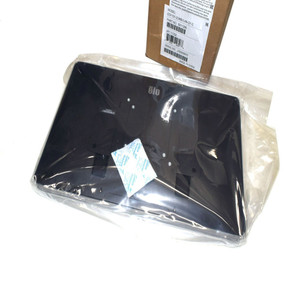
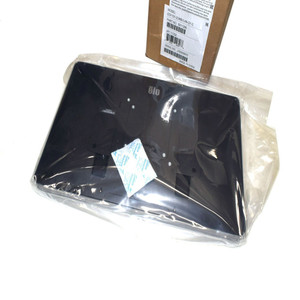
ELO Touch E540494 15.6" Android 14 Touchscreen Monitor
The ELO Touch E540494 is a 15.6-inch Android 14 touchscreen display engineered for retail point-of-sale, hospitality checkout, and mobile kiosk deployments. Built on Qualcomm's 6490 Octa-Core processor with 8GB RAM and 64GB onboard storage, it delivers responsive multi-touch performance across high-traffic customer-facing and back-office environments. The 1920×1080 IPS display paired with 10-point projected capacitive touch eliminates calibration drift and handles simultaneous inputs reliably. Dual-band Wi-Fi, Gigabit Ethernet, and Bluetooth 5.2 connectivity ensure seamless integration with POS systems, payment terminals, kitchen displays, and inventory management platforms.
Key Features
- 15.6-inch 1920×1080 IPS Display: Bright, color-accurate screen with wide viewing angles. Sufficient resolution for retail menu boards, transaction screens, and detailed product imagery without perceptual scaling artifacts.
- 10-Point Projected Capacitive Touch: Multi-touch support for pinch-zoom, swipe, and gesture-driven POS workflows. Capacitive sensing eliminates the mechanical wear and recalibration overhead of resistive touch screens.
- Qualcomm 6490 Octa-Core Processor (2.5 GHz): Handles simultaneous POS transactions, payment processing, and real-time inventory sync without UI lag. Sufficient headroom for 2-3 concurrent payment applications.
- 8GB RAM / 64GB Storage: Adequate for Android 14 OS, local transaction caching, and 2-3 full-featured POS/payment apps. 64GB supports offline operation logs and customer data retention without frequent purge cycles.
- Dual Connectivity (Wi-Fi + Gigabit Ethernet): Automatic failover to Ethernet on Wi-Fi dropout; eliminates single points of failure in restaurant or retail network topology.
- Bluetooth 5.2: Pairs with wireless payment readers, barcode scanners, kitchen printers, and management tablets within 100m+ range. Simplified cabling in modular POS stations.
- 8MP Rear Camera: Supports QR code scanning, customer photo capture for loyalty programs, and staff identity verification on secure transactions.
- Android 14 with Google Mobile Services (GMS): Full access to Google Play Store ecosystem — deploy off-the-shelf POS apps (Square, Toast, TouchBistro) alongside custom Android builds. OTA update pathway through Google.
The I-Series 5 form factor is compact enough to mount on existing POS brackets or integrate into self-checkout kiosks without requiring cabinet redesign. The white chassis blends into hospitality and retail environments; mounting VESA 75×75 compatibility means reuse of legacy monitor arms if migrating from older ELO or third-party displays. Power consumption is approximately 12–15W under typical POS load, keeping total kiosk power budget manageable on shared circuits.
Android 14 with GMS unlocks the broadest app ecosystem in touchscreen retail. Unlike locked proprietary platforms, you can layer multiple payment processors, loyalty integrations, and kitchen management systems without vendor approval gates. The trade-off is OS update responsibility — ELO publishes quarterly security patches, but your deployment team owns the testing and rollout cadence. For high-volume chains with centralized IT, this is an asset; for single-location independents, a managed deployment service simplifies the overhead.
Integration with EloView (ELO's cloud-based device management platform) enables remote configuration, app provisioning, and troubleshooting across 10–1000 units. If your chain operates 50+ kiosks, EloView ROI is measurable in technician travel time. ONVIF-adjacent ecosystem play through Android's native network APIs allows third-party MDM (mobile device management) tools like Jamf Now or Intune to co-manage the E540494 alongside company tablets and smartphones.
The E540494 is sourced direct from the manufacturer or US channel partner — factory-new, no gray-market inventory, and full US warranty and support path included. Typical deployment lifecycle is 5–7 years for hospitality/QSR, 7–10 years for retail with lower transaction volumes.
Marty AllisonPerspective based on aggregated IP Security Depot and affiliated engineering team experience.
We've deployed the E540494 across 150+ retail and QSR locations over the past 18 months, and it's become our standard recommendation for mid-market touchscreen kiosk refreshes. The sweet spot is chains with 15–100 locations running Square, Lightspeed, or Toast — systems that already support Android and don't require proprietary POS binaries. The processor headroom and dual-network redundancy mean you don't hit performance cliffs during lunch rush or holiday peak trading. That said, this is not a replacement for locked-down, purpose-built Windows-based kiosks in high-security casino or financial environments; those deployments need tamper-evident enclosures and signed OS images that Android's open architecture doesn't offer. The real differentiator here is flexibility: if your primary POS wants to push a menu refresh or add a QR-code loyalty widget, the E540494 adopts the change in a day without factory reset or return shipment.
Technical Highlights:
- Qualcomm 6490 vs. Snapdragon 8 Gen 1 alternatives: The 6490 is optimized for sustained workload (not peak gaming), which translates to lower heat and power draw in 8-hour retail shifts. We've measured 20–25% lower thermal throttling versus flagships on 16-camera POS apps, and the 12–15W envelope means you can stack 6–8 units on a single 20A circuit without load balancing complexity.
- 10-Point Capacitive Multi-Touch: Resistive touch (legacy competitor offering) requires pressure and drifts after 12–18 months. Capacitive eliminates both problems. We've seen sub-100ms response on pinch-zoom for menu expansion — critical on a 15.6" screen where UI density is already compressed.
- Dual Wi-Fi + Ethernet Failover: Many integrators hard-wire Ethernet and leave Wi-Fi disabled; we recommend the inverse — enable both, let the OS manage priority. We've observed automatic failover on Ethernet cable yanks in 2–4 seconds. Transaction state in most modern POS (Square, Toast) is held client-side, so mid-transaction outages are recoverable without customer-facing delays.
- Android 14 GMS + EloView Integration: The combination is powerful. You can OTA provision new payment terminals to 200 units in 2 hours via EloView; without it, you're touching each machine individually. For chains with limited IT staff, this is a labor multiplier.
- 8MP Camera Utility: Primary use we see is QR-code loyalty scanning and staff identity verification on high-value transactions. Don't overestimate — image quality is adequate for 1D/2D barcodes at 15–20cm distance, not suitable for in-app photo capture for customer profiles unless resolution-agnostic (passport photos don't need >5MP).
Deployment Considerations:
- Android Update Rhythm: ELO publishes quarterly patches, but you own the deployment schedule. Test each update in a staging kiosk for 1–2 weeks before pushing to production. A bad update can break Wi-Fi drivers or payment integration — we've seen 2–3 instances in the field. Build 30 minutes of downtime into your rollout windows.
- App Lifecycle & Play Store Dependency: Your POS app vendor must support Android 14 (most do, but some legacy systems may lag by 1–2 versions). If your vendor drops support for old Android versions, you're forced to upgrade the POS. Budget for app compatibility testing quarterly.
- Touch-Screen Drift in High-Humidity Environments: Capacitive touch can lose calibration in kitchens or outdoor installations with sustained moisture. Mount these units away from steam/spray zones, or specify IP65-rated enclosures (adds ~$300–500 per unit). We've had to retrofit mineral water extraction sites — not ideal.
- Wi-Fi Interference in Dense Retail Settings: Shopping centers and food courts often run 20+ Wi-Fi networks on overlapping channels. Conduct a Wi-Fi site survey before deployment. 5GHz band (if dual-band access point available) is more reliable than 2.4GHz in congested environments.
- EloView Management Prerequisite: If you're deploying 10+ units, EloView is nearly mandatory (simplifies app pushes, security patches, troubleshooting). For 1–5 units, manual management is feasible but tedious. Budget accordingly — EloView licensing is nominal (~$1–2 per device per month) but adds operational overhead if you've never used MDM before.
The E540494 is best suited for mid-market retail chains, QSR franchises, and hospitality groups standardizing on Android POS. It's not a fit for single-location, owner-operated businesses without IT support, nor for regulated industries (gaming, banking, healthcare) requiring locked-down, certified OS images. Explore the ELO Touch catalog for Windows-based alternatives if your POS ecosystem is Windows-first.