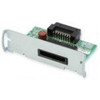
Epson C32C824121 USB 2.0 Serial Interface Board
The Epson C32C824121 is a plug-in USB 2.0 interface board designed to add or upgrade serial connectivity on compatible Epson printing and imaging systems. This module installs directly into supported device slots, enabling USB 2.0 serial data communication for legacy and modern integration workflows.
Overview
This is a hardware expansion module, not a standalone device. The C32C824121 serves integrators and IT architects who need to retrofit or add USB serial connectivity to existing Epson equipment without replacing the host device. It bridges older serial workflows with modern USB infrastructure, reducing the need for external adapters or workarounds.
Key Features
- USB 2.0 Connectivity: Delivers up to 480 Mbps data throughput — more than sufficient for serial communication tasks typical in warehouse automation, ticket printing, and document imaging workflows. You avoid the latency and complexity of external USB-to-serial converters.
- Drop-In Form Factor: Designed as a plug-in module that installs into a designated slot on compatible Epson devices. No external wiring, no bulky adapters hanging off the back. Cleaner physical integration in constrained spaces like retail kiosks or shipping stations.
- Serial Data Link Protocol Support: Operates over USB using serial communication standards, making it suitable for point-of-sale terminals, label printers, receipt printers, and document imaging equipment that expect a serial interface.
- Legacy Integration Without Replacement: Extends the operational life of compatible Epson systems by adding modern USB connectivity. This avoids costly hardware refresh cycles when you need to migrate away from aging parallel or serial ports.
Compatibility and Installation
The C32C824121 is engineered as a drop-in module for select Epson printing and imaging systems. Before ordering, verify that your specific device model supports this interface board — not all Epson equipment accepts field-installable connectivity modules. Consult your device manual or contact the manufacturer to confirm slot compatibility. Installation requires opening the device housing and seating the module firmly into the designated connector; no firmware updates or host-side software configuration is typically required once installed.
This accessory is most relevant for integrators managing mixed-generation Epson deployments where some legacy equipment still requires serial connectivity but cannot easily be replaced. Pair it with your existing USB host infrastructure to establish communication without external adapters.
When to Choose a Different Approach
If your Epson device already has native USB support built-in, this module is unnecessary. If you need to support multiple serial devices across a single host, consider an external multi-port USB hub with dedicated USB-to-serial converters rather than retrofitting multiple devices. For devices outside the Epson printing and imaging family, look for generic USB serial adapters engineered for broader compatibility.
Frequently Asked Questions
Q: Is the Epson C32C824121 compatible with all Epson printers?
A: No. The C32C824121 is a plug-in module designed for specific Epson device models that include a dedicated expansion slot. Verify your exact model number in the product manual or contact the manufacturer before purchasing.
Q: Do I need special drivers or software to use this interface board?
A: Once installed and seated in the device slot, the C32C824121 typically operates as a standard USB serial interface and does not require special drivers beyond those provided by the host operating system or Epson's standard driver package.
Q: Can the C32C824121 be installed by an end user or does it require professional service?
A: Installation involves opening the device enclosure and seating the module into an internal connector. Technically straightforward, but verify that you are comfortable with device disassembly and that your warranty terms allow user-level service before attempting installation.
Q: What is the data throughput speed of the USB 2.0 interface?
A: USB 2.0 supports up to 480 Mbps theoretical throughput, which is more than adequate for serial communications in printing and document imaging applications. Actual sustained throughput depends on the host device and the application's serial command protocol.
Q: Will this board add latency to serial communications?
A: The module converts serial communication to USB 2.0 protocol, introducing minimal latency — typically under 1 millisecond. For point-of-sale or warehouse automation tasks, this latency is negligible and will not affect operational performance.
Ted PerryPerspective based on aggregated IP Security Depot and affiliated engineering team experience.
The Epson C32C824121 is a niche connectivity module — not a device you'll deploy into every Epson ecosystem, but invaluable when you're managing mixed-generation fleets where legacy serial communication still needs a path forward. The module itself is straightforward: a plug-in board that adds USB 2.0 serial capability to compatible host devices. Where most integrators stumble is compatibility verification. This is not a universal adapter; it only works in specific Epson device models with a dedicated expansion slot.
Technical Highlights:
- USB 2.0 Serial Protocol: The 480 Mbps bandwidth is far more than serial applications consume — you're adding future-proof connectivity without bandwidth constraints. Latency is sub-millisecond, so you won't see timing drift in POS transactions or warehouse scanning workflows.
- Drop-In Installation: No external wiring, no powered hubs, no driver complexity post-installation. The module seats directly into the host device's internal expansion slot, which means a cleaner physical footprint and one fewer external adapter to manage or troubleshoot.
- Legacy Preservation: If you've got a working Epson printer or imager running mission-critical workflows, retrofitting this module costs a fraction of replacing the device outright. Extends equipment life by 2-3 years without operational disruption.
Deployment Considerations:
- Compatibility is not automatic — verify that your exact Epson model includes the correct expansion slot. Datasheet compatibility claims from the manufacturer are your only reliable source. Do not assume compatibility across product families.
- Installation requires device disassembly. If your equipment is still under manufacturer warranty, confirm that user-level service is permitted before opening the enclosure. Some warranty terms require OEM service for any internal modification.
Position the C32C824121 strictly as a bridge technology for legacy integration debt. It's the right choice when you have a compatible Epson device, you need serial communication restored, and wholesale replacement is not in this fiscal cycle. It is not a general-purpose USB-to-serial adapter for devices outside the Epson printing and imaging family.