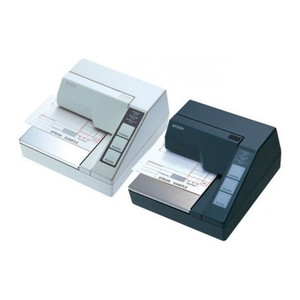
Epson C31C178242 TM-U295 Impact Slip Printer
Overview
The Epson C31C178242 is a compact, wired impact slip printer engineered for point-of-sale and transaction processing environments. Built on the proven TM-U295 platform, this monochrome printer delivers dependable performance in high-volume receipt and slip printing applications. The parallel port interface integrates directly into legacy and modern POS systems without requiring network configuration, making it a straightforward replacement for environments standardized on parallel connectivity.
Key Features
- Impact Print Technology: Monochrome impact printing handles single-part and multi-part carbonless forms — essential when you need to produce receipts and customer copies simultaneously without a second printer pass.
- Print Speed (2.1 lines per second): Throughput sufficient for moderate- to high-volume retail and hospitality counters. This speed balances mechanical reliability with transaction cycle time — fast enough to avoid customer queue buildup, but not so aggressive that ribbon wear becomes a maintenance headache.
- Print Resolution (16.2 characters per inch): Text and barcode legibility is clear enough for standard POS receipts, transaction slips, and inventory tickets. 16.2 cpi is the practical minimum for barcode scanning reliability; anything lower requires wider stock and wastes paper.
- Parallel Connectivity (Centronics / IEEE 1284): Direct hardware connection to POS terminals and legacy host systems. No network stack, no latency, no IP address management. If your host has a parallel port, this printer works immediately — no driver negotiation delays.
- Monochrome Output: Single-color (black ink) printing. Limits promotional colored receipts or multi-color loyalty coupons, but eliminates color ribbon costs and complexity for standard transaction documentation.
- Continuous Ribbon Supply: Standard replacement ribbon cartridges available widely. Budget approximately $15–30 per ribbon depending on length; single ribbon typically yields 2–3 million characters depending on print density.
Integration & Compatibility
The C31C178242 connects via standard parallel port found on legacy POS terminals, receipt printer controllers, and some modern host systems (though parallel ports are becoming scarce on new hardware). Driver support exists for Windows XP through Windows 10/11 and most legacy POS platforms (NCR, Hypercom, Ingenico, etc.). If your host device lacks a parallel port, a USB-to-parallel adapter may work, but test compatibility with the manufacturer before deploying; adapter latency or signal loss can cause ribbon jams or character dropout.
Operating Environment
Impact printers operate reliably in retail, hospitality, and service environments with minimal environmental controls. The TM-U295 platform is rated for 24/7 operation at typical indoor temperatures. Paper dust and ribbon fragments accumulate over time — schedule quarterly cleaning of the print head and platen roller to maintain consistent impression and prevent character skipping. Avoid humid or salt-air environments unless the unit is housed in a protective enclosure; moisture can corrode the ribbon advance mechanism.
When to Choose a Different Model
If your environment requires color receipts, promotional graphics, or photo-quality output, migrate to a thermal or inkjet printer. If parallel port availability is limited or non-existent on your host equipment, consider a USB- or network-connected thermal receipt printer from the Epson TM series (e.g., TM-T88 or TM-m30) to avoid adapter reliability issues. If print volume exceeds 10,000 slips per day on a single unit, consider a line printer or high-capacity thermal system to reduce ribbon changeover frequency and downtime.
Frequently Asked Questions
Q: Does the Epson C31C178242 work with modern USB-only POS terminals?
A: Not directly. If your host has no parallel port, you will need a USB-to-parallel adapter. Compatibility is not guaranteed — test with the specific adapter and host model before full deployment. Some adapters introduce signal integrity issues that cause character dropout or ribbon jams.
Q: What is the expected life span of a ribbon on the C31C178242?
A: A standard ribbon cartridge typically prints 2–3 million characters depending on print density and image coverage. In a typical retail counter (500–1,000 transactions per day), a ribbon lasts 2–4 weeks. Factor ribbon replacement into consumable budgets.
Q: Can the C31C178242 print on 3-part carbonless forms?
A: Yes. Impact printing is specifically designed for multi-part forms. Ensure the platen roller pressure is properly set (Epson service can adjust) to ensure consistent imprint on all copies. Overstriking can cause character smudging; understriking produces faint copies on lower layers.
Q: Is there a thermal version of this printer?
A: The C31C178242 is impact-only. If you require thermal printing (faster, quieter, fewer consumables), look at thermal receipt printers in the Epson TM series, though they do not support multi-part forms without a separate impact unit.
Q: What is the warranty on the C31C178242?
A: Refer to the Epson documentation or your distributor for warranty terms. Impact printers typically include a 1–3 year limited warranty covering defects in materials and workmanship, excluding normal wear on the platen and ribbon mechanism.
Ted PerryPerspective based on aggregated IP Security Depot and affiliated engineering team experience.
From a systems integration perspective, the Epson C31C178242 remains a practical choice for organizations with entrenched parallel-based POS infrastructure. I've deployed and maintained this unit across retail and hospitality chains, and it consistently performs in environments where receipt throughput and multi-part form support are requirements. The TM-U295 platform is solid mechanical hardware — it's not flashy, but it does one job reliably.
Technical Highlights:
- Print Speed (2.1 lines per second): This throughput meets typical transaction cycles in retail and hospitality without requiring thermal infrastructure upgrades. A single unit handles 500–1,000 transactions per day without choking; if you exceed that volume per counter, add a second printer or upgrade to a high-capacity thermal system.
- Resolution (16.2 characters per inch): Sufficient for barcode scanning (Code 128, UPC) and readable transaction data on customer receipts. Don't attempt smaller fonts below 10-point without testing scan reliability first.
- Parallel Interface: Direct hardware connection eliminates network latency and IP management overhead. If your POS terminal still has a parallel port, this is the fastest way to get a slip printer operational.
Deployment Considerations:
- Parallel port scarcity: Verify parallel port presence on your host device before purchasing. Modern laptops and terminals increasingly omit parallel ports. USB-to-parallel adapters exist but introduce potential signal integrity issues — test your specific adapter with this printer model in a non-production environment first.
- Ribbon and consumable costs: Budget for frequent ribbon replacement. At 500–1,000 transactions daily, expect ribbon changeover every 2–4 weeks. This is not a low-total-cost-of-ownership device over 5+ years if volume is high; thermal printers, despite higher initial cost, reduce consumable spend significantly over time.
- Platen wear: The rubber platen roller degrades with impact printing. Schedule quarterly inspection and cleaning; replacement platens cost $30–50 and typically need replacement every 2–3 years depending on volume and print darkness settings.
The C31C178242 is your choice for legacy POS environments where parallel connectivity is available and multi-part forms are non-negotiable. If you're modernizing and can accept thermal-only output, migrate to a USB or network printer — you'll reduce maintenance and consumable overhead significantly.