Image coming soon
Product images are provided for reference and may not represent the exact model, configuration, or included components.

Overview

SKU: E538507
UPC: 815335027642
Condition: New
Availability: Special Order · Usually Ships in 2-3 Weeks
Write a Review 0% OFF

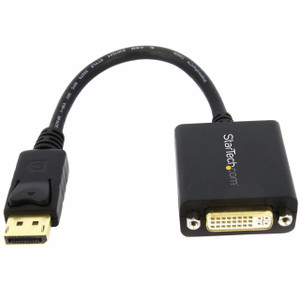
ELO Touch Elo cable kit DVI-D to HDMI converter - E538507

ELO Touch E538507 DVI-D to HDMI Converter Cable Kit Overview The ELO Touch E538507 is a DVI-D to HDMI converter cable kit designed to bridge legacy DV…

$29.00 $28.99 SAVE $0
Special Order
Usually Ships in 2-3 Weeks

Quantity:

Adding to cart… The item has been added
Compatibility guidance available for your deployment
Experts for pre and post-sales support
Technical and documentation support
Shipping and lead-time confirmation before install

Laura Bennett, IPSD Senior Specialist

Talk to Laura

Specialized training • U.S - based

Senior Specialist • 877-277-7147

ELO Touch Elo cable kit DVI-D to HDMI converter - E538507

$29.00
$28.99

Overview

SKU: E538507
UPC: 815335027642
Condition: New
Availability: Special Order · Usually Ships in 2-3 Weeks

No Bots, Just Experts

Questions about this product? Free pre-sales support from a senior specialist — product questions, compatibility checks, BOM quotes, price confirmation — typically answered within one business day. Need camera placement or system design work? Engineering time is $175 per hour (qty 1 = 1 hour). Hardware buyers get up to one hour ($175) credited back on their order.

Description

ELO Touch E538507 DVI-D to HDMI Converter Cable Kit

Overview

The ELO Touch E538507 is a DVI-D to HDMI converter cable kit designed to bridge legacy DVI-equipped displays with modern HDMI video sources. This solves a common integration pain point: your surveillance system or control room uses an older ELO Touch display with DVI input, but your VMS, media player, or IP encoder outputs HDMI. Rather than replacing the display, this kit lets you repurpose the existing hardware.

Compatibility

The E538507 converter kit is compatible with ELO Touch displays equipped with DVI-D (Digital Visual Interface – Dual Link) input connectors. It accepts HDMI 1.3/1.4 sources (set-top boxes, NVRs with HDMI out, laptops, media players, IP decoders). The converter is passive for single-link DVI signals; check your display's DVI pin configuration to confirm dual-link capability if using high-resolution or high-refresh sources.

Installation Notes

This is a straightforward plug-and-play installation: connect the HDMI source to the converter's HDMI input, then plug the DVI-D cable into your ELO display. No drivers, power supply, or configuration needed. Ensure both source and display are powered off before connecting to avoid transient voltage spikes. Test video signal integrity immediately after install; if the image appears degraded or intermittent, verify the HDMI source supports DVI-compatible color space (RGB or YCbCr 4:4:4).

Specifications
Brand: ELO Touch
MPN: E538507
Type: Component Kit
Connectivity: HDMI
Q&A
Reviews
Have Questions? Ask an Expert.

RELATED PRODUCTS

System Design, Deployment & Technical Support

Support services and planning resources for commercial surveillance, access control, and infrastructure deployments.

Fixed scope • Fixed price

System Design Assistance

  • Get help validating product compatibility
  • Coverage requirements
  • Storage planning and deployment architecture before you buy.
Request Design Help

Deployment & Configuration Support

  • Access fixed-scope support for rollout planning
  • User setup guidance
  • Migration and system standardization across single-site or multi-site deployments
View Support Services

Guides, Tools & Calculators

  • PoE requirements
  • Storage retention
  • Camera selection and deployment methodology
Open Technical Resources