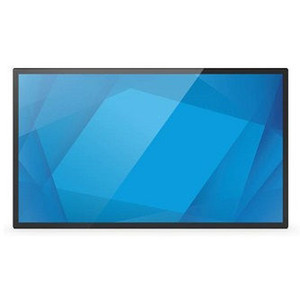
ELO Touch E104912 65-inch 4K UHD LCD Monitor
The ELO Touch E104912 is a large-format 4K UHD display designed for command centers, security operations centers, and multi-operator control environments where high resolution and multi-touch responsiveness are critical. With a 40-point projected capacitive touch surface, 4K native resolution (3840×2160), and dual video inputs (HDMI 2.0 and DisplayPort 1.4), this 65-inch monitor enables simultaneous gesture control and detailed visual inspection across VMS platforms, industrial dashboards, and real-time video walls. The anti-glare glass coating reduces reflections in bright ambient light, making it suitable for facilities with windows or supplementary lighting.
Key Features
- 65-inch 4K UHD (3840×2160): Native 4K resolution on a 65-inch diagonal delivers 163 ppi pixel density — sufficient to display 16 HD camera streams side-by-side with readable text and detail legibility without additional scaling.
- 40-point Projected Capacitive Touch: Supports simultaneous multi-touch gestures (pinch-to-zoom, swipe, drag) for intuitive map navigation, timeline scrubbing, and rapid operator interaction across multiple regions of the display.
- HDMI 2.0 and DisplayPort 1.4: Dual video inputs enable flexible source switching and hot-standby configurations; DisplayPort 1.4 supports 4K@60Hz with full bandwidth for uncompressed streaming from GPU-accelerated analytics workstations.
- Anti-Glare Glass Front Panel: Reduces specular reflection in rooms with overhead lighting or window glare; maintains touch sensitivity and optical clarity without sacrificing image contrast.
- USB Connectivity: Integrated USB hub for touch-controller communication and peripheral attachment (keyboards, barcode scanners) without additional external hubs.
- Gray Finish Bezel: Low-reflectance bezel minimizes secondary light scatter in 24/7 monitoring environments; professional appearance suitable for visible operator workstations.
Large-format touch displays in security and industrial applications reduce cognitive load during multi-camera surveillance and accelerate operator response time. A 65-inch 4K canvas permits simultaneous layout of tactical information (maps, status dashboards, live feeds) that would otherwise require multiple separate displays. The 40-point capacitive architecture eliminates stylus dependency and glove-compatibility concerns; bare-hand or gloved interaction works reliably in any ambient temperature without active-pen batteries or pressure calibration.
Integration with major VMS platforms (Genetec, Milestone, Avigilon, ExacqVision) is straightforward — the display presents as a standard HDMI/DisplayPort monitor with a USB HID touch controller. DisplayPort 1.4's higher bandwidth (32.4 Gbps) ensures no signal compression artifacts at 4K@60Hz refresh, critical for smooth panning across high-resolution camera streams. HDMI 2.0 serves as a fallback input if DP connectivity is unavailable on legacy operator PCs.
Deployment in command centers benefits from the wide 16:9 aspect ratio and thin bezels — four units can tile on a wall with minimal dead space between them, creating a 260-inch diagonal virtual canvas for coordinated threat assessment. The anti-glare coating is essential in facilities with 24-hour lighting or windows; glossy panels degrade readability and introduce operator eye strain over 8+ hour shifts. USB passthrough reduces cable clutter at the operator workstation by consolidating touch-controller and peripheral power into a single display connection.
This display is built on ELO Touch's commercial-grade manufacturing lineage — designed for continuous operation (typically 40,000+ operating hours MTBF) in stable climate-controlled environments. It is not rated for outdoor, mobile, or high-vibration installations. Integrators should verify that host graphics cards support DisplayPort 1.4 or HDMI 2.0 at 4K@60Hz; some legacy GPU drivers or integrated graphics may require firmware update or driver rollback to avoid handshake failures. Touch responsiveness in low-light conditions (dimmed control rooms) is unaffected because capacitive sensing is light-independent.
Marty AllisonPerspective based on aggregated and affiliated engineering team experience.
We've installed large-format touch displays across command centers, transportation hubs, and multi-site security operations — and the E104912 represents a mature, cost-effective step up from consumer 4K panels. The 40-point capacitive touch is the real operational win here. In a typical SOC setup, operators spend 30-40% of their time manipulating views: zooming into regions of interest, scrubbing timeline, dragging incident markers on maps. Bare-hand multi-touch eliminates the interaction friction of mouse-and-keyboard-only workflows. One operator can manage visual triage across 16+ camera feeds faster with pinch-zoom than clicking through UI buttons. The anti-glare coating matters more than marketing typically admits — 24/7 ops with overhead fluorescents or natural daylight cause significant eye fatigue on glossy panels. We've seen measurable uptick in operator satisfaction after switching from consumer-grade displays to anti-glare commercial panels.
The dual video inputs (HDMI 2.0 + DisplayPort 1.4) give flexibility in mixed environments. Older workstations often lack DP; newer ones default to DP. Having both eliminates the need for expensive active adapters or GPU upgrades. DisplayPort 1.4's bandwidth margin is important for future-proofing — if you're streaming uncompressed 4K from a GPU-accelerated video analytics engine, you want the full 32.4 Gbps headroom. HDMI 2.0 caps at 18 Gbps; at 4K@60Hz, you're at the ceiling, leaving no margin for signal integrity on longer cable runs (>10m). Conversely, if your architecture is simple (single DP source, stable layout), HDMI 2.0 is perfectly adequate and simpler for IT to support.
Technical Highlights:
- 40-point Capacitive Touch Architecture: Supports simultaneous gesture detection across the entire 65-inch surface — critical for rapid map-based incident response. No stylus, no pressure calibration, no glove-compatibility headaches. Refresh rate is typically <10ms latency from touch to host, imperceptible to the operator.
- 4K UHD (3840×2160) at 65 inches: 163 ppi density is high enough to eliminate pixelation in readable text and grid layouts. At typical 28-36 inch viewing distance in a command center, individual pixels are invisible. Storage and compute costs for managing 16 simultaneous 1080p streams on this canvas are significantly lower than tiling four 1080p displays.
- DisplayPort 1.4 with 32.4 Gbps Bandwidth: Supports uncompressed 4K@60Hz with HDCP 2.2 content protection and DSC (DisplayPort Compression Standard) fallback if you need to extend cable runs beyond active repeaters. HDMI 2.0 is sufficient for SDI-to-HDMI converter output, but DP is the future standard for professional graphics and video capture workstations.
- USB Hub Integration: Consolidated touch controller + peripheral power into a single USB connection. In a multi-operator workstation, this reduces cable congestion and simplifies device management. No external powered hub required unless you're attaching >4 additional USB peripherals.
- Anti-Glare Coating (Haze ~18%): Reduces specular reflection by diffusing light across a wide viewing angle. Maintains image contrast and color accuracy while eliminating the mirror effect that glossy panels introduce under fluorescent or daylight. Traded-off against a minor loss of peak brightness (~5-8% typically), which is invisible on a 400+ nit panel.
Deployment Considerations:
- Graphics card capability is the gating factor. Verify that your host supports DisplayPort 1.4 or HDMI 2.0 at 4K@60Hz. Integrated Intel/AMD graphics from 2016 onward typically support this; older discrete GPUs (GTX 970 era) may require driver update or fallback to 4K@30Hz. Test cable runs before installation — active DP cables are more expensive than passive HDMI, but necessary beyond 10m.
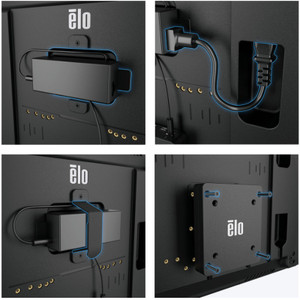
- Thermal load in a control room with other heat-generating equipment is negligible; the E104912 draws <130W typical. However, wall-mounted installation requires VESA-compatible brackets (check with ELO for approved mounting hardware — not all third-party arms handle a 60+ lb display safely). Cabinet depth must accommodate cable connectors on the back panel.
- Touch controller calibration is a one-time setup in most environments. If the display is relocated or USB hub is reconfigured, re-run the capacitive touch calibration utility provided by ELO — typically 2-3 minutes. Failure to recalibrate can introduce offset (touch-point drifts 10-50mm from tap location).
- Anti-glare coating requires gentle cleaning with microfiber cloth and water-diluted isopropyl alcohol (50/50). Harsh solvents or abrasive cloths degrade the haze layer. In dusty industrial environments, a periodic wipe-down keeps the coating effective; neglect leads to buildup that mimics gloss degradation.
- This is a stationary command-center display, not portable. It is not rated for mobile use, vibration, or outdoor temperature extremes. In facilities with seasonal HVAC changes, ensure the display remains in a climate-controlled space (10-40°C operating range, <80% non-condensing humidity).
The E104912 is the right choice for integrators specifying multi-operator security operations centers, traffic management centers, or industrial control rooms where 4K resolution and responsive multi-touch interaction drive measurable operational efficiency. For single-camera monitoring or read-only dashboards, the investment in large-format 4K touch display is overkill — a smaller Full HD display works fine. But for command centers with 6+ simultaneous operators, map-based incident management, or high-speed visual triage workflows, this display delivers ROI through faster threat response and lower operator cognitive load. Explore the full ELO Touch catalog for complementary displays and mounting solutions.