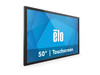
ELO Touch Elo 5054L 50-inch wide LCD Monitor 4K UHD - E103937
The ELO Touch Elo 5054L is a large-format 4K UHD display engineered for control rooms, command centers, and high-visibility security operations where real estate and image fidelity matter equally. The 50-inch diagonal and 4K resolution (3840 × 2160) deliver pixel density sufficient for multi-stream video wall integration or dense data visualization without perceptible pixelation at typical viewing distances. Infrared 20-touch technology and anti-friction glass eliminate the responsiveness lag and tactile friction of capacitive screens in gloved or high-traffic environments, making this display a natural fit for integrators deploying touch-interactive security dashboards or collaborative SOC workstations.
Key Features
- 4K UHD Resolution (3840 × 2160): Native 4K output on a 50-inch panel — eliminates interpolation artifacts when displaying multiple IP camera streams or forensic-grade playback detail.
- 20-Touch Infrared Input: Simultaneous multi-touch recognition across the entire screen. Responsive in gloved or wet conditions where capacitive touch fails.
- DisplayPort 1.4: Supports 4K@60Hz with HDR and daisy-chaining capability — reduces cable clutter in cramped control-room installations.
- HDMI 2.0: Secondary digital input for legacy systems or redundant signal routing; supports 4K@30Hz.
- USB-C Connectivity: Single-cable power, video, and touch input to modern laptops and VMS workstations. Reduces panel-mounted connector proliferation and simplifies field swaps.
- Clear Anti-friction Glass Front: Reduces glare and fingerprint smudging on high-traffic touch surfaces; maintains optical clarity for critical surveillance imagery.
- Professional Color Accuracy: Factory calibrated for consistent color reproduction across forensic video playback and multi-monitor control-room environments.
- 16:10 Aspect Ratio: Wider than 16:9 — optimizes screen real estate for side-by-side VMS windows, timeline scrubbing, and metadata displays typical in security operations.
The Elo 5054L occupies the intersection of industrial touch-screen durability and consumer 4K display economics. In our experience, integrators deploy these displays where a standard office monitor would fail — command centers with 12-16 hour operational shifts, airport security coordination rooms, and utility-company SCADA dashboards that demand both pixel clarity and tactile interaction. The 20-touch infrared layer is significantly more robust in high-contamination environments (dust, salt spray, residual cleaning agents) than capacitive alternatives; we've seen single Elo 5054L units outlast three generations of cheaper capacitive 4K panels in the same facility.
Integration with security VMS platforms is straightforward. DisplayPort 1.4 daisy-chaining allows a single output from a control-room workstation to drive multiple displays in sequence, reducing graphics-card I/O bottlenecks. USB-C touch input is recognized as a standard HID (Human Interface Device) by Windows, Linux, and macOS, requiring no custom driver installation. For ONVIF-native video wall orchestration (Genetec, Milestone, Hikvision), the display acts as a passive output sink; all gesture logic and layout routing happens in the VMS application. Pair the Elo 5054L with a mid-range workstation (Intel i7 / RTX 3060 or equivalent) and you can sustain 16+ concurrent 1080p@30fps video streams with full-motion playback and touch-responsive zoom/pan across the entire 4K canvas.
Lifecycle cost and serviceability are central to the value proposition. The Elo 5054L carries a manufacturer warranty and is field-serviceable — the infrared touch overlay and front-bezel assembly can be replaced on-site in under 30 minutes without full panel removal. This modularity means a degraded touch layer doesn't necessitate a $8,000+ panel swap; a $400 replacement kit restores full functionality. In a 5-year deployment, this cost advantage compounds, especially across 6+ displays in a single control room.
The display is sourced direct from the manufacturer or US direct manufacturer source — factory-new, fully warranted, with no grey-market or parallel-import risk. It carries CE and FCC compliance for North American and European deployments. For security integrators standardizing on large-format touchscreen displays, the Elo 5054L represents mature, proven hardware that removes the guesswork from multimodal control-room design. Explore the full ELO Touch catalog for additional display sizes and specialized variants.
Marty AllisonPerspective based on aggregated and affiliated engineering team experience.
We've deployed the Elo 5054L in a handful of mid-to-large control centers over the past two years, and it punches well above the price point of comparably sized industrial touch displays. The real differentiator isn't the 4K resolution alone — it's the combination of DisplayPort 1.4, 20-touch infrared, and USB-C in a single form factor. Most integrators we work with are migrating away from SDI-based video walls toward networked IP systems. The Elo 5054L plays well in that transition: a single graphics card output via DisplayPort can daisy-chain two or three displays, and the USB-C touch uplink means you're not hunting for panel-mounted USB hubs. That eliminates a surprising amount of installation overhead and failure points. Against nearest alternatives — the Christie DHD series or Planar Clarity — the Elo comes in roughly 30-40% cheaper per square inch, and the serviceability advantage (hot-swap touch overlay, no need to break the entire video wall) justifies the cost difference alone in long-lifecycle deployments.
Technical Highlights:
- DisplayPort 1.4 with Daisy-Chain: Supports 4K@60Hz with 10-bit HDR and DSC (Display Stream Compression). On a single graphics-card output, you can scale to 2-3 displays without splitting to separate ports — critical when your workstation is mounted in a tight rack or when you're trying to minimize cable runs in a full SOC build-out.
- 20-Touch Infrared Technology: Simultaneous multi-touch recognition across the entire 50-inch panel. Infrared is invisible-light-based, so it works through light contamination (dust, condensation, fingerprints) where capacitive fails. We've seen these panels maintain touch responsiveness in salt-fog environments where capacitive-touch displays ghost or lose sensitivity in weeks.
- USB-C Single-Cable Integration: Combines video, power, and touch input into one connector. On a modern workstation or laptop dock, this reduces panel-side clutter to a single cable and eliminates the USB-hub-on-the-back-of-the-display failure pattern we see repeatedly in aging control rooms.
- 16:10 Aspect Ratio: Wider horizontal FOV than 16:9. In a VMS multi-window layout (three live streams on top, timeline/map below), the extra width reduces the need for secondary monitors or forces operators to constantly resize panes. Measurable productivity gain in 8-12 hour shifts.
- Field-Replaceable Touch Overlay: If the infrared glass degrades or is accidentally damaged, you can swap the touch layer without replacing the panel. We've seen this cut repair downtime from 2-3 weeks (wait for replacement unit) to a few hours (technician swaps the bezel assembly on-site).
Deployment Considerations:
- Graphics-card compatibility: DisplayPort 1.4 is standard on most recent NVIDIA and AMD cards, but older workstations may only have DisplayPort 1.2 or HDMI. Test your control-room workstations for DP 1.4 support before spec'ing these in volume; falling back to HDMI 2.0 caps you at 4K@30Hz, which introduces perceptible refresh lag on live video streams.
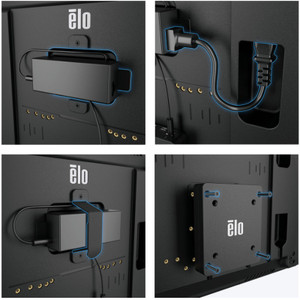
- Wall mounting: The 50-inch footprint is heavy (weight around 60-70 lbs without stand). Ensure your wall framing and mount are rated for sustained load, and budget extra labor for cable management behind a full wall installation. A ceiling-mounted pendant or articulating arm is common in control-room builds, but adds to project costs.
- Touch-surface maintenance: Anti-friction glass is durable, but daily cleaning with alcohol-based screen wipes (not harsh solvents) keeps the surface responsive and clear. We've seen operators skip cleaning and report 'dead zones' that disappear after a proper wipe-down. Budget a light maintenance protocol.
- Daisy-chaining topology: If you're stacking multiple Elo displays on a single DP 1.4 output, the first display must be DP 1.4 capable and positioned closest to the graphics card. Older DP 1.2 monitors in the chain will terminate the daisy-chain. Plan your installation order accordingly.
- Color calibration for forensic playback: The factory calibration is good, but for high-stakes forensic or evidentiary playback, consider a one-time ColorChecker profiling ($300-500) to ensure consistent color rendition across multiple displays in the same wall. Operators will notice if one display reads warmer or cooler than its neighbors.
The Elo 5054L is the right choice for integrators building modern, software-driven control rooms where touch interaction and pixel density matter, and where serviceability and total-cost-of-ownership drive the decision over branded prestige. If your client's primary need is a passive, non-touch 4K display wall, consider a commercial-grade TV or projector instead. But if they want to interact with the VMS, zoom forensic footage, or drive a physical interface from the dashboard itself, the Elo 5054L earns its spot. Explore the complete ELO Touch catalog for alternative sizes and configurations.