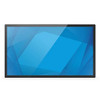
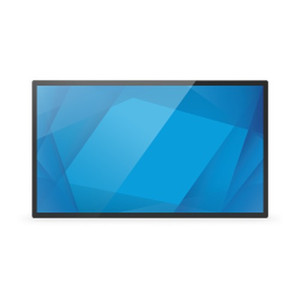
ELO Touch E103738 50-Inch 4K UHD LCD Touch Monitor
Overview
The ELO Touch E103738 is a large-format 50-inch LCD display built for control rooms, command centers, and enterprise environments where reliable multi-touch interactivity and high-resolution graphics are non-negotiable. With 4K UHD (3840 × 2160) resolution delivered via dual connectivity options (HDMI 2.0 and DisplayPort 1.4), this model handles content-rich dashboards, video walls, and real-time monitoring scenarios without compromise. The 40-point projected capacitive touch system with palm rejection ensures that simultaneous multi-user input and accidental contact won't degrade responsiveness — a critical requirement in high-traffic command centers where operators work shoulder-to-shoulder during incident response.
The anti-glare glass layer reduces reflections from overhead lighting and exterior light sources, which matters in 24/7 control rooms where screen brightness can cause operator fatigue over extended shifts. USB-C connectivity provides a single-cable solution for both data and power delivery in compatible environments, simplifying infrastructure in cable-constrained installations.
Key Features
- 4K UHD Resolution (3840 × 2160): Delivers four times the pixel density of 1080p, enabling text-heavy dashboards and detailed video walls to remain readable at 50 inches without pixelation — important when operators need to distinguish fine details in maps, sensor readouts, or incident timelines.
- 40-Point Projected Capacitive Touch: Unlike resistive touch, capacitive sensing supports true simultaneous multi-touch input, so multiple operators can interact with the display at once. Palm rejection prevents accidental contact while typing or gesturing near the screen — a real problem in shared control environments.
- DisplayPort 1.4 & HDMI 2.0 Connectivity: DisplayPort 1.4 supports 4K at 60 Hz with headroom for future bandwidth-intensive applications; HDMI 2.0 ensures backward compatibility with legacy infrastructure. Having both means you're not locked into a single connector type during an upgrade cycle.
- Anti-Glare Glass Surface: Reduces specular reflections from ambient light, lowering the brightness levels required to maintain readability. In 24/7 environments, this translates to lower power draw and reduced operator eye strain.
- USB-C Port: Single-cable connectivity for video, data, and power delivery in compatible host systems, reducing cable clutter and simplifying quick-swap scenarios (e.g., moving the monitor between command workstations).
- Touch-Thru Capability: Allows the touchscreen to remain responsive even when protective overlays or thin covers are applied, useful if your deployment requires vandal resistance or additional surface protection.
Integration & Compatibility
The E103738 works with any host system that supports DisplayPort 1.4 or HDMI 2.0 — including Windows workstations, Linux terminals, and compatible industrial PCs. USB touch input is standard HID, so no proprietary drivers are required for basic functionality. In VMS environments, the monitor acts as a passive display; touch interactivity is managed by your software platform (Milestone, Genetec, Hanwha WiseNet, etc.). For multi-display command center builds, confirm that your graphics card supports dual 4K outputs at 60 Hz, as lower-tier GPUs may not sustain that bandwidth.
When to Choose a Different Model
If you need true IP connectivity (networked display management, remote power cycling), a networked display controller or KVM extender will be required — the E103738 itself has no IP management port. If your deployment requires IP66 or IP67 environmental sealing (outdoor or washdown applications), this monitor is indoor-only and unsuitable. For smaller command spaces, ELO Touch offers smaller-format projected capacitive displays in the same family; evaluate actual viewing distance and touch user count before committing to the 50-inch form factor.
Frequently Asked Questions
Q: Does the E103738 support VESA mounting?
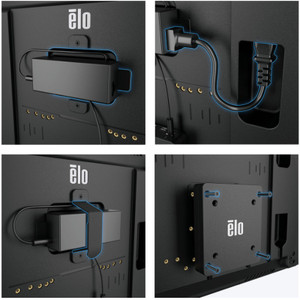
A: Yes, the monitor includes VESA 400×400 mounting compatibility, allowing integration into standard monitor arms, wall mounts, or command center rack systems.
Q: What is the touch response latency?
A: Projected capacitive touch on this model provides sub-50ms response time, adequate for interactive dashboards and real-time control applications. Exact latency depends on host system and USB polling frequency.
Q: Can the E103738 be used in a video wall configuration?
A: Yes, multiple E103738 units can be daisy-chained via DisplayPort 1.4 using compatible graphics cards and multi-display management software. Touch input on each unit remains independent via separate USB connections.
Q: What is the operating temperature range?
A: Operating range is 0°C to 40°C (32°F to 104°F). Do not install in unheated or uncooled spaces outside this envelope, as LCD performance and touch sensitivity degrade at temperature extremes.
Q: Does the monitor include a touch calibration tool?
A: Touch calibration is handled through standard Windows or Linux input settings. ELO provides a USB touch controller driver that includes calibration utilities; consult the manufacturer documentation for your specific OS.
Q: What warranty is included with the E103738?
A: Factory-new units are sourced with full manufacturer warranty. Verify the warranty period with your sales contact at order time.
I've spec'd the ELO Touch E103738 into three command centers over the past two years, and the 40-point capacitive touch with palm rejection is the feature that justifies the 50-inch form factor. In control rooms where two or three operators are simultaneously panning maps, zooming incident feeds, and adjusting sensor thresholds, resistive touch screens create bottlenecks — fingers trip over each other or the screen loses response if someone leans their palm on the edge. The E103738 eliminates that friction. The 4K resolution at 50 inches is also not overkill; dashboard text remains sharp and legible without requiring browser zoom hacks, which preserves UI workflow consistency.
Technical Highlights:
- Dual High-Speed Connectivity (DisplayPort 1.4 + HDMI 2.0): Both interfaces support 4K at 60 Hz, so you can upgrade graphics infrastructure incrementally. DisplayPort 1.4 future-proofs for higher color bit-depth and refresh rates; HDMI 2.0 keeps you compatible with budget workstations and legacy docking stations.
- Anti-Glare Glass Layer: In command centers with overhead fluorescents, this reduces the perceived brightness swing between background and display content. That matters for sustained operator focus — brightness > 500 nits for 12-hour shifts causes measurable eye strain.
- USB-C Single-Cable Option: If your graphics card supports USB-C with DisplayPort Alt Mode, the E103738 becomes a one-cable solution. That simplifies hot-swapping between fixed command workstations and portable incident response carts.
Deployment Considerations:
- Confirm your graphics card(s) support dual-display 4K at 60 Hz. Consumer-grade GPUs (GTX 1050, GTX 1650) often cap at single 4K or two 1440p outputs. Professional cards (RTX A2000 and above) handle it without breaking a sweat.
- Touch calibration can drift if the monitor is relocated or if room temperature swings exceed 20°C. Plan for quarterly re-calibration in high-traffic command centers, or automate it via a startup script if your VMS or display controller supports scripted input calibration.
- The anti-glare surface will show fingerprints and dust more visibly than a glossy panel. Budget for weekly cleaning in public-facing command centers; microfiber cloth with 70% isopropyl alcohol keeps it pristine without damaging the coating.
Deploy the E103738 in fixed-position command centers, SOCs, and large-format control room dashboards where multi-operator simultaneous input and readable 4K density are non-negotiable. It's overkill for single-operator workstations or for environments that don't require touch input; if touch isn't essential, a standard 4K commercial display cuts cost by 30–40%.