Product images are provided for reference and may not represent the exact model, configuration, or included components.

No Bots, Just Experts

Questions about this product? Free pre-sales support from a senior specialist — product questions, compatibility checks, BOM quotes, price confirmation — typically answered within one business day. Need camera placement or system design work? Engineering time is $175 per hour (qty 1 = 1 hour). Hardware buyers get up to one hour ($175) credited back on their order.

Description

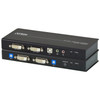
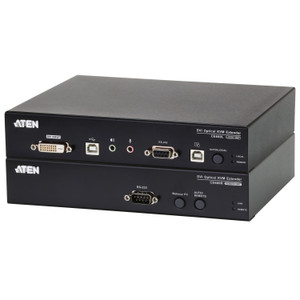
ATEN CE604 DVI Dual View KVM Extender

Overview

The ATEN CE604 is a DVI dual-view KVM extender that pushes keyboard, video, and mouse signals up to 200 feet (60 m) over standard Cat5e/6 cabling — eliminating the need to co-locate a workstation with its display or operator console. The CE604 is built for control rooms, broadcast suites, and industrial operator stations where a CPU must stay in a secured or climate-controlled rack while the operator sits at a remote console. The receiver unit (CE604R) connects over two RJ-45 lines and includes a wakeup button for remote system wake events, letting operators manage machines without physical access to the host. Maximum resolution is 1920×1200 at 60 Hz at distances up to 30 m; at 60 m, the signal steps down to 1024×768 at 60 Hz — plan your cable runs accordingly before committing to a resolution requirement at distance. Firmware v1.2.112 is the current release for the CE604R receiver.

Compatibility

The CE604 is designed for use within the ATEN KVM extender and matrix switching ecosystem. It is compatible with systems that output standard DVI-D video and use PS/2 or USB HID peripherals on the remote console side. It pairs with ATEN's broader KVM extender product line and integrates into ATEN KVM switch deployments where remote console access over structured Cat5e/6 network cabling is required. Confirm DVI output type (single-link vs. dual-link) on your source device before ordering — the CE604 is designed for single-link DVI at the stated resolutions. Not compatible with HDMI or DisplayPort sources without an active converter upstream.

Installation Notes

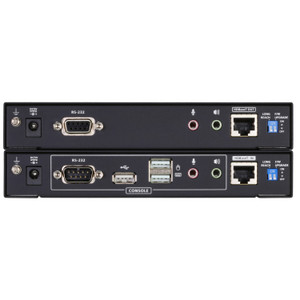
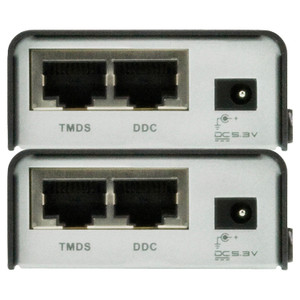
Signal extension uses two RJ-45 female ports on the receiver (CE604R); route both runs through the same conduit or bundle to minimize skew. Humidity tolerance is 0–80% RH non-condensing — do not install in environments with condensation risk. Rack-mount products in the CE604 family use an LxWxH dimensional convention rather than the standard WxDxH; verify rack unit measurements against your enclosure before mounting. The wakeup pushbutton on the receiver provides a single-press remote wake signal to the host — useful in deployments where the CPU is in a locked server room.

Specifications
Resolution: 1920x1200
Mount Type: Rack
Function: CE604R
Sub / Main: 2 x RJ-45 Female (Black)
Power: 1 (Green)
Wakeup Button: 1 x pushbutton
Video: 1920x1200 @ 60Hz (30 m); 1024x768 @ 60Hz (60 m)
Humidity: 0–80% RH, Non-condensing
Ce604 Um W 2019-11-22.Pdf (1.7 Mb: 2019-11-22
Firmware Upgrade: v1.2.112
Q&A
Reviews
Have Questions?

ATEN DVI Dual View KVM Extender UP to 200 FT.3 Years Warranty - CE604

$928.00
$643.99

RELATED PRODUCTS

Save $318.01
ATEN USB DVI Hdbaset 2.0 KVM Extender UP TO 330 FT W/ 1920X1200 4K
Add to Cart The item has been added

ATEN CE620

ATEN USB DVI Hdbaset 2.0 KVM Extender UP to 330 FT W/ 1920X1200 4K - CE620

USB DVI HDBaseT 2.0 KVM extender designed to push keyboard, video, and mouse signals up to 330 ft (100m) over a single Cat 6 or Cat 6a cable

    In stock · Ships same business day Free shipping over $499
    $1,039.00 $720.99 Save $318.01
    The item has been added Add to quote
    $1,039.00 $720.99 Save $318.01
    Save $318.01 Add to cart Add to quote

    System Design, Deployment & Technical Support

    Support services and planning resources for commercial surveillance, access control, and infrastructure deployments.

    Fixed scope • Fixed price

    System Design Assistance

    • Get help validating product compatibility
    • Coverage requirements
    • Storage planning and deployment architecture before you buy.
    Request Design Help

    Deployment & Configuration Support

    • Access fixed-scope support for rollout planning
    • User setup guidance
    • Migration and system standardization across single-site or multi-site deployments
    View Support Services

    Guides, Tools & Calculators

    • PoE requirements
    • Storage retention
    • Camera selection and deployment methodology
    Open Technical Resources