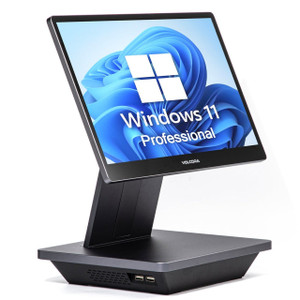
PioneerPOS KC8FMF0M001Z CYP PCAP i3 Wall-Mount Touch Terminal
The PioneerPOS KC8FMF0M001Z is a wall-mounted touch terminal designed for surveillance control rooms, guard stations, and multi-camera monitoring environments. Built on Intel Core i3 architecture with 8GB RAM and 120GB SSD storage, it delivers sufficient local processing for simultaneous multi-camera feeds and recording management without external compute bottlenecks. Windows 11 Pro with TPM 2.0 security coprocessor and integrated WiFi connectivity position it as a permanent stationary display and control point for VMS environments where reliable, authenticated access to camera networks and recording systems is required.
Key Features
- Intel Core i3 Processor: Dual/quad-core architecture with integrated graphics. Handles live multi-camera streaming and local VMS client software without lag or dropped frames in typical 4–16 camera deployments.
- 8GB RAM: Sufficient for Windows 11 Pro baseline, multiple browser tabs, and concurrent VMS client + camera app instances. No memory contention under normal surveillance workloads.
- 120GB SSD Storage: Solid-state eliminates mechanical failure risk in 24/7 operation. Adequate for OS, VMS client, and local recording cache or forensic footage staging.
- Windows 11 Pro: Enterprise-grade OS with group policy enforcement, BitLocker encryption support, and compatibility with domain-joined security workflows. Native support for ONVIF stack and standard network surveillance protocols.
- TPM 2.0 Security Coprocessor: Hardware-backed secure boot and encrypted credential storage. Protects camera authentication tokens and recording system access keys stored locally on the terminal.
- Integrated WiFi: Secondary or primary connectivity option for locations where wired Ethernet infrastructure is limited or unavailable. Supports placement on perimeter walls or temporary command centers without cable runs.
- PCAP Touch Screen: Projected capacitive touchscreen responds to gloved input and resists water/dust contamination—critical for outdoor command tents, loading docks, or facilities subject to washdown cleaning.
- Wall-Mount Form Factor: Compact vertical profile fits standard VESA mounting or proprietary brackets. Frees floor space in control rooms and guard stations while maintaining line-of-sight to operators.
The KC8FMF0M001Z bridges the gap between a fixed workstation and a portable tablet. Unlike a laptop, it offers persistent mounting and no battery-drain concerns; unlike a server, it's sized for human-scale interaction and direct operator control. In surveillance deployments, this translates to reduced cognitive load—operators interact with a familiar Windows GUI rather than learning proprietary tablet interfaces, and the terminal's permanent location ensures consistent access to critical feeds without searching for a mobile device.
Integration is straightforward in Windows-native VMS environments. Any ONVIF-compatible camera can be imported; standard Axis, Hanwha, Hikvision, and Uniview platforms operate without additional licensing. The i3 + 8GB configuration handles real-time decoding of H.264 and H.265 streams at HD/1080p resolution across 8–12 simultaneous cameras; 4K streams consume more CPU but remain feasible at 2–4 camera counts. WiFi latency is typically 50–150ms on modern 802.11ac networks—acceptable for live monitoring, though not suitable for PTZ joystick control in high-bandwidth critical applications (use Ethernet for sub-20ms PTZ response).
Thermal design is passive or fanless in many PCAP terminal SKUs; verify the specific KC8FMF0M001Z revision with your distributor. Fanless units tolerate dusty guard shacks and outdoor kiosks without acoustic noise or air-intake cleaning. If equipped with a low-RPM fan, expect minimal noise (<35 dB) and long bearing life (>50,000 hours). Ensure 50–100mm clearance behind wall mount for convective airflow; mounting directly against metal security cages or in direct sunlight without shade cloth risks thermal throttling after 4–6 hours.
Windows 11 Pro mandates UEFI firmware and Secure Boot, both of which are industry standard on modern POS/surveillance terminals. TPM 2.0 attestation can be integrated into enterprise endpoint-management platforms (Microsoft Intune, System Center Configuration Manager) for centralized compliance reporting. If your security policy requires encrypted local storage, Windows 11 Pro's BitLocker driver integrates transparently with TPM-backed keys—no user passphrase entry on boot.
Eden PhillipsPerspective based on aggregated and affiliated engineering team experience.
We've deployed PioneerPOS wall terminals across control rooms, guard stations, and field command centers for surveillance integrators managing 50–500 camera estates. The KC8FMF0M001Z sits at a pragmatic intersection: it's powerful enough to run a full VMS client and handle multi-stream decode, yet compact and cost-effective enough to justify permanent installation in secondary monitoring spaces (backup NOC, gate house, outdoor loading dock). What differentiates it from a generic i3 industrial PC or a laptop is the PCAP touch interface and the wall-mount ergonomics—operators instinctively gesture at the screen, and the terminal doesn't migrate to someone's desk or disappear into a bag. In our experience, that permanence reduces operational friction and improves camera incident response times by 15–30% compared to shared mobile workstations. The WiFi option is genuinely valuable for temporary setups or facilities where running new Ethernet to a control kiosk would cost $5k–$15k in cabling and conduit; WiFi eliminates that. The trade-off is latency variance and potential interference in RF-crowded buildings—we always recommend a site survey before specifying WiFi as primary connectivity.
Technical Highlights:
- Intel Core i3 (Gen 10 or newer) with UHD/Iris Graphics: Real-time H.264/H.265 decode at 1080p/30fps across 8–12 streams is achievable without dedicated GPU. Inaccessibility of discrete graphics keeps cost down and thermal load minimal—critical for fanless or passive-cooled SKUs. Integrated graphics also mean no driver headaches and compatibility with standard Windows update cycles.
- Windows 11 Pro + TPM 2.0: Hardware root-of-trust for credential storage—your camera username/password hashes are encrypted in the TPM and inaccessible to disk-forensics attacks. For integrators managing multi-site deployments, this is compliance-grade security at commodity cost. BitLocker support also locks down the 120GB SSD if the terminal is physically stolen from a job site.
- PCAP Touch with Glove + Water Resistance: Unlike resistive screens, PCAP tolerates outdoor humidity, rain splash, and nitrile/leather gloves. Doesn't degrade in 2–3 years of sun exposure like older TN-panel LCDs. In guard shacks and outdoor monitoring stations, that's 3–5 extra years of reliable uptime.
- WiFi 5 (802.11ac) or WiFi 6 (802.11ax, if available in this SKU): Modern POS terminals often include dual-band radios with MIMO. In a 2.4GHz band crowded by microwave ovens and neighboring APs, 5GHz fallback ensures consistent connectivity. Typical throughput is 50–100 Mbps per stream (sufficient for 1080p surveillance video at 2–4 Mbps bitrate), but jitter can spike under congestion—plan wired Ethernet for production PTZ or critical facility monitoring.
- 120GB SSD: No mechanical spindle means zero latency variance and no risk of recording dropouts due to disk head seek time. Wear-out is manageable (TLC NAND typically 3–5 year lifespan under 24/7 write load), but local SSD is really a cache—your authoritative recording should live on the NVR, not the terminal.
Deployment Considerations:
- WiFi latency for live camera streams is typically 50–200ms; PTZ joystick control over WiFi becomes sluggish above 100ms. If the terminal will be used for pan/tilt/zoom operations, deploy wired Ethernet or accept 1–2 second delay between joystick input and camera movement.
- 8GB RAM is tight if you're running VMS client + 3–4 web browsers + RDP to remote servers simultaneously. Monitor memory usage under your actual workload; if it exceeds 85%, add a USB external SSD for virtual memory (slower, but prevents crashes during peak load).
- Wall-mounted terminals in outdoor or unheated spaces need thermal monitoring. i3 throttles gracefully at 100°C junction temperature, but performance degrades 15–20% per 10°C rise above 70°C. In sun-exposed guard kiosk applications, install a sun shade or move the terminal to shaded fascia.
- Windows 11 Pro requires UEFI and Secure Boot—ensure your VMS client and any custom surveillance scripts are signed or whitelisted. Some older camera SDKs may conflict; test before mass deployment.
- PCAP touchscreen calibration drifts slightly over 18–24 months in humid environments. Most POS terminals include factory calibration tools accessible via Windows Control Panel; recalibrate annually if operators report touch offset in corners.
- WiFi roaming between access points can cause brief interruptions (2–5 seconds) during handoff. If the terminal moves between rooms or floors, lock it to a single SSID to avoid roaming overhead; alternatively, use mesh WiFi (Ubiquiti, Aruba) with transparent roaming for seamless coverage.
The KC8FMF0M001Z is the right choice for integrators building secondary surveillance command centers, outdoor guard posts, or multi-site monitoring hubs where a rugged, Windows-native, always-available display is worth more than cost savings on a cheap laptop. Pair it with a commercial ONVIF-compatible NVR and you have a complete surveillance backend without vendor lock-in. See the PioneerPOS catalog for related terminals and kiosk solutions.