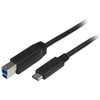
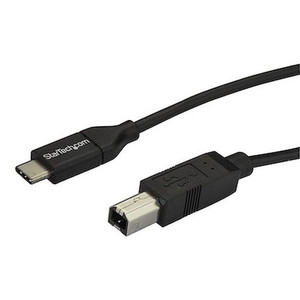
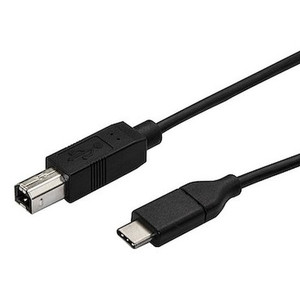
StarTech USB315CB2M USB-C to USB-B Cable — 6.6 ft, 5 Gbps
Overview
The StarTech USB315CB2M is a 2-meter (6.6 ft) USB 3.2 Type-C to Type-B cable engineered to connect USB-B peripheral devices — printers, scanners, external drives, and similar equipment — to USB-C or Thunderbolt 3 host ports. As workstations and laptops increasingly ship with only USB-C ports, older USB-B peripherals risk becoming stranded without a reliable bridge cable. The USB315CB2M fills that gap cleanly: full USB 3.2 Gen 1 speeds at 5 Gbps over a durable, shielded run that's long enough to route cleanly in most rack-adjacent or desk deployments without forcing your peripheral right next to the host.
Key Features
- 5 Gbps USB 3.2 Gen 1 Data Rate: Transfers a 1 GB file in roughly 2 seconds under ideal conditions. For high-volume document scanners or external storage devices, this headroom keeps throughput from becoming a workflow bottleneck compared to USB 2.0 alternatives.
- 6.6 ft (2 m) Cable Length: Provides enough reach to route from a desktop tower or laptop dock to a floor-standing printer or tabletop scanner without stressing connectors or creating cable tension — a common cause of intermittent USB disconnects.
- USB 3.2 Type-C to Type-B Connectors: The Type-C end plugs directly into modern USB-C ports and Thunderbolt 3 hosts (Thunderbolt 3 is backward-compatible with USB 3.2), while the Type-B end fits the square upstream port standard on the vast majority of USB printers, scanners, and lab instruments. No adapter required.
- Aluminum-Mylar Foil with Braid Shielding: The dual-layer shield — foil plus braid — suppresses both high-frequency radiated emissions and lower-frequency common-mode noise. In office environments with multiple switching power supplies and wireless access points nearby, this shielding keeps the data signal clean and reduces the likelihood of CRC errors that cause retransmissions and visible slowdowns.
- 22/30 AWG Wire Gauge: The heavier 22 AWG conductors handle power delivery to the peripheral, while 30 AWG data conductors keep the cable flexible and manageable. This gauge combination is appropriate for the 900 mA USB 3.x power delivery spec without resistive voltage drop that could destabilize bus-powered devices.
- Nickel Connector Plating: Nickel plating resists oxidation better than bare copper contacts, which matters in environments where cables are connected and disconnected frequently or where humidity is a factor. It also provides a consistent contact surface that maintains signal integrity over the connector's life cycle.
- PVC Cable Jacket: The PVC outer jacket is flexible enough for desktop routing and resists common office abrasion. It won't crack under normal bend cycles when routed around desk edges or through cable management trays.
- Black Finish: Neutral color routes unobtrusively through standard cable management hardware and doesn't stand out in professional or customer-facing environments.
Integration and Compatibility
The USB315CB2M works with any host system exposing a USB 3.2 or USB 3.1 Gen 1 Type-C port — this includes current-generation workstations, USB-C laptop docks, and Thunderbolt 3 equipped machines (Thunderbolt 3 supports USB 3.2 natively at the same physical connector). On the peripheral side, any device with a standard USB Type-B upstream port is compatible: laser and inkjet printers, flatbed and document scanners, audio interfaces, external hard drive enclosures, and measurement instruments. The cable is also backward-compatible with USB 2.0 hosts and devices, though data rate will negotiate down to 480 Mbps in that configuration — still sufficient for most printers and low-speed scanners. No driver installation is required; USB cables are plug-and-play at the OS level across Windows, macOS, Linux, and ChromeOS.
For USB cables and connectivity accessories, the USB315CB2M sits at the USB 3.2 Gen 1 tier. If your workflow demands USB 3.2 Gen 2 speeds (10 Gbps) for high-speed storage or camera tethering, verify that both your host port and peripheral support Gen 2 before stepping up to a higher-rated cable. For most printer and scanner connections, 5 Gbps is more bandwidth than the peripheral can saturate, making this cable the practical choice. See the full StarTech cable and connectivity catalog for related options including USB-A to USB-B variants, active extension cables, and USB-C hubs.
Frequently Asked Questions
Q: What devices is the USB315CB2M designed to connect?
A: The USB315CB2M connects USB-B peripheral devices — such as printers, scanners, and external drives — to USB-C or Thunderbolt 3 host ports. The Type-B end fits the square upstream port found on most printers and scanners; the Type-C end connects to modern laptops, workstations, and docks.
Q: Is the USB315CB2M compatible with Thunderbolt 3 ports?
A: Yes. Thunderbolt 3 uses the same USB-C physical connector and is backward-compatible with USB 3.2. The USB315CB2M will operate at USB 3.2 Gen 1 speeds (5 Gbps) when plugged into a Thunderbolt 3 port.
Q: Will this cable work with USB 2.0 printers or hosts?
A: Yes. The USB315CB2M is backward-compatible with USB 2.0. When connected to a USB 2.0 host or peripheral, the link negotiates to 480 Mbps — adequate for most printers and scanners. Full 5 Gbps requires both host and peripheral to support USB 3.x.
Q: What is the warranty on the USB315CB2M?
A: The USB315CB2M carries a 2-year manufacturer warranty.
Q: Why does shielding matter on a printer cable?
A: The USB315CB2M uses aluminum-Mylar foil combined with a braid shield. In environments with multiple wireless devices, switching power supplies, or dense cable runs, unshielded cables can pick up interference that causes USB errors, retransmissions, or intermittent disconnects. The dual-layer shielding on this cable suppresses both high- and low-frequency noise, keeping the data link stable.
Q: Is 6.6 ft long enough for most printer installations?
A: For most desk or workstation setups — laptop to printer on the same desk, or tower to a nearby floor-standing printer — 2 meters (6.6 ft) is sufficient and leaves enough slack for clean cable management. If the printer is in a separate location, consider an active USB extension or a networked print solution instead, as passive USB cables beyond 5 meters risk signal degradation.
The detail I always check first on a USB peripheral cable is the shielding spec — and the USB315CB2M's aluminum-Mylar foil plus braid combination is meaningfully better than the single-foil construction you'll find on budget cables. In a busy office or lab environment with multiple switching supplies and dense wireless coverage overhead, that dual-layer shield is the difference between a stable print queue and intermittent USB bus resets that nobody can diagnose.
Technical Highlights:
- 5 Gbps Data Rate: USB 3.2 Gen 1 throughput is far above what any current laser or inkjet printer requires — but it matters if this cable also services a scanner with a high-capacity document feeder or an external drive running a backup job alongside print tasks.
- 22/30 AWG Construction: The 22 AWG power conductors handle the 900 mA USB 3.x power spec without resistive drop. Bus-powered devices at the end of an undersized cable often exhibit unstable enumeration — this gauge avoids that problem at 2 meters.
- 2-Year Warranty: StarTech backs the USB315CB2M with a 2-year manufacturer warranty, which is worth noting for IT asset tracking and replacement planning in managed environments.
Deployment Considerations:
- At 2 meters, this cable sits comfortably within the 5-meter passive USB limit. Routing it through conduit or tight cable trays is fine, but avoid sharp 90-degree bends at the connector exits — PVC jackets under constant flex fatigue at stress points over time.
- If the host is a Thunderbolt 3 dock rather than a direct laptop port, confirm the dock's USB-C downstream ports are wired for data (not just power delivery) — some budget docks omit full USB 3.x data on their USB-C outputs.
For a shared workgroup printer in a commercial office — particularly one being migrated from a USB-A host to a USB-C workstation or dock — the USB315CB2M is the cable to reach for: correct connectors, adequate shielding for the environment, and a length that covers the typical desk-to-printer run without excess slack cluttering the cable tray.