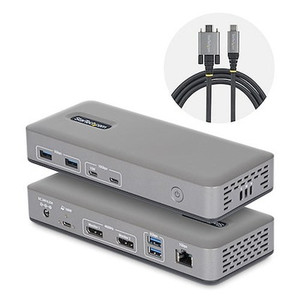
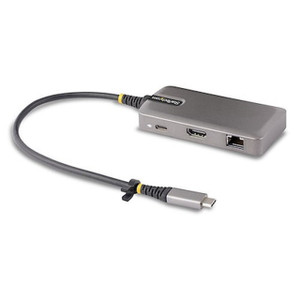
StarTech 199N-USBC-DOCK Triple-Display USB-C Docking Station
Overview
The StarTech 199N-USBC-DOCK is a single-cable USB-C docking station built to drive three simultaneous 4K displays from one host connection — two DisplayPort outputs at 4K 60Hz and one HDMI output at 4K 30Hz. For workstation operators, security analysts, and network engineers who routinely work across multiple screens, this dock eliminates cable clutter while keeping every monitor at full resolution. At 7.5 x 3.1 x 1.1 inches and 0.6 lb, it sits flat on a desk without demanding real estate, and a Kensington lock slot keeps it secured in shared-access environments.
The 199N-USBC-DOCK (often searched as 199N USBC DOCK) draws power from an included 100–240V AC adapter delivering 24V DC at 6.25A — 150W total system draw — so the dock itself handles its own power budget rather than loading the host USB-C port. That frees the host-side connection for pure data and display signaling.
Key Features
- 2x DisplayPort at 4K 60Hz: Both DP outputs run at full 3840×2160 at 60 frames per second simultaneously. For surveillance review workstations or multi-pane VMS dashboards, this means smooth, full-resolution playback on two monitors without dropped frames or resolution compromise — something that matters when reviewing 4K camera footage in real time.
- 1x HDMI at 4K 30Hz: The HDMI port extends to a third display at 4K resolution, suitable for status boards, reference monitors, or client-facing screens where 60Hz refresh is not critical. Three independent 4K screens from a single USB-C cable is the headline capability here.
- 100W USB-C Power Delivery: The host laptop receives up to 100W back through the dock's USB-C connection — enough to charge most commercial laptops at full speed while running all three displays and every peripheral simultaneously. No separate laptop charger required at the desk.
- 4x USB-A at 5Gbps + 2x USB-C at 10Gbps: Six downstream USB ports total. The four USB-A ports each handle 5Gbps throughput — fast enough for external SSD transfers, barcode scanners, or card readers. The two USB-C ports push 10Gbps each, which matters if you are moving large video files or connecting NVMe enclosures. The dock also provides 15W USB-C power output for charging phones or low-power peripherals.
- Gigabit Ethernet: Wired network connectivity without requiring a separate adapter. For environments where Wi-Fi is unreliable or restricted — data centers, secure control rooms, warehouse floors — the GbE port delivers stable throughput for VMS streams, VOIP, and file transfers at the same time the USB ports are active.
- Kensington Lock Slot: A small but operationally relevant feature in shared workspaces, trading floors, and security operations centers where unsecured peripherals represent an access risk. Cable-lock the dock to the desk in under 30 seconds.
- Wide Input Voltage (100–240V AC): The included power adapter accepts any mains voltage globally, so the dock travels between regions or gets deployed across international facilities without a voltage converter.
- Operating Temperature 0°C to 70°C: Rated for standard commercial indoor environments. This is not an outdoor or industrial-hardened device — it belongs at a workstation, not in a conditioned-air-free equipment closet.
Integration and Compatibility
The 199N-USBC-DOCK connects to any host with a USB-C port that supports DisplayPort Alt Mode and USB Power Delivery. Verify your laptop or workstation supports DP Alt Mode over USB-C — not all USB-C ports on all machines do. The dock's display output capability is dependent on the host GPU's ability to drive three independent streams simultaneously; some integrated graphics configurations may limit multi-display output. The gigabit Ethernet port requires a driver on some operating systems — check StarTech's support page for your OS version before deployment. The 3-year manufacturer warranty covers the dock and its components.
Frequently Asked Questions
Q: Does the 199N-USBC-DOCK support three monitors running simultaneously at 4K?
A: Yes — two DisplayPort outputs run at 4K 60Hz simultaneously and the HDMI output runs at 4K 30Hz, for a total of three active 4K displays from one USB-C connection. Host GPU capability must support three independent display outputs.
Q: How much power does the dock deliver back to the laptop?
A: The dock passes up to 100W back to the host laptop via USB-C Power Delivery. This is sufficient to charge most commercial laptops at full rate while all ports and displays are active.
Q: Does the 199N-USBC-DOCK require a separate power supply?
A: Yes — the dock includes an external power adapter (100–240V AC input, 24V DC / 6.25A output). It does not draw operating power from the host USB-C port; the adapter is required for full functionality.
Q: What is the warranty on the 199N-USBC-DOCK?
A: StarTech covers the 199N-USBC-DOCK with a 3-year manufacturer warranty.
Q: Can I use the dock in a non-US country?
A: The included power adapter accepts 100–240V AC input, making it compatible with mains voltages used worldwide. A plug adapter for the local outlet type may be needed.
Q: What is the USB-C power output for charging peripherals?
A: One of the downstream USB-C ports provides 15W of power output for charging phones or low-power USB-C devices. This is separate from the 100W host PD pass-through.
The spec that stands out on the 199N-USBC-DOCK for security operations deployments is the 100W USB-C Power Delivery combined with three simultaneous 4K outputs — that is a single cable replacing what used to be a power brick, a DisplayPort hub, and an HDMI adapter all fighting for desk space in a cramped SOC analyst station. When you are building out a multi-screen video review workstation, the last thing you want is a dock that can only push one monitor at full 4K or throttles charging under display load.
Technical Highlights:
- Dual 4K 60Hz DisplayPort: Both DP outputs sustain 3840×2160 at 60fps simultaneously — essential for real-time VMS playback where lower refresh rates create the impression of dropped frames in motion-heavy scenes.
- 100W Host PD Pass-Through: Delivers full laptop-class charging at 100W while every port is active. No separate charger needed at the analyst desk, which simplifies cable management and reduces desk clutter in high-density workstation rows.
- 6x USB Downstream Ports (5Gbps + 10Gbps mix): Four USB-A at 5Gbps and two USB-C at 10Gbps handle simultaneous connections for input devices, external storage, and card readers without bandwidth contention on typical workstation loads.
Deployment Considerations:
- Confirm USB-C DisplayPort Alt Mode support on the host machine before ordering — the dock's triple-display output is entirely dependent on host GPU and port capability. A USB-C port that supports only charging or data will not drive any displays through this dock.
- The 150W total system power draw means the external adapter is non-optional — do not plan to run this dock bus-powered. The adapter is included, but budget for a UPS or filtered PDU in sensitive environments since the dock itself has no surge protection documentation in evidence.
The 199N-USBC-DOCK is the right fit for security analyst workstations and network operations centers where a single operator needs three 4K displays, wired Ethernet, and full laptop charging from one connection point — particularly in deployments where desk cable density is already a management problem.