

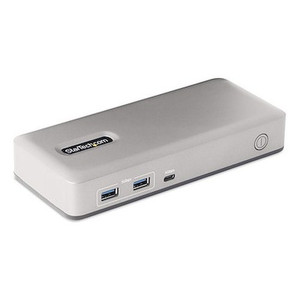
StarTech Dual-monitor Usb-c Docking Station - 101N-USBC-DOCK
In stock · Ships same business day
Free shipping over $499
$163.99

Manufacturer-verified compatible cameras, recorders, mounts, accessories, and licenses for this product. Adjust quantities and add the entire bundle to your cart in one click.
Questions about this product? Free pre-sales support from a senior specialist — product questions, compatibility checks, BOM quotes, price confirmation — typically answered within one business day. Need camera placement or system design work? Engineering time is $175 per hour (qty 1 = 1 hour). Hardware buyers get up to one hour ($175) credited back on their order.
The StarTech 116N-USBC-DOCK is a universal docking station designed to expand the capabilities of USB-C or USB-A enabled laptops. It addresses the need for increased display output, high-speed data transfer, and simultaneous device connectivity, particularly in environments where multiple monitors and peripherals are essential for productivity, such as workstations or trading desks. This dock supports up to three external displays, providing a significant boost in screen real estate for multitasking. The 116N-USBC-DOCK model offers a robust solution for consolidating connections and powering your laptop through a single cable.
This docking station is compatible with laptops featuring USB 3.2 Gen 2 (10Gbps) or USB 3.2 Gen 1 (5Gbps) ports, including Thunderbolt 3 and Thunderbolt 4 enabled systems. It supports Windows 10 and later, macOS 10.14 and later, and ChromeOS 5.0 and later. For optimal performance, particularly for dual 4K 60Hz displays, a USB 3.2 Gen 2 (10Gbps) connection is recommended. Older USB 3.0/3.1 Gen 1 (5Gbps) connections will function but may have display resolution limitations.
Connect the included 100W AC power adapter to the docking station and a wall outlet. Use the included USB 3.2 Type-C cable to connect the dock to your laptop's USB-C port. For laptops requiring higher power delivery than the dock's 100W output, ensure the laptop's original power adapter is connected directly to the laptop. The RJ-45 port supports 10/100/1000 Mbps Ethernet connectivity.

Manufacturer-verified compatible cameras, recorders, mounts, accessories, and licenses for this product. Adjust quantities and add the entire bundle to your cart in one click.


Looking for more StarTech products? Shop the full StarTech catalog →
Support services and planning resources for commercial surveillance, access control, and infrastructure deployments.
Fixed scope • Fixed price