
Sato W2312-400NB-EX1 vs Zebra ZT11143-D01000FZ: Specification Comparison
Both the Sato WS2 W2312-400NB-EX1 and the Zebra ZT11143-D01000FZ are desktop-class 300 DPI direct thermal label printers aimed at shipping, warehousing, and barcode printing applications. Neither uses a ribbon, both connect via Ethernet and USB, and both carry a one-year warranty. This comparison examines print performance and media handling, connectivity and integration options, and form factor and operator experience to help installers and IT buyers determine which unit better fits their deployment.
In This Guide
- Which printer delivers faster throughput and handles wider or higher-capacity media?
- Which printer offers broader connectivity for legacy and modern warehouse management systems?
- Which printer is better suited to fixed-station deployment and daily operator interaction?
- Which should you choose: the W2312-400NB-EX1 or the ZT11143-D01000FZ?
- Side-by-Side Specs
- FAQ
Which printer delivers faster throughput and handles wider or higher-capacity media?
The Sato W2312-400NB-EX1 is rated at 7 inches per second (ips) print speed. The Zebra ZT11143-D01000FZ does not have a print speed specified in the provided data, so a direct speed comparison cannot be made.
On print width, the Sato specifies a maximum print width of 2.2 inches. The Zebra ZT11143-D01000FZ does not list a maximum print width in the provided specifications.
For media capacity, the Sato supports roll stock up to 5 inches outer diameter. The Zebra specifies roll label stock as the supported media type but does not provide an outer-diameter or roll-capacity figure in the provided data.
Both units are rated at 300 DPI resolution, placing them on equal footing for barcode scan-reliability and fine-print legibility.
Which printer offers broader connectivity for legacy and modern warehouse management systems?
The Sato W2312-400NB-EX1 provides USB 2.0, Ethernet, Wi-Fi, and Bluetooth. The inclusion of Wi-Fi enables wireless placement without running Ethernet drops to each station.
The Zebra ZT11143-D01000FZ provides USB, Ethernet, and Bluetooth Low Energy (BTLE). The Zebra specification also references RS-232 compatibility in its card bullets, which addresses legacy WMS serial interfaces. However, Wi-Fi is not listed in the Zebra's provided specifications.
For Bluetooth, the Zebra explicitly identifies BTLE as the Bluetooth standard. The Sato lists Bluetooth without specifying the version or standard in the provided data.
The Sato specifies Windows operating system compatibility. The Zebra does not list a supported OS in the provided specifications. Buyers integrating with specific WMS platforms should verify driver and SDK support with each manufacturer independently.
Which printer is better suited to fixed-station deployment and daily operator interaction?
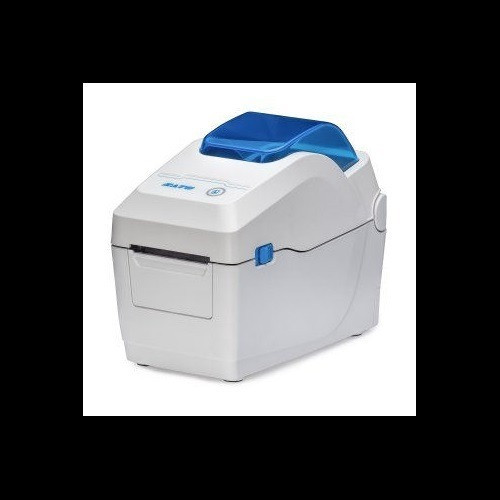
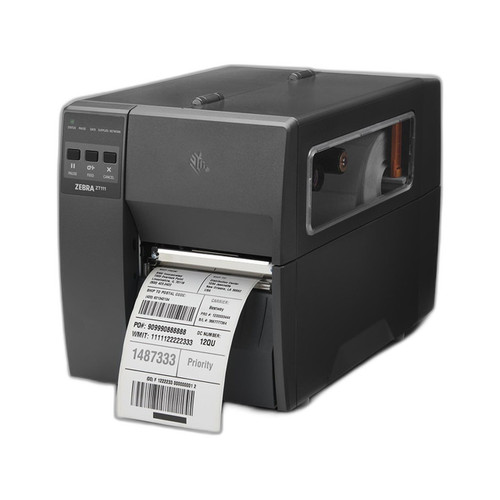
Both units share a desktop form factor and are intended for fixed-station use. The Zebra ZT11143-D01000FZ includes an integrated tear-off bar, which is a noted feature for high-volume label dispensing without an additional accessory.
The Sato W2312-400NB-EX1 includes a 2.4-inch color LCD display, per the provided card bullets. This facilitates on-device media-change guidance and status feedback for operators. The Zebra does not list a display type or size in the provided specifications.
The Zebra ZT11143-D01000FZ specifies AC power at 110–240V, confirming universal voltage input suitable for North American and international deployments. The Sato does not list a power input specification in the provided data.
The Zebra is noted as factory-configured for North America. The Sato does not specify a regional configuration in the provided data.
Which should you choose: the W2312-400NB-EX1 or the ZT11143-D01000FZ?
Our take: The W2312-400NB-EX1 is the stronger choice when wireless flexibility, a richer operator interface, and a confirmed print speed are primary requirements. The Sato documents a 7 ips print rate, a 2.4-inch color LCD for guided media changes, and adds Wi-Fi to the standard USB/Ethernet/Bluetooth stack—none of which appear in the Zebra's provided specifications. The ZT11143-D01000FZ counters with an integrated tear-off bar for streamlined high-volume label dispensing, explicit BTLE identification, RS-232 legacy-serial support, and a confirmed 110–240V universal power input—all absent or unspecified for the Sato. Where print speed, wireless mobility, and operator guidance matter most, the Sato's documented specs support it. Where legacy serial WMS integration, universal power, and a built-in tear-off mechanism are the deciding criteria, the Zebra's spec sheet is more explicit. Buyers should request full datasheets from both manufacturers to fill the gaps before finalizing either selection.
Side-by-Side Comparison
Spec-for-spec, from manufacturer data.
| Specification | Sato W2312-400NB-EX1 | Zebra ZT11143-D01000FZ |
|---|---|---|
| Print Technology | Direct Thermal | Direct Thermal |
| Resolution | 300 DPI | 300 DPI |
| Print Speed | 7 ips | — |
| Max Print Width | 2.2 inches | — |
| Media Roll Capacity | 5 inch OD | — |
| Form Factor | Desktop | Desktop |
| Tear-Off Bar | — | Integrated |
| USB | USB 2.0 | USB |
| Ethernet | Yes | Yes |
| Wi-Fi | Yes | — |
| Bluetooth | Yes (standard not specified) | BTLE |
| RS-232 / Serial | — | Yes (per card bullets) |
| Display | 2.4-inch color LCD | — |
| Power Input | — | AC 110–240V |
| OS Compatibility | Windows | — |
| Warranty | 1 Year | 1 Year |
Frequently Asked Questions
Which should you choose: the W2312-400NB-EX1 or the ZT11143-D01000FZ?
The W2312-400NB-EX1 is the stronger choice when wireless flexibility, a richer operator interface, and a confirmed print speed are primary requirements. The Sato documents a 7 ips print rate, a 2.4-inch color LCD for guided media changes, and adds Wi-Fi to the standard USB/Ethernet/Bluetooth stack—none of which appear in the Zebra's provided specifications. The ZT11143-D01000FZ counters with an integrated tear-off bar for streamlined high-volume label dispensing, explicit BTLE identification, RS-232 legacy-serial support, and a confirmed 110–240V universal power input—all absent or unspecified for the Sato. Where print speed, wireless mobility, and operator guidance matter most, the Sato's documented specs support it. Where legacy serial WMS integration, universal power, and a built-in tear-off mechanism are the deciding criteria, the Zebra's spec sheet is more explicit. Buyers should request full datasheets from both manufacturers to fill the gaps before finalizing either selection.
Does the W2312-400NB-EX1 or the ZT11143-D01000FZ support wireless printing?
Based on the provided specifications, only the Sato W2312-400NB-EX1 lists Wi-Fi as a connectivity option. The Zebra ZT11143-D01000FZ specifications do not include Wi-Fi; its wireless capability is limited to Bluetooth Low Energy (BTLE). If wireless LAN printing is required, the Sato is the only model with that spec documented here.
Which printer is better for high-volume fixed-station label dispensing in a distribution center?
The Zebra ZT11143-D01000FZ specifies an integrated tear-off bar and is described as targeting high-volume shipping label applications with legacy WMS compatibility via RS-232 and BTLE. The Sato W2312-400NB-EX1 documents a 7 ips print speed and a 5-inch OD media roll capacity. The Zebra's print speed is not provided in the available data, making a direct throughput comparison impossible. The Zebra's tear-off feature and serial port support may favor fixed high-volume DC deployments where legacy integration is needed.
Are both printers ribbon-free, and does either require special media?
Yes. Both the Sato W2312-400NB-EX1 and the Zebra ZT11143-D01000FZ use direct thermal printing, which requires no ink ribbon. Both use roll label stock. The Sato specifies rolls up to 5 inches outer diameter; the Zebra does not specify a maximum roll size in the provided data. Direct thermal media is heat-sensitive and not recommended for applications requiring long-term label durability under UV or high-temperature exposure.
Get a Second Opinion on Your Camera Choice
Share your site layout, coverage goals, and budget. Our team will validate the camera selection, flag anything we would change, and recommend products that match the use case.