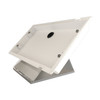
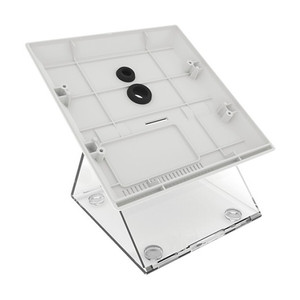
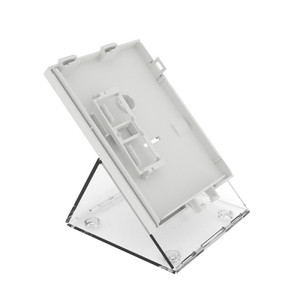
Comelit 6812 Desk Base for Maxi Monitor
Overview
The Comelit 6812 is a desk base accessory engineered to mount the Comelit Maxi Monitor in fixed desktop and countertop installations. This mount delivers stable positioning for video intercom displays in reception areas, security offices, and building entry points where a permanent, non-adjustable display fixture is required. Unlike wall-mounted or swivel-arm alternatives, the 6812 provides a self-contained footprint suitable for cramped workstations or areas where drilling into walls is impractical.
Key Features
- Fixed Desktop Mounting: Designed for stationary positioning on flat surfaces — countertops, reception desks, control room benches. Once installed, the display does not move, eliminating pinch-point hazards and reducing accidental knock-over risk in high-traffic areas.
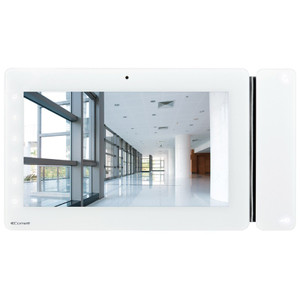
- Maxi Monitor Compatibility: Engineered specifically for Comelit Maxi Monitor systems. The mechanical interface is designed to Comelit specifications, ensuring secure seating without additional adapters or aftermarket brackets.
- Indoor Commercial/Residential Environments: Rated for indoor use in temperature-controlled settings — reception lobbies, apartment building entry halls, office security stations, and residential building foyers. Not intended for outdoor, wet, or extreme temperature deployments.
- Integrator-Ready Installation: Designed as a plug-and-play mounting solution for Comelit video intercom deployments. Minimal assembly required; works with standard Comelit wiring and integration practices used by installers deploying Comelit video entry systems.
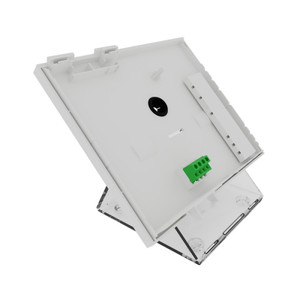
- Compact Footprint: A desk-based mount saves wall real estate and simplifies cable routing — video and audio connections run downward to the back of the base rather than being concealed in walls or conduit.
- Secure Seating: Provides solid, level support for the Maxi Monitor display, preventing tilt, sag, or vibration-induced drift during normal operation or accidental contact.
Integration & Compatibility
The 6812 is engineered for integration with Comelit video intercom systems. It supports stationary positioning in any indoor commercial or residential environment where a fixed video entry display is appropriate. When deploying video intercom equipment, desk-based mounting offers a middle ground between wall-mounted solutions (which require drilling and patch work) and portable monitors (which lack stability). The 6812 is compatible with standard Comelit wiring practices and does not introduce incompatibilities with PoE or power supply architectures already present in a Comelit video entry deployment. Integrators using Comelit Maxi Monitors in multi-unit residential buildings, office complexes, or commercial entry control systems will find the 6812 a practical alternative when wall mounting is restricted by building codes, lease agreements, or aesthetic preferences. For deployments requiring tilt, pan, or swivel adjustment post-installation, consider alternative mounting strategies or consult a video intercom accessories reference to verify alternative mounting options within the Comelit product family.
Deployment Considerations
Install the Comelit 6812 on a flat, level surface away from high-traffic walkways where foot traffic might jostle the base. Ensure adequate clearance behind the monitor for cable routing — video, audio, and power connections should descend into cable management or conduit without sharp bends. Verify that the surface is free from liquid splash — while the monitor itself may have some rating for indoor dust, the 6812 desk base and its mounting points are not sealed against liquid ingress. For wet environments (e.g., building lobbies with frequent cleaning, facilities near humidifiers or steam pipes), a wall-mounted solution with drip loops is recommended instead. Test the base for wobble after final positioning; uneven surfaces can cause the monitor to drift out of vertical alignment over time.
Frequently Asked Questions
Q: Can the 6812 be wall-mounted?
A: No. The 6812 is designed as a desk or countertop base only. It is not engineered for wall, ceiling, or pendant mounting. For wall mounting, consult Comelit's wall-mount accessory options or contact your integrator for alternative mounting solutions.
Q: What surfaces work best for desk installation?
A: Flat, level, solid surfaces such as reception desks, control room benches, or countertops work best. Avoid uneven or flexible surfaces (e.g., mobile carts, thin shelving) that may introduce vibration or tilt.
Q: Is the 6812 compatible with other manufacturers' monitors?
A: The 6812 is engineered specifically for Comelit Maxi Monitor systems. Use with non-Comelit displays is not recommended and may result in instability or mechanical damage.
Q: What is the maximum viewing angle from the 6812 base?
A: The 6812 provides a fixed, non-adjustable mounting position. Viewing angle is determined by the monitor's physical orientation once seated on the base. The base does not support tilt or pan adjustment after installation.
Q: Can outdoor or wet-environment monitors be installed on the 6812?
A: No. The 6812 is rated for indoor, temperature-controlled environments only. Wet-environment or outdoor Maxi Monitor displays require different mounting solutions engineered for those conditions.
Q: How is cable management handled with the 6812?
A: Connections route downward from the rear of the base. Route video, audio, and power cables through conduit, cable trays, or desk grommets as appropriate for your installation. Plan cable paths before final positioning to avoid sharp bends or pinch points.
Ted PerryPerspective based on aggregated IP Security Depot and affiliated engineering team experience.
The Comelit 6812 is a straightforward accessory — a fixed desktop base for the Maxi Monitor. If your deployment calls for a video intercom display that stays in one place and doesn't need wall drilling, this is your answer. The 6812 solves a real problem: permanent indoor positioning without construction work, and it does exactly that.
Deployment Strengths:
- No Wall Modification Required: Drop it on a desk, wire it, and go. Useful in rented spaces, historic buildings, or facilities where wall-mount brackets would violate lease terms or aesthetic requirements.
- Stable Footprint: A fixed base eliminates the wobble or drift risk that sometimes plagues wall-mounted displays in high-vibration environments (e.g., buildings near transit hubs or factories). Once seated, the monitor stays level.
- Cable Routing Simplicity: Connections exit downward; no need to fish cables through walls or hide conduit on finished surfaces. Desk-based positioning also makes future maintenance or display replacement faster.
Deployment Gotchas:
- Fixed Angle Only: The 6812 offers no tilt or swivel adjustment. If your user's eye line or preferred viewing angle doesn't align with the monitor's native orientation once mounted, you cannot adjust it. Plan monitor height and angle before final installation.
- Footprint Trade-off: A desk base occupies surface real estate. In cramped reception areas or control rooms where desk space is premium, the 6812 may crowd work surfaces. Wall mounting, by contrast, leaves the desk clear.
- Indoor-Only Rating: This is not a weather-sealed solution. Outdoor vestibules, unconditioned loading docks, or high-humidity spaces (e.g., kitchens, laundries) are out of scope. Moisture and temperature swings will degrade the mount and display over time.
Position the 6812 in reception lobbies, apartment entry halls, and office security stations where a permanent, maintenance-free video intercom display is the goal and wall drilling is not an option. Skip it if you need pan/tilt flexibility or if the installation is outdoors or in a wet environment.