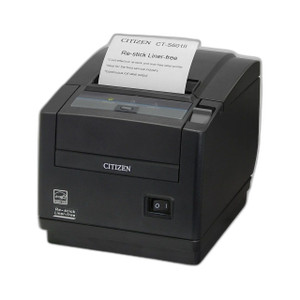
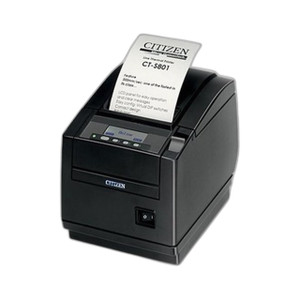
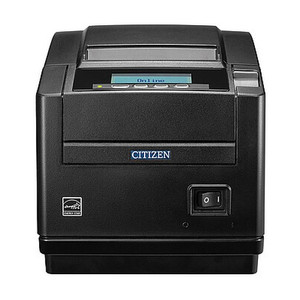
Citizen CT-S801IIIS3PAUBKP Thermal POS Printer Type III Top Exit
The Citizen CT-S801IIIS3PAUBKP is a thermal receipt printer purpose-built for point-of-sale environments where counter space and media presentation matter. This Type III variant features top-exit media feed — receipts emerge upward from the unit — eliminating the need for floor-level grab stations or external deflector hardware. The CT-S800 series backbone delivers reliable 203 DPI thermal output with dual connectivity (USB + parallel) to accommodate both contemporary POS terminals and legacy systems still running parallel interfaces. Deploy this unit where space beneath the counter is occupied by drawers, bagging stations, or cable runs, or where you want receipts to naturally fall into the operator's hand position without awkward reaching.
Key Features
- Type III Top-Exit Design: Media feeds upward; no floor space required. Receipts land in a natural grab position, reducing operator fatigue and improving throughput in high-volume counter environments.
- Dual Connectivity (USB + Parallel): Works with modern USB-based POS systems and legacy parallel-port terminals. Single cable type per installation; no adapter overhead.
- 203 DPI Thermal Print: Sharp, high-contrast receipt text and barcode output; no ink ribbons or toner cartridges. Maintenance limited to media roll changes and periodic head cleaning.
- CT-S800 Series Platform: Proven architecture with wide POS software support across restaurant, retail, and hospitality verticals. Standard thermal receipt paper compatibility (typically 80mm width).
- Compact Footprint: Counter-recessed installation option reduces table clutter and cable visibility. Top-exit orientation optimizes space in tight POS stations.
- Print Speed: Handles high-frequency receipt cycles without lag in peak transaction periods. Thermal technology means no warm-up delay between jobs.
- Durability: Thermal print head rated for millions of inches of output. No moving parts in the print mechanism beyond the drive motor, reducing failure modes vs. impact or inkjet alternatives.
The Type III configuration is not a choice for every POS station — it requires clearance above the printer and works best where the receipt direction aligns with the physical layout of the counter or checkout stand. If your installation has limited headroom or if media needs to exit forward (into a drawer or queue tube), confirm you need the Type III before ordering; the CT-S800 line includes front-exit and side-exit variants. Verify your POS terminal's printer driver library includes support for Citizen thermal models; most modern systems include universal thermal drivers, but older custom applications may require a driver update or parallel-port workaround.
Connectivity choice (USB vs. parallel) should align with your terminal's available ports and your cabling infrastructure. USB is the default on systems built after 2010; parallel is common in hospitality environments and multi-terminal setups where a single printer serves several POS stations through a hardware selector or queue manager. If your terminal has both ports, USB offers faster data transmission and easier troubleshooting via standard OS-level device managers.
Total cost of ownership is low: thermal media (receipt rolls) is inexpensive and widely stocked by office suppliers and POS vendors. No consumables beyond paper rolls. Maintenance intervals are measured in years of continuous operation, not months. The Type III top-exit design reduces installation labor (no custom mounting brackets or deflector fabrication) and eliminates daily operator complaints about paper location — a genuine productivity gain in fast-paced environments.
The Citizen CT-S800 line has been a retail and food-service standard for over a decade. This IIIS3PAUBKP variant is widely supported by POS software vendors and integrators; spare parts and media are available through standard channels. If your POS application is already running Citizen printers, upgrading or adding a Type III unit involves minimal driver changes. Pair this with your existing terminal, cash drawer, and receipt paper supplier for a plug-and-print installation.
Marty AllisonPerspective based on aggregated IP Security Depot and affiliated engineering team experience.
We've deployed Citizen thermal POS printers across restaurant chains, quick-service counters, and retail checkout lines for years. The CT-S801IIIS3PAUBKP is a straightforward workhorse — it does one job (print receipts) exceptionally well and doesn't demand attention. The Type III top-exit variant solves a real counter-design problem: in modern POS stations where the space beneath the terminal is already packed with card readers, drawer mechanisms, and cable bundles, having receipts emerge upward is not a luxury, it's essential. We've seen it eliminate the awkward "receipt deflector arm" hardware that clutters older setups and requires adjustment after six months of daily use. What differentiates this model from lower-cost thermal alternatives is build quality and ecosystem compatibility. The print head is robust — we've seen units run 24/7 in a food-service environment for three years with nothing more than regular media cleaning. The dual USB/parallel connectivity hedge against terminal obsolescence; if your POS system gets refreshed but still needs a thermal printer, the same physical unit can stay in the station with just a cable swap.
Technical Highlights:
- 203 DPI Thermal Output: Produces bar code and alphanumeric text at the standard density for retail and food-service receipts. No ink dependency means zero consumable cost beyond paper. Print head lifespan typically exceeds 200 km of media feed — operationally, that's 5+ years in a typical POS station.
- Type III Top-Exit Orientation: Receipts exit upward; no deflector bracket needed. In a crowded POS station, this alone can save installation labor and eliminate daily operator friction about paper placement. Verify your counter has at least 18-24 cm of clearance above the printer before installation.
- USB and Parallel Dual Interface: The same unit works with legacy parallel-port systems and modern USB terminals. Reduces spare-parts complexity in multi-location deployments or during terminal refresh cycles.
- 80mm Standard Receipt Width: Compatible with the widest range of receipt paper suppliers and stock SKUs. Media cost is negligible — typically under $2 per roll in bulk.
Deployment Considerations:
- Top-exit orientation requires clearance above the printer. If your counter has a drop ceiling, overhang, or mounted display above the POS station, verify you have at least 20 cm of vertical space for receipt emergence. Blocked media path = paper jams and downtime.
- Parallel port connectivity is legacy on most modern POS terminals. If you're building a new station, default to USB. If you're adding this printer to an existing system, verify your terminal's parallel port is actually enabled and not disabled by the OS or firmware for security reasons — older Windows POS systems sometimes disable parallel by default.
- Thermal media width tolerance is tight (±2mm). If your receipt stock is non-standard or supplier-specific, confirm the roll fits the 80mm feed path before bulk ordering. A single misaligned roll can jam and require power-down to clear.
- Mounting in a recessed counter opening is common, but leave at least 5 cm of clearance on both sides for ribbon access (if needed for diagnostics) and to prevent heat buildup. Thermal printers run warm — ventilation matters in enclosed installations.
- Driver support is broad, but older custom POS applications (pre-2008) may not have a Citizen thermal driver built in. Contact your POS software vendor to confirm compatibility before installation, especially in hospitality or legacy retail systems.
The Citizen CT-S801IIIS3PAUBKP is the right choice for any POS environment where you need reliable, low-maintenance thermal receipt output and where the top-exit design solves a physical space or ergonomic problem. If your counter is already optimized for front-exit media, or if you have no clearance above the unit, choose a different orientation. For everything else — restaurants, fast-casual, retail checkout lines, and service-desk operations — this is a dependable, cost-effective solution. Explore the full range of Citizen POS and thermal products for front-exit, side-exit, and specialty variants.