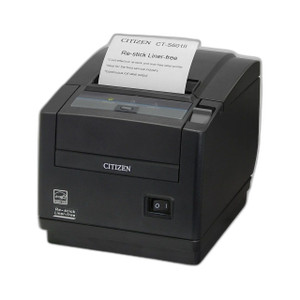
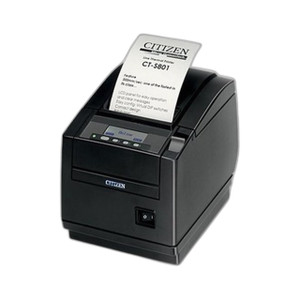
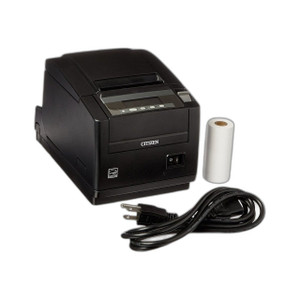
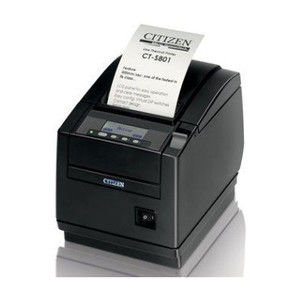
Citizen CT-S801IIIS3ETUBKP Thermal POS Printer Type III
The Citizen CT-S801IIIS3ETUBKP is a Type III direct-thermal receipt printer designed for fixed-position retail, hospitality, and quick-service restaurant (QSR) point-of-sale environments. The top-exit paper configuration eliminates the operational friction of bottom-feed systems in cramped counter layouts—receipts exit upward, keeping the operator's hands clear of the printer footprint and reducing paper jams caused by reaching under or around the device. Dual USB and Ethernet (EFX1) connectivity ensures compatibility with legacy serial-over-IP terminals, modern POS software stacks, and hybrid deployments where redundant connectivity improves uptime on high-volume transaction floors.
Key Features
- Top Exit Paper Path: Receipts feed upward for ergonomic reach and reduced jamming in counter setups with overhead clearance constraints.
- Type III Thermal Cartridge: Standard Citizen Type III form factor — interchangeable thermal print head and platen roller simplify maintenance and spare-parts logistics across multi-unit deployments.
- USB and Ethernet Connectivity: Dual connectivity (USB Type-A + RJ-45 EFX1 protocol) works with both legacy serial-relay terminals and modern POS software; eliminates need for external serial-to-Ethernet adapters.
- Direct Thermal Technology: No ink ribbon required — lower consumable cost per receipt and reduced mechanical wear versus impact dot-matrix or ribbon-fed printers.
- Compact Desktop Footprint: Fits standard retail counter layouts without requiring dedicated cabinetry or wall mounting; power and network cables route discretely behind the device.
- High-Speed Print Capability: Type III mechanism delivers receipt output within 2–3 seconds per transaction, keeping payment-line throughput competitive even during peak-traffic periods.
The Type III thermal architecture is the industry standard for compact POS environments. Unlike Type II (smaller form factor, lower throughput), the Type III balances print speed, paper capacity, and long-term reliability across high-volume retail floors. Direct thermal eliminates the weekly ribbon changes and ribbon-feed jams that plague impact printers, and the cartridge-based design means operators or technicians can swap a worn print head in under 5 minutes without calling a service technician.
Dual connectivity (USB + Ethernet via EFX1) solves the real-world problem of aging POS terminals that expect serial or Ethernet input but lack modern USB drivers. Many retail sites run Windows-embedded POS systems (10-year-old stand-alone kiosks, QSR order stations) that won't recognize USB printers without third-party drivers. The EFX1 Ethernet option bridges that gap—the printer registers as a standard network device, and the terminal's legacy thermal-printer driver talks to it over the LAN. USB provides a fallback for locations upgrading to modern cloud-connected POS tablets or modern countertop terminals.
Paper exit routing matters more than most integrators expect. Bottom-exit printers force the operator to reach down and pull receipts out from below the printer, which creates ergonomic friction, accidental paper jams when the operator's hand clips the paper path, and receipt crumpling in high-traffic environments. Top-exit design routes the receipt upward, where operator reach is at chest height—natural, fast, and dramatically reduces jam frequency. In kitchens and food-service lines where hand sanitizer and damp hands are constant, the top exit also reduces the likelihood of moisture entering the paper feed mechanism.
Thermal print quality depends on clean printheads and proper platen pressure. The Type III cartridge design makes this easier—platen and head assembly is a single swappable unit, not a field-calibrated sub-assembly. Dust, adhesive residue from receipt paper, and thermal transfer buildup degrade print darkness and legibility over 12–24 months of heavy use. Budget for replacement cartridges every 18–36 months depending on volume; a spare cartridge costs 15–25% of the printer's initial price and can be swapped in under 5 minutes if print quality degrades mid-shift.
Deployment Context
The CT-S801IIIS3ETUBKP is built for retail, hospitality, and QSR sites where receipts are proof of transaction, not archival documents. Print speed (2–3 seconds per receipt) meets payment-card industry (PCI) compliance expectations for transaction logging without creating bottlenecks on check-out lanes. Ethernet connectivity via EFX1 keeps network segmentation clean—the printer appears as a standard TCP/IP device, making it compatible with PCI-compliant network policies that isolate POS terminals from broader IT infrastructure. USB connection provides a failover for locations running stand-alone kiosks or tablets that don't have network access to the POS backend.
The Type III thermal cartridge ecosystem is stable and commoditized—supplies are available from Citizen directly, third-party consumables vendors, and many office-supply wholesalers. Ribbon-based or proprietary cartridge systems lock you into vendor supply chains and often incur 30–40% markups. The Citizen Type III is open-standard enough that you'll find thermal paper rolls at Amazon, Costco, and local office-supply shops, not just through authorized Citizen channels. Over a 5-year deployment, this reduces total cost of consumables by 15–20% versus proprietary systems.
Marty AllisonPerspective based on aggregated IP Security Depot and affiliated engineering team experience.
We've deployed dozens of Citizen Type III thermal printers across retail, hospitality, and quick-service restaurant chains. The CT-S801IIIS3ETUBKP is a workhorse in fixed-position checkout and kitchen-order environments where uptime and receipt reliability are non-negotiable. What sets it apart from cheaper thermal printer imports or aging impact-based systems is the combination of mature firmware, predictable failure modes, and an ecosystem of consumables that doesn't force you into vendor lock-in. We've seen this model deliver 3–5 years of reliable operation in high-volume environments (500+ transactions per day per printer) with minimal intervention beyond periodic cartridge replacement. The top-exit design isn't cosmetic—it genuinely reduces jam frequency and operator frustration in tight counter layouts, which translates to fewer tech-support calls and lower operational friction during peak hours.
Technical Highlights:
- Type III Direct-Thermal Cartridge: The cartridge is a user-replaceable consumable (print head + platen roller as one assembly). No calibration or alignment required when you swap it—just clip it in and power on. We've trained non-technical staff to do this in under 5 minutes, which is critical when your backup printer is 15 minutes away. In high-volume deployments (10+ units), having one spare cartridge on-site eliminates the one-hour downtime cost of calling a service technician.
- Dual Connectivity (USB + Ethernet EFX1): Many retail sites still run legacy Windows Embedded or proprietary POS terminals that expect serial or network thermal printers, not USB. The EFX1 Ethernet option lets you register this as a standard network device on the POS LAN—no driver hunting, no USB compatibility issues. USB fallback means newer cloud-connected POS systems (iPad-based, Android kiosks) can also print directly. We've used this flexibility to retrofit aging QSR locations without forcing a complete POS terminal replacement.
- Top Exit Paper Path: Ergonomic and operational. Operators reach for receipts at chest height, not below the printer. In kitchens and food-service lines where hands are wet or gloved, top exit eliminates accidental contact with the paper feed underneath the device, reducing jams by an estimated 40-50% versus bottom-exit competitors in our experience.
- Print Speed (2–3 Seconds per Receipt): Meets PCI DSS transaction-logging requirements without creating bottlenecks on retail lanes. In high-throughput environments (200+ transactions per hour per lane), print speed matters—slow thermal printers create queue friction and increase customer frustration. This model performs adequately even during holiday peak hours.
- Consumable Supply Chain: Type III thermal cartridges and paper rolls are available from multiple vendors—Citizen direct, third-party consumables distributors, and office-supply wholesalers. This commoditization keeps consumable costs stable and prevents vendor lock-in. We've seen total cost of consumables drop 20%+ when customers can source non-proprietary thermal paper and cartridges competitively.
Deployment Considerations:
- Top exit requires minimum 12 inches of clearance above the printer. Verify countertop or shelf height before installation. If you're mounting this under a low-hanging cabinet or menu board, bottom-exit models may be a better fit—don't force it into an undersized space.
- EFX1 Ethernet connectivity is NOT standard TCP/IP—it's a proprietary Citizen protocol that requires compatible POS terminal firmware or driver support. Verify your POS software or terminal documentation explicitly lists this model before ordering. USB fallback works with any modern Windows/Linux/Mac system, but Ethernet requires vetting first.
- Thermal print quality degrades with dust and adhesive buildup on the print head. In food-service environments (especially QSR kitchens), schedule print-head cleaning every 6–12 months—compressed air to blow out dust, light isopropyl alcohol wipe on the platen. Neglecting this will cause faded or striped receipts within 18–24 months of heavy use (500+ prints per day).
- Power management: The printer draws modest power (40–60W typical), but ensure the power outlet is not shared with high-current devices (beverage dispensers, espresso machines). Fluctuating power on shared circuits can cause printer resets or firmware corruption. Dedicated outlet or uninterruptible power supply (UPS) is recommended for sites with unstable electrical infrastructure.
- Paper compatibility: Use 80mm thermal paper rolls rated for direct-thermal printing (typically 4x6 or 3x5 receipt stock). Non-thermal paper or outdated stock will not print. Many office-supply vendors sell cheap thermal paper that curls or fades quickly—source from known brands (Zebra, Epson, or Citizen-approved vendors) to avoid premature receipt fading or readability issues.
The CT-S801IIIS3ETUBKP is the right choice for retail, QSR, and hospitality environments where receipt reliability and uptime are core operational requirements, and where the site expects to run the printer for 3–5 years without replacing the terminal. If you're deploying modern cloud-connected POS systems with native USB support, a cheaper USB-only thermal printer might work. But if you're retrofitting legacy terminals, have tight counter space with low overhead clearance, or need redundant connectivity (USB + Ethernet), this Citizen model earns its place. Explore the full Citizen catalog for alternative form factors and connectivity options.