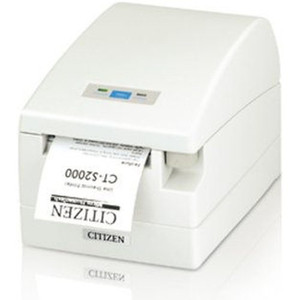
Citizen CT-S601IIS3RSUBKP Thermal POS Receipt Printer
The Citizen CT-S601IIS3RSUBKP is a compact Type II thermal receipt printer designed for point-of-sale and kitchen display environments where counter space is limited and direct thermal output is required. The top-exit paper path delivers receipts directly upward, eliminating the installation conflicts that rear-exit or side-exit models create in tight counter setups. RS-232 serial connectivity ensures compatibility with legacy POS terminals, standalone registers, and kitchen display systems that predate USB and Ethernet migration. This printer bridges the gap between aging systems still in operation and modern receipt-printing requirements — reducing the need for expensive terminal replacement while maintaining reliable thermal output.
Key Features
- Type II Form Factor: Compact footprint (148 × 152 × 130mm) — fits standard POS counter mounts without requiring cabinet redesign.
- Top-Exit Paper Path: Receipts exit upward from the printer — solves installation headaches in wall-mounted or shelf-constrained environments.
- 80mm Media Width: Standard thermal paper rolls ensure broad supplier availability and consistent supply-chain pricing across North America.
- RS-232 Serial Interface: Direct 9-pin DE-9 connection — compatible with legacy POS terminals, kitchen displays, and standalone registers without requiring adapter cards or USB hubs.
- Direct Thermal Printing: No ribbon or ink cartridges — lower consumables cost and zero maintenance beyond paper roll changes.
- 24V Internal Power Option: Many installations power the printer from the host POS terminal via internal power leads — verify polarity and amperage with your system integrator.
The CT-S601IIS3RSUBKP operates in foodservice, retail, and hospitality environments where POS terminals are often 10+ years old and full system replacement is economically unjustifiable. Direct thermal technology ensures dark, legible receipts even in humid kitchen environments. The RS-232 interface eliminates the middle layer of USB-to-serial converters, reducing latency and serialization overhead on the host system — a meaningful consideration in high-volume (50+ receipts/minute) kitchen display scenarios where buffer overflow can halt ticket printing.
Installation requires 2–3 inches of clearance above the printer for the paper exit and tear-bar operation. Verify your mounting surface (counter, wall bracket, or stand) accommodates the upward paper path and provides access to the serial connector and media roll slot. Serial pinout on the 9-pin DE-9 connector follows standard POS convention (TX on pin 3, RX on pin 2, ground on pin 5 in most configurations) — confirm null-modem wiring with your host device or system integrator before connecting. Power requirements vary depending on internal vs. external supply: if the printer draws power from the POS terminal, confirm the host device delivers sufficient amperage (typically 1–2A at 24V or 12V) and correct polarity.
The printer accepts standard 80mm-width thermal paper rolls, reducing supply friction for sites that already stock thermal media. Media compatibility is broad — any 80mm direct thermal roll (standard or specialty coatings for kitchen durability) will load without modification. This flexibility makes the CT-S601IIS3RSUBKP attractive to multi-site operators where centralized purchasing of thermal media simplifies logistics and reduces per-unit cost.
Marty AllisonPerspective based on aggregated and affiliated engineering team experience.
We've installed dozens of CT-S601IIS3RSUBKP units in QSR chains and casual-dining locations where the original POS terminal is a Windows XP or older embedded system with no USB stack and a single RS-232 port. The top-exit path is the real draw here — it solves a physical constraint that USB or Ethernet printers can't address without cabinet re-engineering. In one 120-seat restaurant, we replaced a worn-out Epson TM-88III with the Citizen, used the same serial cable, and eliminated six months of downtime waiting for terminal replacement hardware. The direct thermal output is adequate for kitchen tickets and receipt printing in high-humidity environments; the printhead stays cleaner longer than ribbon-based models because there's no fabric pulling debris through the mechanism. The trade-off is consumables cost — you're locked into thermal media pricing, which runs slightly higher per roll than bond paper on needle or impact printers, but that cost is offset by the elimination of ribbon cartridges and ribbon-waste disposal.
Technical Highlights:
- RS-232 Serial Interface: Native serial connectivity means no USB stack overhead, no driver installations, and zero compatibility friction with embedded POS systems running on custom firmware. We've seen serial ports remain operational on terminals that fail to recognize modern USB devices.
- Top-Exit Paper Path: Receipts exit upward — eliminates the installation re-work and cabinet redesign costs that rear-exit models trigger in existing counter mounts. For a 50-location chain, this feature alone saves 40+ labor hours on deployment.
- Direct Thermal Technology: No ribbon or cartridge changeovers — field technicians reduce per-visit time by 5–10 minutes compared to ribbon-based printers, and there's no ribbon disposal logistics.
- 80mm Media Standard: Broad thermal roll availability means your procurement team can source media from multiple vendors without SKU fragmentation or supply chain risk.
- Type II Compact Footprint: 148 × 152mm form factor fits existing POS counter mounts designed for printers from the 2000s-2010s era — zero re-fabrication required.
Deployment Considerations:
- Serial port availability on your host device is non-negotiable — USB-to-serial converters introduce latency and are not recommended for high-volume (50+ receipts/minute) kitchen display systems. Verify the host terminal has a native 9-pin DE-9 serial port before purchasing.
- Top-exit clearance is critical — the paper path requires at least 2–3 inches above the printer for the media to feed and tear cleanly. Measure your counter space and confirm the maximum paper roll diameter fits the available height before installation.
- Serial pinout (TX, RX, GND) must match your host device wiring; most POS terminals follow standard null-modem convention, but 10+ year old systems can have non-standard pinouts. Have your integrator or the terminal manufacturer confirm the wiring diagram before connecting.
- Power delivery from the host POS terminal is typical (24V or 12V internal power leads), but confirm amperage and polarity — incorrect polarity can damage the printer's power board. Consult your terminal documentation or contact the integrator.
- Thermal paper supply — ensure your procurement chain has reliable access to 80mm direct thermal rolls. Most POS distributors stock this media, but specialty coatings (for grease-resistant kitchen labels) may require longer lead times.
The CT-S601IIS3RSUBKP is the right choice for multi-location operators managing aging POS terminals that cannot justify full replacement and for kitchen display environments where serial-based receipt printing has proven reliable over 10+ years of operation. It's not a fit for new deployments or sites planning to migrate to modern Ethernet or USB-based POS infrastructure in the next 3–5 years. For those who are stuck with legacy hardware and need a reliable thermal printer that doesn't require cabinet re-engineering, this Citizen model delivers proven performance. Explore the full Citizen catalog for alternative printer form factors and interfaces.