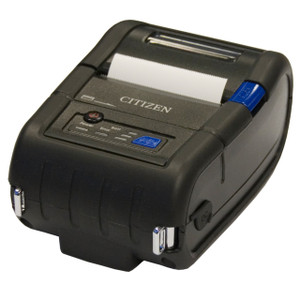
Citizen CMP-30IIBTIUC Mobile Receipt Printer
Overview
The Citizen CMP-30IIBTIUC is a Type II mobile thermal receipt printer designed for field operations, delivery, and point-of-capture workflows where you need printed receipts, tickets, or labels on demand without a stationary workstation. It supports serial, standard USB, and iOS Bluetooth connectivity — meaning it pairs with rugged handhelds, tablets, or warehouse mobile computers without requiring vendor-specific middleware. The CMP-30IIBTIUC handles both ESC/POS and CPCL command protocols, so it integrates with existing retail POS systems, WMS platforms, and custom logistics software that already speak those languages.
Connectivity & Command Support
Three independent connection paths reduce dependency on any single interface. Serial (RS-232) works with legacy systems and provides reliable, low-latency communication for high-volume receipt printing. USB (Type B) connects to modern computers and mobile devices running Windows, Mac, or Linux without special drivers on many systems. Bluetooth via iOS opens deployment to Apple tablets and iPhones — valuable when your field team runs Apple MDM-enrolled devices. ESC/POS is the de facto thermal printer standard across retail and logistics; CPCL (Citizen Printer Command Language) gives you access to Citizen-specific features like enhanced graphics and advanced paper handling. If your workflow already runs ESC/POS commands, the CMP-30IIBTIUC prints without reprogramming.
Compatibility
Verify printer driver availability and command-set compatibility with your specific POS software, mobile device OS version, and any middleware (label design tools, receipt generators, WMS print queues). Test Bluetooth pairing and range with iOS devices in your target environment — obstructions and RF interference vary by venue. Confirm that custom receipt formats and barcode symbologies supported by your application are also supported by the printer firmware.