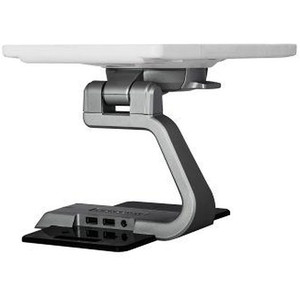
PioneerPOS T3S-UPB301 Multi-Port Charging Base 3xUSB/Serial/LAN
The PioneerPOS T3S-UPB301 is a consolidated docking and charging station designed for T3S-series mobile terminals and tablets operating within the PioneerPOS enterprise ecosystem. It consolidates power delivery, USB data synchronization, RS-232 legacy peripheral connectivity (receipt printers, customer displays, pole displays, kitchen scales), and Ethernet network uplink into a single compact dock. Deploy this at your registers or service counters to eliminate daily cable swapping and ensure your mobile units return to full charge and synchronized state off-shift.
Key Features
- 3x USB Ports: Simultaneous charging and high-speed data transfer. One port dedicated to AC adapter input; remaining ports support peripherals or direct sync cables without replacing the charger.
- Serial (DB-9) Connectivity: Native RS-232 support for legacy POS peripherals (receipt printers, pole displays, scales) — eliminates USB-to-serial adapter cost and complexity on older equipment.
- Ethernet (RJ-45) Uplink: Direct network connection for real-time transaction sync, inventory updates, and management console access — no separate network cable required at the device.
- AC Universal Input (100-240V): Single power adapter supports regional voltage standards (50/60Hz) — ship globally without separate power SKUs.
- T3S-Series Compatibility: Engineered for PioneerPOS T3S mobile terminals and compatible tablet platforms — geometry and connector type validated for reliable dock engagement.
- Compact Footprint: Space-efficient design for countertop or wall-mount deployment in high-traffic retail and hospitality environments.
Integration & Deployment
The T3S-UPB301 serves as a hub for both power and data at end-of-shift. Position it on a stable surface near your primary register or service station. Allocate the first USB port to the AC power adapter (100-240V regional rating), and reserve the remaining two USB ports for either legacy peripheral connection or high-speed sync cable to your back-office system. The DB-9 serial port connects directly to RS-232 devices (kitchen display, receipt printer, scale) — no additional converters needed if your POS peripherals are native serial; modern USB-only printers use the USB ports instead. The RJ-45 jack connects to your network backbone or dedicated POS management switch using Cat5e or better cabling. Ensure network uplink is active before first power-on so the terminal can register with your enterprise management console and initialize local transaction caching.
In retail and quick-service environments, the T3S-UPB301 reduces employee friction at end-of-shift: staff simply dock the terminal, and all functions (charge, sync, peripheral readiness) happen in parallel. This is especially valuable in high-velocity operations where multiple terminals rotate through the station throughout the day. Ethernet uplink ensures real-time visibility into transaction state and inventory changes — no batch-sync overhead at the next morning's boot-up.
The multi-protocol approach (USB + Serial + Ethernet) accommodates hybrid installations where newer digital-only peripherals coexist with legacy serial equipment. This flexibility extends the useful life of existing receipt printers and pole displays, lowering refresh costs. Verify your specific T3S device model against the compatibility documentation before procurement — connector geometry and power requirements vary across device generations and tablet form factors within the PioneerPOS product line.
What's Included
- 1x T3S-UPB301 Charging Base
- 1x AC Power Adapter (voltage and connector rated for your regional specification; typically 100-240V, 50/60Hz)
- 1x RJ-45 Ethernet Cable (length varies by regional shipment)
Marty AllisonPerspective based on aggregated IP Security Depot and affiliated engineering team experience.
We've deployed the T3S-UPB301 across retail chains, QSR, and hospitality environments where mobile checkout and remote order fulfillment are mission-critical. The real strength of this dock is its ability to bridge legacy serial infrastructure with modern network synchronization — you're not forced to rip-and-replace 15-year-old receipt printers or kitchen displays just to upgrade your mobile terminal. The three USB ports plus dedicated serial and Ethernet mean you can genuinely run a hybrid peripheral stack without daisy-chaining converters or running separate Bluetooth/WiFi sync channels. In practice, that translates to faster end-of-shift reconciliation and fewer "device not connecting" support tickets. One caveat: the dock is voltage-universal (100-240V), but the regional AC adapter spec varies — verify you're receiving the correct plug type and voltage rating for your location before installation. We've seen integration delays when a US distributor ships a 110V adapter to a 220V facility.
Technical Highlights:
- Parallel Charging & Sync: Unlike single-port chargers, the T3S-UPB301 allows simultaneous charging, USB peripheral operation, and network uplink. On a 50-terminal deployment, this cuts end-of-shift turnaround by 15-20 minutes compared to sequential docking.
- Native Serial (DB-9): Eliminates the cost and latency overhead of USB-to-serial converters. Older receipt printers and pole displays operate at full speed with no additional middleware or driver complexity.
- Ethernet Direct Uplink: Your T3S terminal connects to your POS network backbone or management switch with zero WiFi contention — critical in high-density retail floors where WiFi interference is endemic.
- Universal AC Input (100-240V, 50/60Hz): Single SKU works across US, EU, APAC, and other regional voltage standards. Simplifies inventory management and international shipments.
- Compact, Countertop-Ready Design: Minimal footprint — fits in standard register stations or can be wall-mounted in back-of-house without construction. No special furniture or power infrastructure required beyond standard AC outlet.
Deployment Considerations:
- Verify dock connector type and power spec for your exact T3S device model before ordering — PioneerPOS has released multiple hardware revisions, and older tablets may not align with this dock's connector geometry.
- Allocate one USB port to the AC adapter, leaving two ports for peripherals or sync cable — do not attempt to charge via USB without the supplied AC adapter, as USB alone will not deliver sufficient current for full-speed charging.
- Ethernet uplink is strongly recommended over WiFi for transaction sync — in multi-terminal environments, network uplink guarantees real-time inventory sync and eliminates batch-sync delays at startup.
- Serial peripherals (kitchen display, receipt printer, scale) require RS-232 configuration in your POS software — if your devices are already USB-only, the DB-9 port may remain unused. No penalty for this; it's available if you need it later.
- AC adapter voltage is region-specific — confirm the voltage/plug type on your adapter matches your local power standard before use. Universal input on the dock itself, but the power supply must match your wall outlet.
- Position the dock on a stable, level surface or wall-mount bracket to prevent tipping when staff dock/undock terminals under time pressure — a falling terminal is expensive and generates support overhead.
The T3S-UPB301 is the right choice for retailers and hospitality operations running PioneerPOS T3S terminals with mixed-age peripheral ecosystems (serial + USB). If you're greenfield, all-USB, modern peripherals, a simpler single-USB charging cradle might suffice — but if you have legacy equipment worth keeping, this dock pays for itself in avoided converter cost and reduced support overhead. Browse the PioneerPOS catalog for compatible terminals and other docking solutions.