Axis 5506-881 T8415 Wireless Installation Tool Kit
Overview
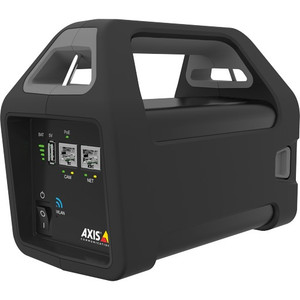
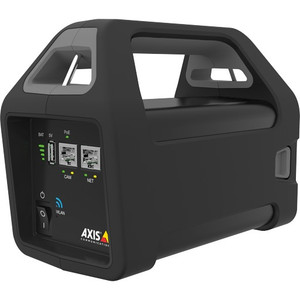
The Axis 5506-881 is a battery-powered Wi-Fi access point purpose-built to streamline Axis IP camera installation and configuration in field environments. Unlike traditional wired setups, this tool eliminates the need for temporary network cabling during camera deployment — you bring wireless connectivity and PoE+ power to the camera location, configure from a mobile device, and move on. The kit includes the T8415 tool itself, a spare 12V 3.4Ah battery, and a protective installation bag. For integrators managing multi-camera rollouts or troubleshooting on-site, this removes a significant friction point from the deployment workflow.
Key Features
- Wireless Setup Connectivity: The T8415 operates as a standalone Wi-Fi access point, meaning you don't need pre-existing network infrastructure to configure cameras on-site. Technicians connect via the AXIS Installation app on iOS or Android, eliminating the need to carry temporary Ethernet runs or rely on facility networks that may not exist yet.
- PoE+ Power Injection During Setup: Delivers Power over Ethernet Plus (PoE+) during installation, supplying power to cameras that draw up to PoE+ levels. This is essential when you're installing or troubleshooting in spaces without existing power distribution — the tool becomes a temporary power anchor for the camera during focus, lens adjustment, and firmware updates.
- Extended Runtime Battery: The included 12V 3.4Ah battery supports full-day installation projects without recharge. For larger deployments spanning two or more days, the spare battery (also included) ensures continuous operation — swap the depleted unit while the other charges.
- Mobile App Integration: Works directly with the AXIS Installation application, letting you remotely view live video, adjust focus, zoom, and pan/tilt settings, and upload firmware — all from your phone or tablet. No laptop required for basic setup tasks.
- Portable Field Package: Everything fits in the dedicated installation bag, which is designed for transport and organization on job sites where space and cable management are constraints.
- Broad Axis Compatibility: The tool is designed for integration with the Axis camera installation ecosystem, supporting cameras that accept PoE+ input and connect via Wi-Fi during provisioning phases.
Integration & Compatibility
The T8415 pairs with the AXIS Installation app (available on iOS and Android), which provides a graphical interface for camera discovery, IP address assignment, and basic optical configuration. The tool's Wi-Fi network creates a temporary deployment zone around the camera — typically sufficient for a single installation location or small work area. Once cameras are configured and integrated into the permanent network, the T8415 is powered down and ready for the next job.
For larger multi-camera deployments requiring centralized video management, the T8415 serves as the setup phase enabler; permanent network infrastructure and NVR/VMS integration happen separately using your standard facility backbone.
What's in the Box
- 1x Axis T8415 Wireless Installation Tool
- 1x 12V 3.4Ah Spare Battery
- 1x Installation Bag (protective carry case)
Deployment Considerations
The 5506-881 (often searched as 5506 881) is most valuable in greenfield installations, facility renovations, or retrofit projects where temporary network infrastructure is impractical. It also accelerates troubleshooting in remote locations or areas with network access challenges — power and connectivity are independent of facility systems during diagnosis.
Battery runtime is sufficient for typical workdays; however, if you're managing large-scale deployments with multiple technicians working in parallel, consider how many units your crew needs. The spare battery in each kit helps, but extended multi-day projects may require external chargers or additional kits.
Frequently Asked Questions
Q: Can I use the T8415 to power any Axis camera?
A: The tool delivers PoE+ power, so it will supply cameras that accept PoE+ input (up to ~95W depending on IEEE 802.3bt class). Standard PoE devices (802.3af, 13W max) work fine, but confirm your specific camera model supports wireless provisioning mode in the AXIS Installation app.
Q: How long does the 12V 3.4Ah battery last per charge?
A: Runtime depends on Wi-Fi usage intensity and PoE power draw from the connected camera. For typical setup workflows (configuration, focus adjustment, firmware upload), expect 6–8 hours per charge. The included spare battery extends your workday without returning to base.
Q: Does the T8415 work with non-Axis cameras?
A: The tool is designed specifically for Axis camera integration. Non-Axis cameras may not be discoverable by the AXIS Installation app, and compatibility is not guaranteed. Confirm your camera model against Axis documentation before deployment.
Q: What's the Wi-Fi coverage range?
A: Wi-Fi range depends on obstacles and interference; typical open-space coverage is sufficient for a single camera installation location (roughly 30–50 meters line-of-sight). For detailed range specifications in your environment, consult the product datasheet.
Q: Can I use the T8415 as a permanent network access point?
A: No. The tool is designed for temporary deployment workflows only. Once cameras are configured and integrated into your permanent network, the T8415 is powered down and stored for the next installation job.
Q: Is the installation bag waterproof?
A: The bag is protective and designed for transport and organization on job sites. For full waterproofing and submersion protection, consult the product documentation to confirm material specifications and IP ratings.
Ted PerryPerspective based on aggregated IPSD and affiliated engineering team experience.
The Axis 5506-881 solves a real field problem: you need power and connectivity to configure a camera before permanent infrastructure is ready, and the tool eliminates the temporary-wiring dance that slows installations. The 12V 3.4Ah battery delivers enough runtime for a typical workday, and the spare battery bundled in the kit ensures you don't lose momentum on larger deployments.
Technical Highlights:
- PoE+ Power Delivery: Supplies up to ~95W (IEEE 802.3bt class-dependent), meaning you can power and configure high-draw cameras (turrets, PTZs with heaters) without a facility power connection. Eliminates the need for temporary 12VDC adapters or extension cords during setup.
- Wi-Fi Wireless Connectivity: Acts as a standalone access point, freeing you from dependence on facility networks that may not exist, be unconfigured, or be off-limits during construction. The AXIS Installation app on iOS/Android lets you configure from your mobile device — no laptop required for basic focus and firmware tasks.
- Dual-Battery Kit Design: The 12V 3.4Ah spare battery means you can swap units without halting work. For multi-technician crews or back-to-back installation days, this is a practical hedge against downtime waiting for a single battery to recharge.
Deployment Considerations:
- The T8415 is strictly a temporary setup tool — it's not a permanent network device. Once cameras are integrated into your VMS and facility infrastructure, this unit gets stored for the next job.
- Wi-Fi range and PoE capacity are both finite. For large multi-camera installations in the same location, you may need multiple kits or staggered configuration passes. Verify that your cameras support wireless provisioning in the AXIS Installation app before committing to this tool as your deployment standard.
- Battery runtime depends on PoE load and app usage. Expect 6–8 hours for typical setup workflows, but intensive firmware uploads or extended troubleshooting sessions may require a battery swap mid-shift.
The 5506-881 is essential for integrators doing greenfield rollouts, facility retrofits, or remote site troubleshooting where permanent network infrastructure isn't available or ready. If your crews regularly deploy cameras ahead of network provisioning, this kit pays for itself in eliminated labor hours and reduced on-site improvisation.