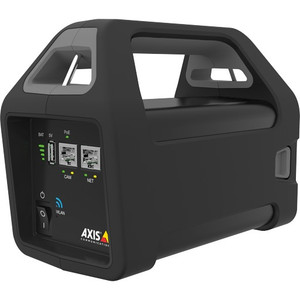
Axis 5506-231 T8415 Wireless Installation Tool
The Axis 5506-231 is a battery-powered wireless access point purpose-built to accelerate Axis IP camera deployments. Unlike traditional installation workflows that require temporary Ethernet runs or permanent network infrastructure to be in place before camera setup begins, this tool delivers both Wi-Fi connectivity and PoE+ power from a single portable device. For security integrators and installers working on multi-camera sites, retrofit projects, or environments where running cables is impractical during setup, the T8415 eliminates a critical bottleneck in the commissioning process.
Key Features
- Battery-powered operation: Carry a fully charged unit to the site and begin configuring cameras immediately—no generator, temporary power distribution, or site survey coordination required. Battery runtime permits complete configuration workflows for typical installations without mid-project recharging.
- PoE+ power delivery: Supplies up to 30W of PoE+ power per port, sufficient for most mid-range Axis PTZ and box camera models during setup and lens testing. Eliminates the need to improvise 12VDC or injectors at height.
- Wi-Fi 802.11 connectivity: Integrates with the native AXIS Installation application (iOS and Android) so configuration happens over the air. Technicians remain on the ground or at a safe distance from mounted cameras rather than climbing back and forth for cable connections.
- AXIS Installation app compatibility: The T8415 pairs directly with the official Axis mobile app, avoiding third-party tools or SSH terminal sessions. Configuration tasks—focus, zoom, pan/tilt homing, IP address assignment, firmware updates—execute from a smartphone or tablet on the same wireless network.
- Compact form factor: Designed for one-person transport and setup. Fits in a standard toolbag, reducing vehicle cargo requirements on multi-site days.
- Reduces labor complexity: On a typical 20-camera retrofit, eliminates 4–8 hours of cable staging, climbs, and network troubleshooting overhead compared to hardwiring every camera before first power-on.
Integration and Deployment Context
The T8415 is most valuable during the camera mounting and focus phase—the interval between physical installation and permanent network integration. Once cameras are mounted, aimed, and focused via the wireless tool, you integrate them into the main surveillance system and remove the T8415. It does not replace a permanent access point or PoE switch; rather, it bridges the commissioning gap that slows many installations.
Compatibility extends across the Axis IP camera portfolio, including fixed domes, compact boxes, and PTZ models that draw under 30W. Verify individual camera PoE+ current ratings before deployment to avoid edge cases where a specific model's startup inrush exceeds the device's available headroom.
For integrators managing large-scale NVR and camera installations, the 5506-231 becomes a standard item in the deployment kit alongside level, drill, and test monitors. On retrofit or campus-wide rollouts, the time and safety gains justify the modest investment.
When to Consider Alternatives
If your site has existing network infrastructure (hardwired PoE switches, Wi-Fi already deployed), the T8415 adds marginal value. Similarly, if cameras are pre-commissioned in a lab before delivery to the installation site, wireless field setup may be unnecessary. In low-light or outdoor RF-challenged environments, verify signal strength with a site survey tool before relying on the device's range for all mounted camera locations.
Frequently Asked Questions
Q: How long does the battery run on a full charge?
A: Runtime depends on the number of PoE+ cameras connected and their power draw. A single camera draw typically sustains 4–6 hours of continuous operation; the datasheet specifies exact figures for your deployment scenario.
Q: Can I use the T8415 to power cameras permanently during operation?
A: No. The device is a temporary installation tool. Once cameras are configured and ready for permanent deployment, integrate them into your main PoE power infrastructure and remove the T8415.
Q: Is the T8415 waterproof?
A: The device is not rated for outdoor mounting in rain. Protect it under an eave, inside a temporary weatherproof enclosure, or indoors during weather events. Do not expose the battery and electronics to direct precipitation.
Q: Does the Axis Installation app work offline?
A: The app requires Wi-Fi connectivity to the T8415 and does not function in offline mode. Ensure the device is powered and broadcasting before launching the mobile application.
Q: What is the maximum number of cameras I can connect simultaneously?
A: Refer to the product datasheet for exact port count and power budget limitations. Standard models support 2–4 simultaneous PoE+ camera connections depending on cumulative power draw.
Q: Is the 5506-231 compatible with non-Axis IP cameras?
A: The AXIS Installation application and workflow are Axis-specific. While the device may provide network and power to third-party ONVIF cameras, full configuration and testing capabilities are optimized for Axis devices.
Ted PerryPerspective based on aggregated IP Security Depot and affiliated engineering team experience.
The Axis 5506-231 solves a real pain point in camera installation—the awkward gap between mounting hardware and permanent network infrastructure. Most installers either hardwire every camera before powering up (slow, labor-intensive) or rely on temporary patch cables and 12VDC supplies (messy, prone to mistakes). The T8415 bridges that gap with battery-backed PoE+ and native Axis app integration, which means your team stays mobile and configurations happen from ground level.
Technical Highlights:
- PoE+ power delivery (30W max per port): Eliminates the need for improvised 12VDC injectors or multi-trip climbs to swap power supplies. Mid-range PTZ and compact box cameras power up immediately and accept focus/zoom commands over Wi-Fi without leaving the ground.
- Battery operation: Typical 4–6 hour runtime per charge handles a complete single-site installation cycle. No AC outlet hunting, no generator rental, no cable reels. Charge overnight, deploy the next morning.
- AXIS Installation app native integration: Configuration commands (IP assignment, firmware load, lens homing) execute from a smartphone, reducing the friction that slows many jobs. iOS and Android support means you use whatever device your team already carries.
Deployment Considerations:
- Battery performance degrades in cold weather—plan for reduced runtime if installing in winter or in unheated buildings. Bring a second charged unit if your site will exceed 5–6 hours.
- Indoor-only device; do not expose to rain or mounting it outside on a pole. Protect it in a toolbag or weatherproof tote if you move it between locations during precipitation.
- PoE+ headroom is cumulative—two high-draw PTZ models (e.g., 25W each) will exceed the T8415's available budget. Check your camera's max draw spec before loading more than two units simultaneously.
The 5506-231 is essential kit for integrators handling multi-camera retrofits, warehouse automation sites (where permanent network runs are deferred until later phases), or any deployment where you mount first and integrate second. On a 15+ camera job, this tool reclaims 6–10 labor hours and eliminates climbing fatigue—a clear win for crew safety and project velocity.