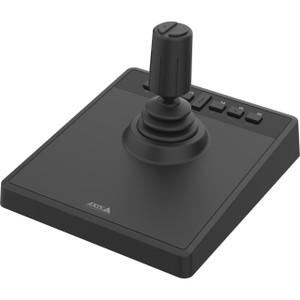
Axis 5020-101 T8311 Joystick Controller for PTZ and Dome Cameras
Overview
The Axis T8311 joystick, part number 5020-101 (often searched as 5020 101), is a dedicated PTZ control peripheral engineered for operators who manage pan/tilt/zoom and dome network cameras from a fixed workstation. Where keyboard shortcuts and on-screen drag controls introduce latency and imprecision, a hardware joystick delivers proportional, analog movement — the difference between chasing a moving subject and smoothly tracking it. This is the controller to reach for when your Axis camera deployment includes any PTZ or dome unit that operators need to drive in real time.
The T8311 ships in a clean white housing sized for desktop use without dominating the operator console. The 2-meter cable provides enough reach to position the unit ergonomically without routing issues at a standard security desk.
Key Features
- Analog Joystick Movement: Proportional control means slow joystick deflection produces slow camera movement; full deflection drives maximum speed. This is what separates a hardware controller from software pan/tilt buttons — you get graduated response, not binary on/off, which matters when you're centering on a face in a crowd rather than just sweeping a parking lot.
- 2-Meter Cable Length: Enough reach for a standard security operations desk without an extension. Operators can position the unit in front of the keyboard, off to the side, or hand it off without unplugging — the cable won't pull taut at arm's length.
- White Housing: Matches typical light-colored control room and reception desk environments. For installations where the console aesthetic matters — corporate lobbies, broadcast control rooms, retail loss-prevention desks — the white form factor integrates without looking like a gaming accessory.
- Compatibility with Axis PTZ and Dome Network Cameras: Designed specifically for the PTZ camera lineup and dome units in the Axis ecosystem. If your site already runs Axis hardware, this controller integrates without driver gymnastics or third-party middleware.
- Dedicated Hardware Control: Moving PTZ management off the mouse and keyboard frees the operator's primary input devices for VMS navigation, incident logging, and communication. In a multi-monitor SOC environment, that separation of input tasks reduces errors under pressure.
- Desktop Form Factor: The joystick sits flat on the desk rather than requiring a rack slot or panel mount, making it practical for temporary deployments, mobile command posts, or installations where the operator position changes.
Integration and Compatibility
The T8311 is built for Axis pan/tilt/zoom and dome network camera systems, making it the straightforward choice when your VMS or AXIS Camera Station deployment already includes Axis PTZ hardware. For operators running video management software with Axis device integration, the joystick maps to camera movement commands through the host application — check your VMS documentation for joystick device support to confirm the control path before ordering. The 2-meter USB-style cable connects directly to the operator workstation without requiring a separate power supply or interface box.
Frequently Asked Questions
Q: What cameras is the Axis 5020-101 compatible with?
A: The T8311 is designed for use with Axis pan/tilt/zoom and dome network cameras. It is built specifically for the Axis camera ecosystem.
Q: How long is the cable on the Axis 5020-101?
A: The T8311 includes a 2-meter cable, sufficient for standard desktop and operator console installations without requiring an extension.
Q: Does the Axis T8311 work with third-party VMS platforms?
A: Compatibility with third-party VMS platforms depends on whether the VMS supports joystick input devices. The T8311 is confirmed for use within the Axis ecosystem. Verify joystick device support with your VMS vendor before deploying.
Q: Does the 5020-101 require external power?
A: No external power supply is specified. The unit connects via its included cable to the operator workstation.
Q: What color is the Axis T8311 housing?
A: The T8311 housing is white, suitable for light-colored control room and reception desk environments.
Q: Can the T8311 be used in a mobile or temporary command post setup?
A: Yes. The desktop form factor and 2-meter attached cable make it practical for temporary deployments and mobile command positions, as it requires no rack mount or panel installation.
The 5020-101 is a purpose-built hardware controller — and that specificity is the point. When I'm speccing out an operations center running Axis PTZ cameras, I want operators on a dedicated joystick rather than hunting through a VMS UI with a mouse. The T8311's 2-meter cable keeps the unit in comfortable reach at a standard security desk without slack piling up on the surface.
Technical Highlights:
- 2-Meter Cable: Long enough for flexible desk positioning, short enough that it won't become a cable management problem. No extension cables required for a standard operator workstation depth.
- Analog Joystick Control: Proportional deflection means operators can make micro-adjustments to center on a subject — critical when tracking individuals in crowded scenes where a binary slew control overshoots every time.
- White Housing: The form factor and color are intentional for control room and reception environments. It doesn't look out of place on a corporate security desk the way a black gaming joystick would.
Deployment Considerations:
- Confirm your VMS supports USB joystick input before ordering — the T8311 is built for the Axis ecosystem, and third-party VMS joystick support varies significantly by platform and version.
- This controller is designed specifically for Axis PTZ and dome cameras. If your deployment mixes Axis with other manufacturers' PTZ units, you'll need to verify whether the same controller can drive non-Axis cameras through your VMS joystick mapping.
The T8311 is the right call for a fixed security operations center running Axis PTZ hardware where operator precision and ergonomics are a daily workflow concern — not a casual addition, but a genuine productivity tool for sites where cameras are actively driven rather than passively monitored.